Custom menu icons
It is possible to add custom icons both to system menu entries and to custom menu entries.
Custom Icons in Custom entries for RMB Popup Menus
It is possible to display Custom Icons for each distinct custom entry (script) of any RMB Popup Menu.
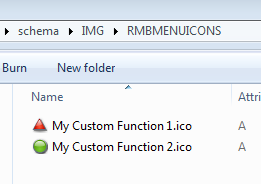
MechWorks PDM checks now if a file .ICO with the same name of the .VBS is existing in the sub-directory SCHEMA\IMG\RMBMENUICONS
Menu entry have the same name (without extension) of the script file.
Example
Suppose to create two new scripts in the LST\AnyType shared folder:
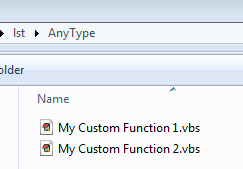
If you like to associate to those scripts a custom icon, you need to create the proper .ICO files, with the same names of the .vbs, under:
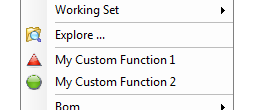
When you will display the RMB popup menu, you will then see:
RMB Submenu custom icons
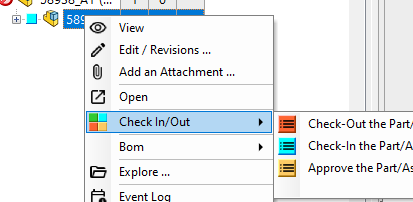
Other than showing icons for the (already existing) single entries, it's possible to show custom icons also for submenu entries, such as Check in/out, BOM, Projects, Working Set, etc.
The .ico file must be placed into \SCHEMA\IMG\ folder and named as the entry with a DBW prefix and with "_" (underscore) char replacing any space or special char.
Example
Check in/out → \SCHEMA\IMG\DBW_CHECK_IN_OUT.ico
Rename/Replace → \SCHEMA\IMG\DBW_RENAME_REPLACE.ico
Utility menu custom icons
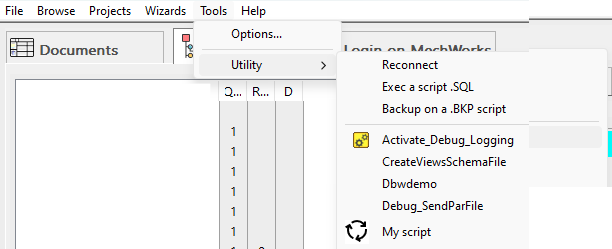
For the Utility menu, the image files (BMP only) can be placed in both folders:
•\SCHEMA\IMG\DBW_<cleanScriptName>.bmp
•\SCHEMA\IMG\RMBMENUICONS\<cleanScriptName>.bmp
Example
\LST\Activate_debug_logging.vbs → \SCHEMA\IMG\DBW_Activate_debug_Logging.bmp
\LST\My script.vbs → \SCHEMA\IMG\RMBMENUICONS\My_script.bmp