Prerequisites
•DBWLM can be installed as a system service only on the SERVER where the USERS folder is located;
•on the CLIENTS only make sure that parameters point to correct server USERS\ folder, that has to be Full Control by Everyone.
•The service has to be started as Local Administrator (domain administrator could not work)
Procedure
1.Run the batch createService.bat, after having properly modified it, setting the correct path of the executables
Example
Replace the code
REM "(full path)\instsrv.exe" DBWLM "(full path)\srvany.exe"
with
"C:\program files\dbworks\bin\instsrv.exe" DBWLM "C:\program files\dbworks\bin\srvany.exe"
in case you unzipped files provided in the BIN folder of DBWorks installation.
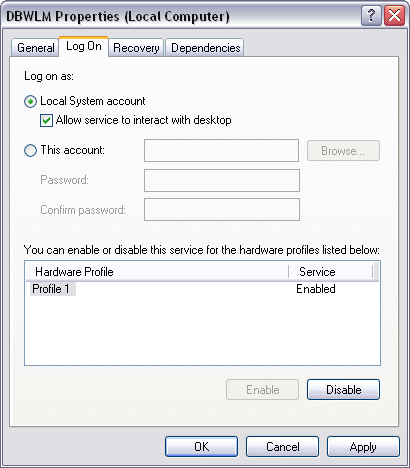
2.In the service’s properties, you can choose the kind of login depending on your needs:
•Local System account (option Allow service to interact with desktop must be checked) will display the DBWLM dialog that shows connected users real-time.
•With specified account you won’t see any dialog because it’s designed to run on servers where usually no user is logged.
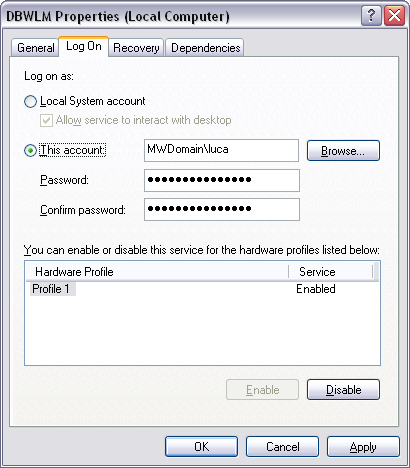
please note that the specified account must have full control on the USERS folder specified in the registry key (see below point 7)
3.Open the regedit.exe registry editor
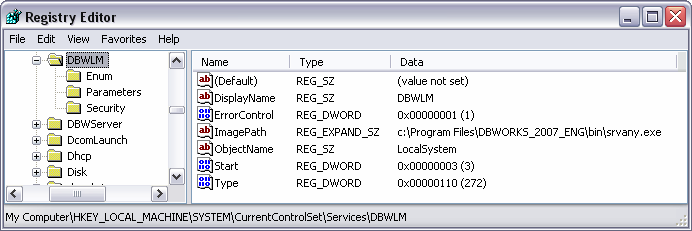
4.Locate the key DBWLM under HKEY_LOCAL_MACHINE\SYSTEM\CurrentControlSet\Services\DBWLM\
5.Create a new key named Parameters
6.Create a new string value named Application
7.Insert in the string value the full path of DBWLM.EXE, followed by the path of the USERS directory
in case you chose Local System account, you cannot specify an UNC path for the USERS folder; you have to enter a local disk path.

Then check about correctness of srvany.exe location in DBWLM\ImagePath key:
8.start the service from the service property dialog
In case you chose Local System account, the DBWLM dialog will appear.