DBWServer.ADM administrative file
From Version 2.4, it is also possible to declare more personalities that can have Full Control on the files managed by DBWServer.
To add more personalities with full control, you need to create a text file named DBWServer.ADM in the same directory of the DBWServer.EXE executable.
The format is the following:
<group\user>=permissions
<group\user>=permissions
...
<empty line>
Examples:
CompanyDomain\John.Hayes=F
CompanyDomain\Peter.York=RW
CompanyDomain\cax-externalGroup=CRW
CompanyDomain\ReadonlyGroupUsers=R
<empty line>
Please note that specifying a user name only (with no "=<right>" it's like granting F (full control) right; so this
CompanyDomain\John.Hayes
is evaluated as this
CompanyDomain\John.Hayes=F
Here are admitted values for granting specific rights to users:
F |
Full control |
|---|---|
C |
Change |
R |
Read |
P |
change Permissions |
O |
take Ownership |
X |
eXecute |
E |
rEad execute |
W |
Write |
D |
Delete |
DBWServer.ADM location
DBWServer first looks in the existing folder of dbwserver.exe, and, if not found there, it looks in the GlobalParametersPath registry value.
Starting from DBWServer version 3.0, the DBWServer.ADM file can be located in the same folder pointed by the GlobalParametersPath registry entry
In case the .adm file is placed on a remote location, you've to make sure the GlobalParametersPath address is declared with UNC syntax
Anyway, in the system Event Viewer→Application log, DBWServer writes the path from which the .ADM file is loaded
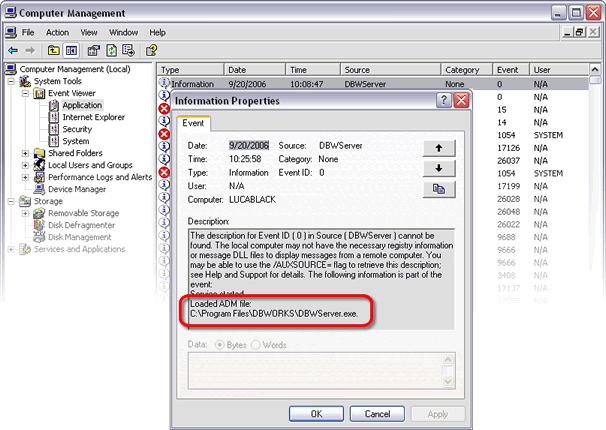
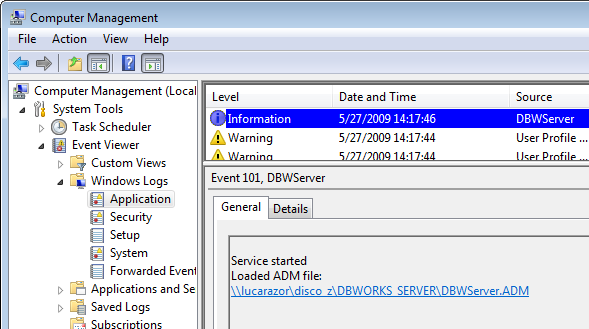
Since the file is loaded when the service starts, after modifying the DBWServer.ADM file you've to restart the service on every machine to make the changes take place.
From version 2.12, it is possible also to declare special parameters for the DBWServer service. The list of this parameters is the following:
@FULL_PERMISSIONS_ON_CHECKOUT_TO
Can be declared for controlling special generic documents file types that, since of limitations in the driving application, must have full control when checked-out. Sometimes it may happen that some applications cant work correctly if the permission for deleting the working copy of the file is denied ( for example, Autocad is one of this ). In such cases, the Administrator can declare the file extensions that may cause problems to the relative applications when checked-out. The default extensions on which it is always granted full permission are .DWG, .MI and .ME
As an example, suppose you need to grant full control ( with the deletion too ) to files with extensions .ABC and .EFG.
The DBWServer.ADM file should be prepared as follows:
@FULL_PERMISSIONS_ON_CHECKOUT_TO .ABC .EFG
<empty line>
@DEBUG_MODE
If declared, when starting up the service reports in the Event Viewer:
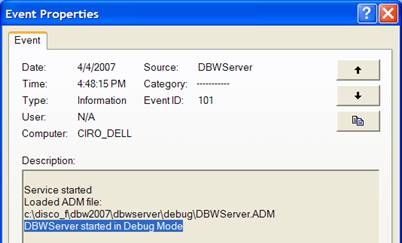
When running in @DEBUG_MODE, DBWServer manifests the following behavior:
1.it keeps track of all the calls to the DBWACL.EXE utility in the system Event Viewer:
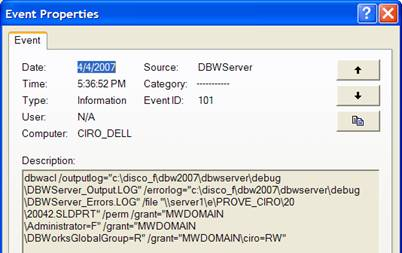
From such window, it is possible to copy/paste into a Command Window, in order to test the ACL command as it would be invoked by DBWServer
Unfortunately, due to unknown causes, in the Checkin case, the message sent to the EventLog leaves a dirty tail (shown below in red), that must be manually removed before the copy/paste in the Command Window:
dbwacl /outputlog="c:\disco_f\dbw2007\dbwserver\debug\DBWServer_Output.LOG"
/errorlog="c:\disco_f\dbw2007\dbwserver\debug\DBWServer_Errors.LOG" /file "\\server1\e\PROVE_CIRO\20\20042.SLDPRT" /perm
/setowner="MWDOMAIN\Administrator" /grant="MWDOMAIN\Administrator=F" /grant="" /grant="" /grant="" /gran=R"
2.it writes the following files:
DBWServer_Output.LOG
DBWServer_Errors.LOG
An example of DBWServer_Errors.LOG is the following:
LookupAccountName : \\server1\e\PROVE_CIRO\20\20042.SLDPRT:r 1337 The security ID structure is invalid.
Current object \\server1\e\PROVE_CIRO\20\20042.SLDPRT will not be processed
@DEBUG_LOG_FILES_FOLDER
if defined, the parameter
@DEBUG_LOG_FILES_FOLDER <output_folder>
sets a different location to create the log files.
If not specified, the LOG files are created in in the service's startup directory (the DBWServer.exe path)
In order to directly copy/paste the information from the EVENT_VIEWER into a Command Window to test an ACL command, you will be required to be logged into a workstation as the DBWServer Service account or possible 'Run As...' against the cmd.exe and enter the DBWServer Service account.