No-browsing directory permissions
For defining no-browsing permission to the protected Top Level Folder you must modify the settings for the DBWorks Users group as explained here under.
If you deny a folder browsing permission, the user is not able to save documents into anymore.
For this reason you've to delegate a script (DataEntr.LST) to generate a valid file location for the document.
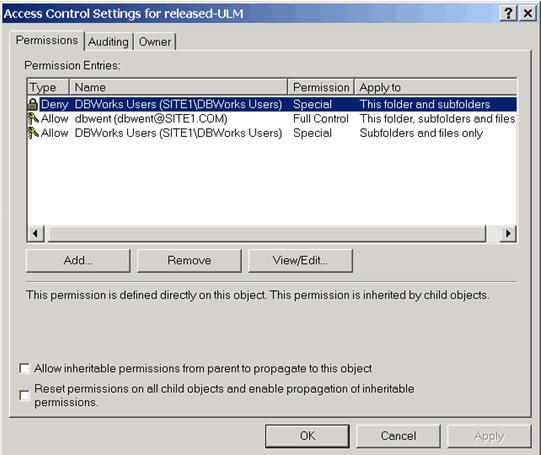
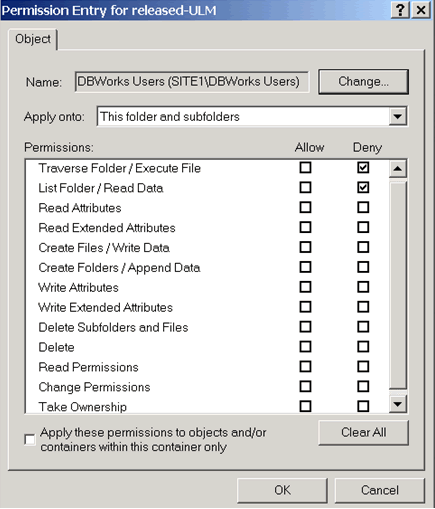
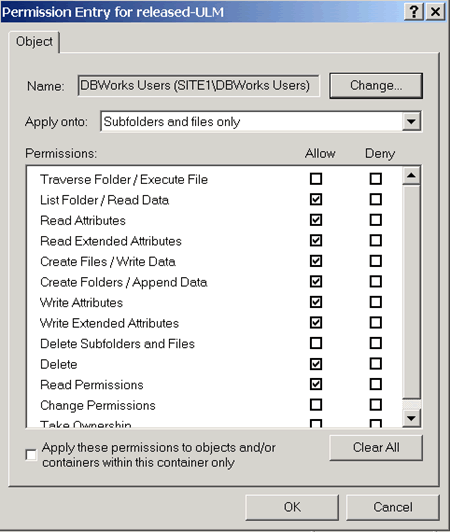
Please note in the Subfolder and files only dialog the Delete right set to Allow to be compatible with most of the Office/Autocad/... applications.
You could also set it as Denied: MechworksPDM will be able to create ExcelBOMs as well, but compatibility with most of applications won't be maintained.
More, in such case the folder for non-Solidworks files and non-ExcelBOM files must have different folder rights (Delete set to Allow).