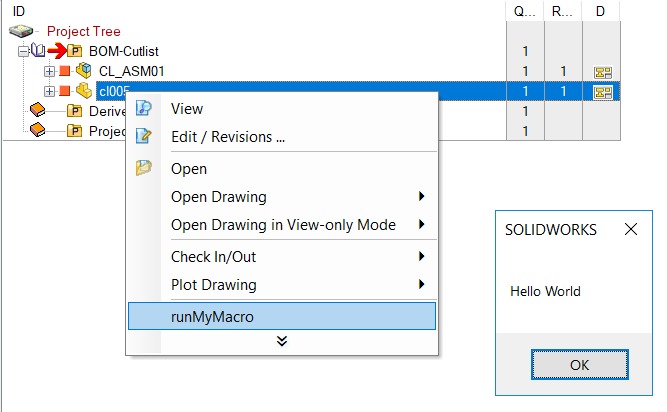
Description
Executes an external macro. Useful for launching CAD-specific macro commands
Syntax
call DBWShell("ExecMacro FileName ModuleName FunctionName")
Parameters
FileName |
It is the name of the file containing the module that contains the macro to execute. Please note any space char in filenames and paths must be replaced by "|" char. |
|---|---|
ModuleName |
It is the name of the module containing the macro to execute. |
FunctionName |
It is the name of the function (or macro) to execute. |
Remarks
Implemented for both SolidWorks and Inventor platforms.
Example for Solidworks
This is an example of a macro: 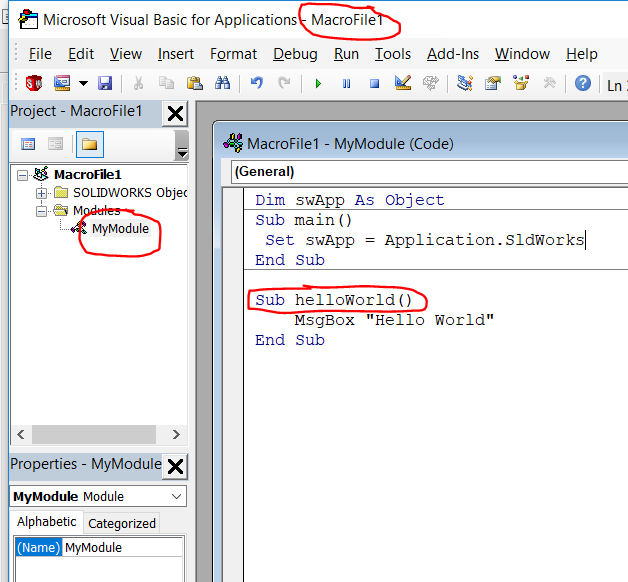
This is the code to call its subroutine:
sub main()
filename = "c:\sw_files\MacroFile1.swp"
moduleName = "MyModule"
functionName = "HelloWorld"
dbwshell("ExecMacro " & filename & " " & moduleName & " " & functionName)
end sub
And associating the above code to a script named LST\runMyMacro.LST