available from build: 20150626 |
Description
This command outputs into the %tmp%\dbwreslt.in text file the file properties of the assigned documentPathName.
If the optional configurationName parameter is passed, then the properties will be related to the specific configuration properties section.
Syntax
call DBWShell("FileGetProperties documentPathName [configurationName]")
Parameters
documentPathName |
the full path of the file |
|---|---|
configurationName |
optional.the specific configuration to retrieve custom properties of. |
Results
@FILE_IS_READ_ONLY |
1: if the file is read-only |
Example
'.x64
Sub main()
DBWinit(TRUE)
filePath = "E:\test\fogbugz\case47905\case47905PART1.SLDPRT"
configuration = "Default"
DBWShell("FileGetProperties " & Replace(filePath," ","|") & " " & Replace(configuration," ","|") )
Set fs = CreateObject("Scripting.FileSystemObject")
Set tfolder = fs.GetSpecialFolder(TemporaryFolder)
Set f = fs.OpenTextFile( tfolder & "\dbwreslt.in", ForReading, True )
Dim tokens
Do While f.AtEndOfStream <> True
line = f.ReadLine
if line<>"" then
tokens = Split( line, "=", 2, 1)
DBWShell("ActivityConsolePrint " & Replace(tokens(0)," ","|") & "=" & Replace(tokens(1)," ","|"))
end if
Loop
f.Close
End Sub
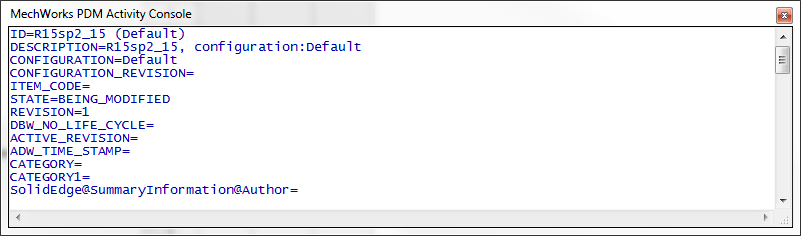
This is the resulting activity console: