available from build: 20070518 |
Description
It loads an addin into the host cad
Such addin must be registered as a COM module
Syntax
call DBWShell("LoadAddin AddinName AddinProgID AddinXMLMenuDefFile ")
Parameter
AddinName |
Any unique name for the add-in |
|---|---|
AddinProgID |
the ProgID for creating the add-in object |
AddinXMLMenuDefFile |
the name of the XML file containing the menu structure of the add-in |
Remarks
The supported format of the XML file for the menu structure is the following:
<?xml version="1.0" encoding="utf-8" ?>
<DBWMenu>
<DBWSubMenu Name="My1stAddinMenu">
<DBWMenuItem Name="Func1" ID="5"></DBWMenuItem>
<DBWMenuItem Name="Func2" ID="6"></DBWMenuItem>
<DBWSubMenu Name="MySubMenu1">
<DBWMenuItem Name="Func3" ID="1"></DBWMenuItem>
<DBWMenuItem Name="Func4" ID="2"></DBWMenuItem>
</DBWSubMenu>
<DBWSubMenu Name="MySubMenu2">
<DBWMenuItem Name="Func5" ID="3"></DBWMenuItem>
</DBWSubMenu>
<DBWSubMenu Name="MySubMenu3">
<DBWMenuItem Name="Func6" ID="4"></DBWMenuItem>
</DBWSubMenu>
</DBWSubMenu>
<DBWSubMenu Name="My2ndAddinMenu">
<DBWMenuItem Name="Func7" ID="7"></DBWMenuItem>
<DBWMenuItem Name="Func8" ID="8"></DBWMenuItem>
</DBWSubMenu>
</DBWMenu>
The attributes ID must be UNIQUE in the file, being those numbers passed to the functions OnMenuItemClicked(long itemID) and OnMenuItemEnabled(long itemID)
Her is an example of an addin class in VB.NET:
<Microsoft.VisualBasic.ComClass()> Public Class TestClass1
Public Function Start(applicationName As String) As Boolean
MsgBox("This is start from " & applicationName)
Start = True
End Function
Public Function OnMenuItemClicked(ByVal itemID As Integer) As Boolean
MsgBox("you have clicked item ID: " & itemID)
Return True
End Function
Public Function OnMenuItemEnabled(ByVal itemID As Integer) As Boolean
'add check to enable/disable according to itemID
Return True
End Function
End Class
Remarks
VB.NET users have to check that:
•the <Microsoft.VisualBasic.ComClass()> attribute for the TestClass1 class;
•in the project properties:
oCompile -> it is checked the "Register for COM Interop"
oBuild Events... -> Post-build event contains the regasm /codebase registration instructions.
To run it, you have to rebuild the project (to perform registration) and to move the .vbs and .xml file in C:\Program Files\DBWorks\BIN\AddIns\TestAddin1 folder.
Example
C:\Program Files\DBWorks\BIN\AddIns\MyDBWAddin\AddinStartup.VBS
sub Main()
DBWInit(True)
DBWShell("LoadAddin MyDBWAddin ClassLibrary1.Class1 AddinMenu.xml")
End Sub
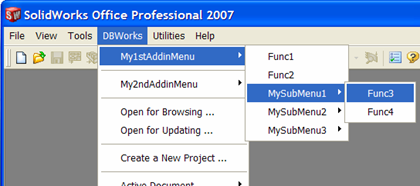
Using the XML menu definition file described in the above example, the displayed menu structure will be the following: