Description
Activates the Query page and loads and executes the query contained in the assigned file. The path of the file must be complete.
Syntax
call DBWShell("LoadQuery SQLQueryFile ["FILTER"|"WORKINGSET"] [applyToDBWFeatureManager] ")
Parameters
SQLQueryFile |
The full path of a valid .sql file containing an SQL query to be run |
|---|---|
"FILTER" |
Optional. a query such as "AND <condition 1> AND <condition 2> ..." |
"WORKINGSET" |
Optional. the query is expected to be the list of UIDs separated by commas ( ex: 100,102,103, ) Large Working Set Mode supported. uid1 The sql file can also contain a real SQL statment that has unique_id as results (see example2). |
applyToDBWFeatureManager |
1: the result of the FILTER query will be applied to the DBW Feature Manager search grid of the active CAD document |
Remarks
MechworksPDM browser must be open if no applyToDBWFeatureManager is passed.
It is preferable to use the DBWQuery standard library function instead of a direct call to the shell.
Autofit columns
It is possible to force column widths to fit results content with keyword .RESIZE_COL_WIDTH_TO_FIT
Example
Set fs = CreateObject("Scripting.FileSystemObject")
Set tfolder = fs.GetSpecialFolder(TemporaryFolder)
queryFileName = tfolder & "\PartListSample.sql"
Set a = fs.OpenTextFile( queryFileName, ForWriting, True )
a.WriteLine( "SELECT * FROM DOCUMENT WHERE T='G' AND ID='" & docId & "'" )
a.Close
DBWShell("LoadQuery " & queryFileName )
if( okDBW = False ) then exit sub
Example2
...
queryFileName = "C:\temp\MyQuery.sql"
call DBWShell("LoadQuery " & replace(queryFileName," ","|") & " WORKINGSET")
...
Example with FILTER
sub main
DBWInit(TRUE)
Set fs = CreateObject("Scripting.FileSystemObject")
Set tfolder = fs.GetSpecialFolder(TemporaryFolder)
queryFileName = tfolder & "\ProjectsListSample.sql"
Set a = fs.OpenTextFile( queryFileName, ForWriting, True )
a.WriteLine( "AND T='0'" )
a.Close
DBWShell("LoadQuery " & replace(queryFileName," ","|") & " filter" )
set fs = nothing
end sub
Example with applyToDBWFeatureManager
sub main
DBWInit(TRUE)
Set fs = CreateObject("Scripting.FileSystemObject")
Set tfolder = fs.GetSpecialFolder(TemporaryFolder)
queryFileName = tfolder & "\ProjectsListSample.sql"
Set a = fs.OpenTextFile( queryFileName, ForWriting, True )
a.WriteLine( "AND T='0'" )
a.Close
DBWShell("LoadQuery " & replace(queryFileName," ","|") & " filter 1" )
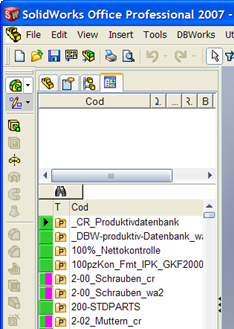
end sub
and the result is as follows:
Example with autofit
Sub Main
Set fs = CreateObject("Scripting.FileSystemObject")
Set tfolder = fs.GetSpecialFolder(TemporaryFolder)
queryFileName = tfolder & "\PartListSample.sql"
Set a = fs.OpenTextFile(queryFileName, ForWriting, True)
a.WriteLine(".RESIZE_COL_WIDTH_TO_FIT")
a.WriteLine("SELECT ID,DESCRIPTION,CATEGORY FROM DOCUMENT WHERE T = 'P'")
a.Close
DBWShell("LoadQuery " & queryFileName)
End Sub