Vectorial preview of HP/CoCreate ME10 files |
|

An option enables the vectorial preview of ME10 files: User Interface, Preview, Enable vectorial preview of ME10 files.
Pre-requirements for using this function:
a valid ME10 license installed on the workstation, with a valid DXFDWG translator from CoCreate. The translator version used to develop this support is the following:
CoCreate/Interface for MI to DWG/DXF (TM*)
Release 11.60 (build 191.37), 2002
To install the necessary files:
•copy the <me10 installation path>\DXFDWG\dxfdwg.exe file, the <me10 installation path>\DXFDWG\adinit.dat and the <me10 installation path>\DXFDWG\dxfdwg.con files into the <MechworksPDM installation path>\BIN directory
•rename <MechworksPDM installation path>\BIN\DXFDWG.EXE as DBWDXFDWG.EXE
Limitations:
•only ME10 files with extensions .MI and .ME are managed
•a sub-directory named Iges2D, under the BIN sub-directory has been added to preview files with version older than 2.5. If these tools are not availables, MechworksPDM can't preview the files
DWG Viewer:
When the option is checked, when right-clicking on an ME10 file the function Open DWG Viewer is also available. This command opens in the MechworksPDM DWG viewer the DWG conversion of the ME10 file.
|
Note: for security reasons, converted DWG files are created in the same directory of the original .mi files, with "read-only,hidden" attributes. |

Background color
A new option has neeb added to set the bakground color in User Interface, Preview, Vectorial preview background color
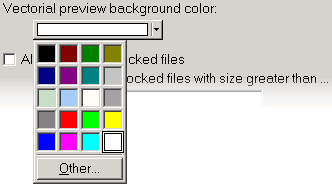
Assign the background color of the window when a vectorial preview is executed (for DWG, DXF or ME 10 files).
The option is also supported by the DWG Viewer