Description
This script allows to change the default behavior of the Tree Page search box when a custom query tab has been activated.
No further tab will be displayed in the TreePage since the OnCustomQueryTabSearch_ file has to be referred to an existing OnCustomQueryTab_ script.
Location
LST folder
Inputs
@SEARCH_STRING |
The string that has been typed in the search box |
Outputs
@SEARCH_QUERY |
the query that has been built by the search script related to the custom query tab currently activated |
Example
.VBSCRIPT
Sub Main()
DBWInit(True)
searchString = DBWInput("@SEARCH_STRING")
Query = GetQuery(searchString)
If Not Query = "" Then
DBWOutput "@SEARCH_QUERY",Query,ForWriting
End If
End Sub
Function GetQuery(searchString)
GetQuery = <build your custom query here>
End Function
Example2
Suppose you have a OnCustomQueryTab_PDF.lst that shows all the PDF in the database.
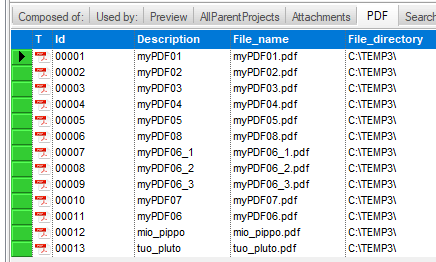
Suppose your PDFs have IDs that are a numerical code so it's not so comfortable to search agaist ID values; for this reason the search must be done on DESCRIPTION field rather than to ID field
To do that you can write a search routine (OnCustomQueryTabSearch_PDF.LST) that limits the input query to DESCRIPTION field when searching into PDF tab:
.VBSCRIPT
Sub Main()
DBWInit(True)
searchString = DBWInput("@SEARCH_STRING")
Query = GetQuery(searchString)
If Not Query = "" Then
DBWOutput "@SEARCH_QUERY",Query,ForWriting
End If
End Sub
Function GetQuery(searchString)
GetQuery = "SELECT * FROM DOCUMENT WHERE FILE_NAME LIKE'%.PDF' AND DESCRIPTION like '%" & searchString & "%'"
End Function
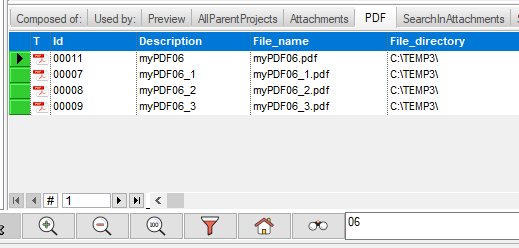
So if you search for example '06' you will see records with such field in DECSCRIPTION field only: