Description
This script is executed when the user presses the OK button in the Data Input Form. It receives as input all the field values, then returns @OKDATA variable.
When approving (checkin → approve) a model with a linked drawing the script is invoked 1 time for the model and 2 times for the drawing (see below the @IS_PRE_DRAWING_APPROVE_CASE parameter value).
This extra call allows any Drawing Annotation, linked directly to a Drawing Property, to be properly updated by the OnOK.LST, by outputting the changed value (like a WATERMARK field use case).
Activation
Options→Data input
Input
@DRAWING_FNAME |
file name |
|---|---|
@EDIT |
<0/1> |
@INSERT |
<0/1> |
@REVISION_PHASE |
"REVISION_PROCESSED" | "REVISION_APPROVED" | "REVISION_NEW" | "REVISION_ACTIVATED" | "CHECKIN" Remarks
|
@TITLE |
It's the title of the dialog depending on the document type/action performed. It's used to know the context the dialog is called from. examples"Save... PART" | "Edit / Revisions ... PART" | "New Bom Item ... PART" |
@UNIQUE_ID |
uid ( only when @EDIT=1 ) |
@CURRENT_PROJECT |
the name of the current project (highlighted by the red arrow in the TreeProject)
|
@SELECTED_PROJECT |
the name of the currently selected project in the Data Input Form
|
@PARENT_WINDOW_TITLE |
the title of the window the script has been called from |
@PARENT_WINDOW_HANDLE |
the handle (long integer) of the window the script has been called from |
@CURRENT_DATAENTR_TXT_FILENAME |
it allows the script developer to understand what is the current FORM definition file that invoked the script. For example, the developer can open such form definition file and look for what field names are listed into it. |
@IS_PRE_DRAWING_APPROVE_CASE |
1: linked drawing pre event |
 →
→  @REVISION_PHASE=CHECKIN
 →
→  →
→ 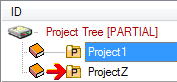 In this example ProjectZ is the current project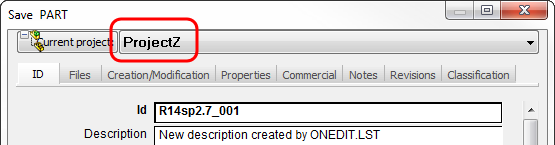
Remarks
Special case when a drawing is being saved:
A drawing saves its own record and that ones of the document being saved.
When saving the drawing's own record
@DRAWING_UNIQUE_ID |
|
|---|---|
@DOCUMENT_UNIQUE_ID |
= 0 |
When saving any drawn document's record
@DRAWING_UNIQUE_ID |
|
|---|---|
@DOCUMENT_UNIQUE_ID |
= part/assembly unique id |
Output
any field name |
|
|---|---|
@OKDATA |
0: avoid validation |
@CURRENT_PROJECT |
project name |
Example
.VBSCRIPT
Sub Main()
DBWInit(TRUE)
descr = DBWInput("DESCRIPTION")
if descr = "Made by MechWorks" then
DBWOutput "@OKDATA",1,ForWriting
else
DBWMsgBox "The description must be exactly 'Made by MechWorks'"
DBWOutput "@OKDATA",0,ForWriting
end if
End Sub
In the above trivial script, the validation is negated if the field DESCRIPTION is not exactly equal to a dummy value.
Example
Another example: read DESCRIPTION from configurations specific properties and fill the DESCRIPTION field in the input data form.
.VBSCRIPT
sub main()
DBWInit(TRUE)
fileName = DBWInput("FILE_NAME")
fileDir = DBWInput("FILE_DIRECTORY")
configuration = DBWInput("CONFIGURATION")
set Part = DBWApp.ActiveDoc
'< check if it is nothing ...>
...
set cfg = Part.GetConfigurationByName( configuration )
configurationDescription = cfg.Description
if configurationDescription = "" then
configurationDescription = fileName & " (" & configuration & ")"
end if
DBWOutput "@OKDATA", "1", ForWriting
DBWOutput "DESCRIPTION", configurationDescription, ForAppending
end sub