Support for PowerShell in MechworksPDM
The extension .ps1 is recognized in the LST_DIR folder and scripts will be shown in the Tools → Utility menu.
Similarly, in the right mouse button menu on an assembly, part, drawing or project it is possible to add commands creating .ps1 scripts in the LST\(A|P|D|0|G) folder (respectively).
.SPT and .LST files can be PowerShell scripts too: the first line must be a .PS1 directive (similar to the legacy .VBSCRIPT directive).
Examples of PowerShell scripts are available in the LST_DIR\demo\demo_ps1 folder.
Pre-requisites
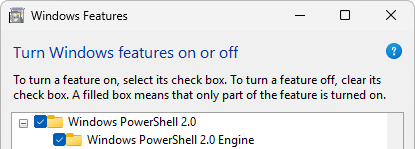
PowerShell is part of the operating system so there's no need to install further modules; you just have to make sure the feature is enabled in the Windows features panel:
PowerShell scripts are always executed out of process calling the Windows PowerShell engine.
Basic structure of a PDM PowerShell script
Every script should start with the following lines:
$ErrorActionPreference = "Stop"
Add-type -path $Env:DBWorksApiNetDll
$instance = New-Object MwPDMApi.Initialize
$app=$instance.StartConnection($Env:DBWorksApplicationName)
Let's see in details the above instructions:
$ErrorActionPreference = "Stop"
The first line instructs PowerShell to stop execution if an error occurs. This line is optional and its use depends on the developer preferred strategies in error handling. We suggest its use.
Add-type -path $Env:DBWorksApiNetDll
The second line instructs PowerShell to import the .Net PDM Apis. These are the .Net API already distributed and documented in the PDM: in fact, PowerShell is built in .Net and can natively manage .Net objects. The DBWorksApiNetDll environment variable is a variable that is passed to the PowerShell engine at execution time and contains the path to the installed MwPdmApi.dll.
$instance = New-Object MwPDMApi.Initialize
$app=$instance.StartConnection($Env:DBWorksApplicationName)
The latest 2 lines are the same instructions used to initialize a connection using the Apis in .Net. The first creates a new Initialize object, while the second starts the connection with the PDM. The DBWorksApplicationName environment variable contains the caller application name: "DBWorks", "DBInventor", "DBSolidEdge", "DBWorks Standalone".
Execution Policy
No strict need for PowerShell execution policy
The PDM does not strictly need PowerShell policy enabled to run. PowerShell policy restricted at machine or user level (not at domain level) are bypassed by the PDM (only in regard to the scripts run by PDM) without the need to change any configuration on the PC.
In case the IT department is in an enterprise environment and wants to avoid any type of PowerShell scripting execution, the PDM can use other types of scripting, like python or the compiled custom .Net dll. Some of the scripts may still need to be converted, though, depending on the customer’s needs.
Anyway, every internal or unmodifiable script in lst/system that in previous versions was launched by PDM has been integrated into the compiled code.
Running custom script in PS1
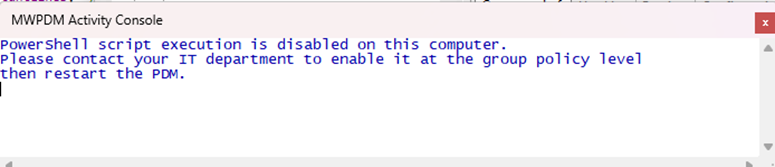
Custom PowerShell script execution policy is checked the first time a script is run and in case they are blocked at the domain policy level, a message is shown in the Activity Console because an IT personnel must enable them.
Note: the minimum policy level needed is RemoteSigned.