Description
Activate the Tree page and select an item in the tree given its unique id.
Syntax
call DBWShell("SelectTreeByUniqueId UniqueID [updatePreviewAndGrids] ")
Parameters
UniqueID |
unique id of the selected document |
|---|---|
updatePreviewAndGrids |
Optional.In the Tree Page, it controls if grids and the preview have to be updated after the selection. |
Remarks
The browser must be open and the passed document must be visible in the Tree to be selected.
Example
given the command
DBWShell("SelectTreeByUniqueId 3717")
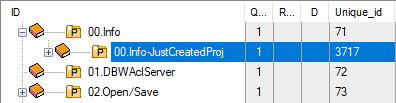
If the project with uid=3717 is visible in the tree, then you got it selected 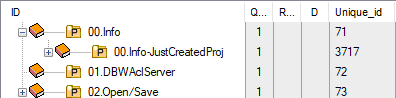 →
→ 
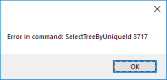
otherwise you got an error: 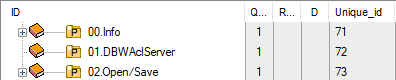 →
→ 
See also
AndSelectTreeByUniqueId command
SelectByUniqueId command
SelectQueryByUniqueId command
Example
'select a sub-assembly
call DBWShell( "SelectTreeByUniqueId 164" )