Description
Set the position of splitter in Documents Page.
Syntax
call DBWShell("SetDocPageSplitterPosition splitter_id x_coords y_coords")
Parameters
splitter_id |
name of the splitter to set. These are available values for splitter_id: 0 for splitter between project grid and assembly grid |
|---|---|
x_coords |
relative measure of the grid width. |
y_coords |
relative measure of the grid heigth. |
Remarks
The measure of x_ccords and y_coords is intended to be in a 0-1 interval.
There is a special parameter , APPLY, that performs the refresh of the browser window. It's advisasble to use it once you finished with splitters setting.
The browser must be open.
See also
SetTreePageSplitterPosition command
Example
DBWShell("SetDocPageSplitterPosition 0 0.25 0.4")
DBWShell("SetDocPageSplitterPosition A 0.4 0.4")
DBWShell("SetDocPageSplitterPosition P 0 0.23")
DBWShell("SetDocPageSplitterPosition D 0 0.1")
DBWShell("SetDocPageSplitterPosition C 0 0.4")
DBWShell("SetDocPageSplitterPosition APPLY")
Let see with an image how the above example affects the browser behaviour.
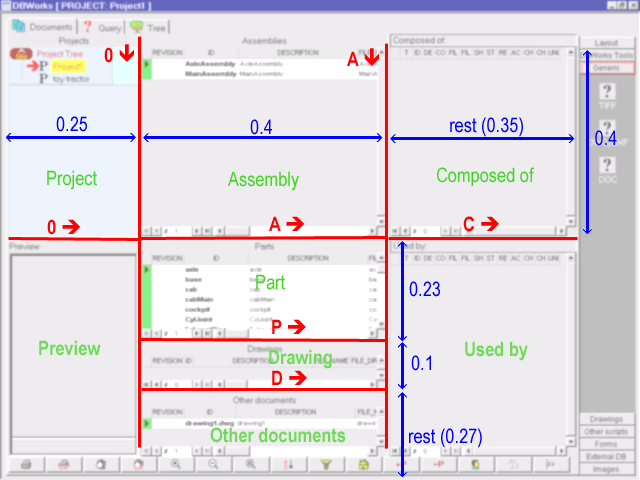
Please note that the code is divided in 3 groups (4 including the APPLY command):
The first lines of code set the Project and Preview aspect ratio.
We have ho preview splitter because the preview space will be consequently resized to fit the screen.
The second goup of lines set three (A,P and D) splitters. As we said above, the Other document grid heigth depends on previously set splitters.
Last goup, as for first one, sets only two grid aspect ratio: Composed of grid and Used by grid.