Description
Sets the names of the Primary Database Tables to the assigned ones.
The passed tables are supposed to have EXACTLY the same structure of the original ones
Syntax
call DBWShell("SetPrimaryDatabaseTables permanent altDOCtab altREVtab altPCtab altPARTview altASMview altDRWview altGENview altPRJview [altDbwAttachmentsTab]")
Parameters
permanent |
0: set in a non-permanently way (the script engine will reset it once the script has terminated) |
|---|---|
altDOCtab |
alternative DOCUMENT table |
altREVtab |
alternative REVISIONS table |
altPCtab |
alternative PARENT_CHILD table |
altPARTview |
alternative PART view |
altASMview |
alternative ASSEMBLY view |
altDRWview |
alternative DRAWING view |
altGENview |
alternative GENERIC view |
altPRJview |
alternative PROJECT view |
altPRJview |
alternative PROJECT view |
altDbwAttachmentsTab |
Optional. |
Remarks
WARNING
this command must be used by expert DBWorks Administrators only, and with an intensive testing of the scripts that will use it
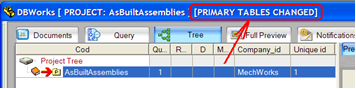
When the Primary Tables are different from the standard ones, the Mechworks PDM browser shows a notification in its title:
See also
IsPrimaryDatabaseChanged
ResetPrimaryDatabaseTables
Example
This example shows how to switch from the engineering database to the released one.
Sub ShowEngineering()
Call DBWShell( "IsPrimaryDatabaseChanged" )
If (DBWResult("@IS_PRIMARY_DATABASE_CHANGED") = "0") Then
DBWMsgBox "Already showing Engineering Database", vbInformation, "Switch Database"
Else
Call DBWShell( "ResetPrimaryDatabaseTables" )
End If
Call DBWShell( "OpenForBrowsing" )
End Sub
'__________________________________________________
Sub ShowReleased()
Call DBWShell( "IsPrimaryDatabaseChanged" )
If (DBWResult("@IS_PRIMARY_DATABASE_CHANGED") = "0") Then
Call DBWShell( "SetPrimaryDatabaseTables 1 RELEASED_DOCUMENT RELEASED_REVISIONS RELEASED_PARENT_CHILD RELEASED_PART RELEASED_ASSEMBLY RELEASED_DRAWING RELEASED_GENERIC RELEASED_PROJECT" )
Else
DBWMsgBox "Already showing Released Database", vbInformation, "Switch Database"
End If
Call DBWShell( "OpenForBrowsing" )
End Sub