Description
The command shows the Document Selector Dialog used for multiple checkout/checkin/approve, for briefcase import/export, etc.
Syntax
call DBWShell("ShowDocumentSelectorDialog title message info includeLinkedDrawings checkForeignDocuments uidList [NoTraverseChildren[NeverReturnLinkedDocuments[uidsToBePreSelected[uidsToBePreDisabled[extraColumnsToShow]]]]]")")
Parameters
title |
title of the dialog |
|---|---|
message |
explaining message |
info |
additional info |
showLinkedDrawings |
0:exclude any linked drawing |
checkForeignDocuments |
0:enable the row if the document is foreign |
uidList |
A comma separated list of the documents unique ids to be listed in the Selector dialog |
NoTraverseChildren |
Optional. |
NeverReturnLinkedDocuments |
Optional. |
uidsToBePreSelected |
Optional. A comma separated list of values to be show as already selected in the displayed dialog. |
uidsToBePreDisabled |
Optional. A comma separated list of values to be show as already disebled in the displayed dialog. |
ShowParentTree |
Optional. |
typeList |
Optional. A lists of the types T of the Documents that must be displayed, with a format like: 'A','P','D','G','0' and any combination of the above. |
extraColumnsToShow |
Optional. A comma separated list of database fields |
Remarks
all the other optional parameters can be set to "0" if not necessary
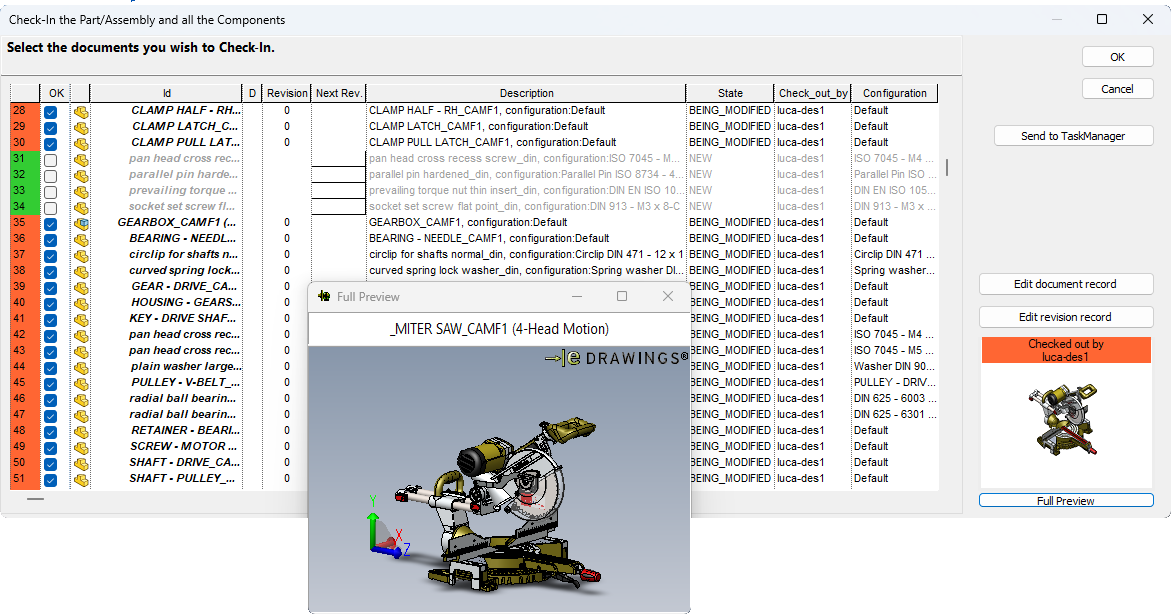
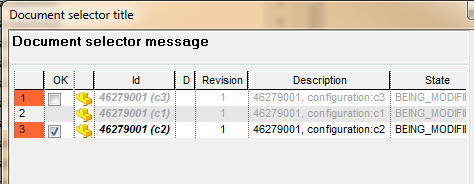
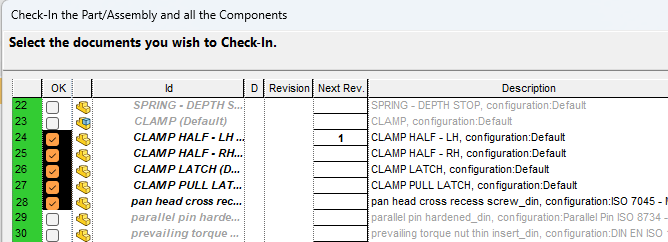
Starting from R26 the Shift range selection feature has been introduced in the OK column.
Users can toggle multiple checkboxes at once by clicking a checkbox and then using SHIFT + Click on another checkbox to apply the action to the entire range.
Results
The %tmp%\dbwreslt.in file containing a list of lines like the following:
@DOCUMENT_UNIQUE_ID |
selected or linked uid 1 |
|---|---|
@DOCUMENT_UNIQUE_ID |
selected or linked uid 2 |
@DOCUMENT_UNIQUE_ID |
selected or linked uid 3 |
... |
... |
@DOCUMENT_UNIQUE_ID |
selected or linked uid N |
See also
GetSortedUIDListForProcessing command
Example
The following example display the above dialog
Sub main()
DBWInit(TRUE)
listOfUids = "671,76,26,27,32,35,37,38,43,44,45"
listOfCheckedUids = "0"
listOfDisabledUids = "0"
showParentTree = "1"
typeList = "'A','P'" ' display only parent Assemblies and Parts
extraColumnsToShow = "CATEGORY1,CATEGORY2,CATEGORY3"
DBWShell("ShowDocumentSelectorDialog" &_
" " & chr(34) & "Document selector title" & chr(34) &_
" " & chr(34) & "Document selector message" & chr(34) &_
" " & chr(34) & "info message" & chr(34) &_
" " & chr(34) & "1" & chr(34) &_
" " & chr(34) & "0" & chr(34) &_
" " & chr(34) & listOfCheckedUids & chr(34) &_
" " & chr(34) & listOfDisabledUids & chr(34) &_
" " & chr(34) & showParentTree & chr(34) &_
" " & chr(34) & typeList & chr(34) &_
" " & chr(34) & extraColumnsToShow & chr(34))
returnedDocumentUniqueIds = ""
Set fs = CreateObject("Scripting.FileSystemObject")
Set tfolder = fs.GetSpecialFolder(TemporaryFolder)
Set a = fs.OpenTextFile( tfolder & "\" & "dbwreslt.in" , ForReading, True )
Dim tokens
Do While a.AtEndOfStream <> True
line = a.ReadLine
tokens = Split( line, "=", 2, 1)
documentUniqueId = tokens(1)
if returnedDocumentUniqueIds<>"" then
returnedDocumentUniqueIds = returnedDocumentUniqueIds & ","
end if
returnedDocumentUniqueIds = returnedDocumentUniqueIds & documentUniqueId
Loop
a.Close
DBWMsgBox "Returned document uids =" & vbcrlf & returnedDocumentUniqueIds
End Sub
Another example:
given a selection in the tree, shows a dialog with selected documents only (no children, no dependent, no drawings)
Sub main()
DBWInit(TRUE)
DBWShell("GetSelection")
selection = DBWResult("@SELECTION")
DBWMsgBox selection
title = "title"
msg = "msg"
info = "info"
includeDraws = "0"
checkForeign = "0"
noTraverse = "1"
NeverReturnLinkedDocuments = "0"
DBWShell("ShowDocumentSelectorDialog" &_
" " & chr(34) & title & chr(34) &_
" " & chr(34) & msg & chr(34) &_
" " & chr(34) & info & chr(34) &_
" " & chr(34) & includeDraws & chr(34) &_
" " & chr(34) & checkForeign & chr(34) &_
" " & chr(34) & selection & chr(34) &_
" " & Chr(34) & noTraverse & chr(34) &_
" " & Chr(34) & NeverReturnLinkedDocuments & chr(34))
End Sub
Example with missing first 2 optional parameters:
Sub main()
DBWInit(TRUE)
listOfUids = "1235,1237,1239"
listOfCheckedUids = "1237"
listOfDisabledUids = "1235"
DBWShell("ShowDocumentSelectorDialog" &_
" " & chr(34) & "Document selector title" & chr(34) &_
" " & chr(34) & "Document selector message" & chr(34) &_
" " & chr(34) & "info message" & chr(34) &_
" " & chr(34) & "1" & chr(34) &_
" " & chr(34) & "0" & chr(34) &_
" " & chr(34) & listOfUids & chr(34) &_
" " & chr(34) & "0" & chr(34) &_
" " & chr(34) & "0" & chr(34) &_
" " & chr(34) & listOfCheckedUids & chr(34) &_
" " & chr(34) & listOfDisabledUids & chr(34))
returnedDocumentUniqueIds = ""
Set fs = CreateObject("Scripting.FileSystemObject")
Set tfolder = fs.GetSpecialFolder(TemporaryFolder)
Set a = fs.OpenTextFile( tfolder & "\" & "dbwreslt.in" , ForReading, True )
Dim tokens
Do While a.AtEndOfStream <> True
line = a.ReadLine
tokens = Split( line, "=", 2, 1)
documentUniqueId = tokens(1)
if returnedDocumentUniqueIds<>"" then
returnedDocumentUniqueIds = returnedDocumentUniqueIds & ","
end if
returnedDocumentUniqueIds = returnedDocumentUniqueIds & documentUniqueId
Loop
a.Close
DBWMsgBox "Returned document uids =" & vbcrlf & returnedDocumentUniqueIds
End Sub