Description
This command shows a small popup window with a message of maximum three lines of text
Syntax
call DBWShell("ShowPopupWindow title messageshowDelay animateDelay transparency width height )
Parameters
440x100
title |
the title of the window |
|---|---|
message |
the message to be displayed in the window (up to 3 lines allowed) |
showDelay |
the delay in milliseconds after that the window will be closed |
animateDelay |
the delay in milliseconds of the initial and ending animation of the window display |
transparency |
value of the transparency (0..255) |
width |
the width of the dialog in pixel (default value is 440px) |
height |
the height of the dialog in pixel (default value is 100px) |
Remarks
This is an example of the dialog:
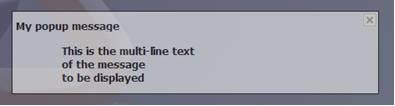
Example
Sub main()
DBWInit(TRUE)
title = "My popup message"
message = "This is the multi-line text" & vbcrlf & "of the message" & vbcrlf & "to be displayed"
showDelay = "3000"
animateDelay = "500"
transparency = "160"
width="600"
height="200"
DBWShell("ShowPopupWindow " & _
replace(title," ","|") & " " &_
replace(message," ","|") & " " &_
showDelay & " " &_
animateDelay & " " &_
transparency & " " &_
width & " " &_
height)
End Sub