Here below you'll find some useful constants to use with msgbox interface commands.
You can mix them to obtain different combination of dialogs.
Dialog buttons
Constant |
Value |
|---|---|
VBOKOnly |
0 |
VBOKCancel |
1 |
VBAbortRetryIgnore |
2 |
VBYesNoCancel |
3 |
VBYesNo |
4 |
VBRetryCancel |
5 |
Dialog appearance
Icon |
Constant |
Value |
Description |
|---|---|---|---|
|
VBCritical |
16 |
Show critical message icon |
|
VBQuestion |
32 |
Show warning query button |
|
VBExclamation |
48 |
Show warning message icon |
|
VBInformation |
64 |
Show information message icon |


Return values
Constant |
Value |
Description |
|---|---|---|
VBOK |
1 |
OK Button selected |
VBCancel |
2 |
Cancel button selected |
VBAbort |
3 |
Abort button selected |
VBRetry |
4 |
Retry button selected |
VBIgnore |
5 |
Ignore button selected |
VBYes |
6 |
Yes button selected |
VBNo |
7 |
No button selected |
Example
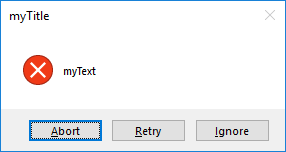
res = DBWMsgBox2("myText", 16 OR 2, "myTitle")
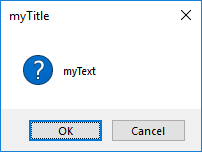
res = DBWMsgBox2("myText", 32 OR 1, "myTitle")