Conversion Wizard now can convert files not managed by PDM. The file list is provided as a txt file containing the full path to the files to be converted, one per line. The file list could be created for example with the command:
dir /b /s > C:\temp\files_to_convert.txt
When you select a list of files to convert, it is assumed that they are not present in the database, so many options are grayed out as meaningless.
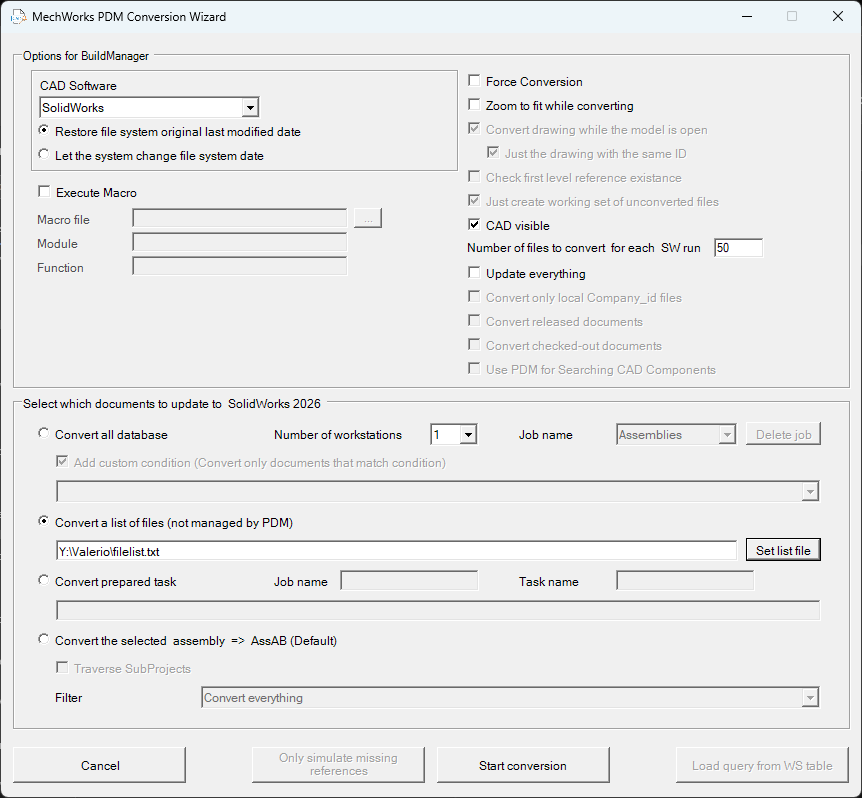
The list of files to be converted can be split into multiple tasks, just as you would when converting the whole database. Simply select a number of workstations greater than 1 and multiple tasks will be created on the database, which can be run from different computers.
Please note that:
-It is recommended to convert parts first, then assemblies, and finally drawings. It is the user's responsibility to provide separate lists, one for each of these cases.
-When converting a list of files read from a txt list, they are converted in the order they are found in the list. But if the list is used to create tasks, there is no guarantee that the order is maintained during the conversion process.
-Macro execution has been left enabled, but please note that since the files are not registered in the database, there is no data associated with them and wrong accesso to PDM usage could lead to data corruption