The steps below describe how to properly set up and run the MWAIScriptConverter application.
a) Copy the file MWAIScriptConverter.exe to your local machine. No additional installation steps are required.
b)Double Click on the application icon  to run MWAIScriptConverter.
c)The application will display the login user interface, as shown below:
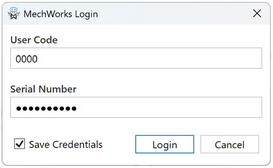
•User Code: it is the Customer or Reseller Code; the 4-digit Company code.
•Serial Number: Any 10-digits MechWorks valid serial number (the same credentials used by Customer or Resellers to login on to the MechWorks website reserved area. The application remembers the last used).
•Save Credentials flag: check it if you want to save the login credential on the local machine.
•The first login will credit 20 free MWTokens for trial purposes.