The MWAIScriptConverter user interface is organized around the following main elements:
a)Pages
The application is divided into multiple pages, each dedicated to a specific function:
Conversion Page: This is the main and default page of the application. All VBScript-to-PowerShell or VBScript-to-Python conversions are performed here.
Revision Page: This page is used to generate automatic conversion rules. Users can review the automatically converted code, submit corrected versions, and trigger the rule creation process.
Rules Page: This page displays the list of available rules. Users can manually add new rules, edit existing ones, or delete rules from the rule list.
History Page: This page displays the list of performed conversions and the related MWTokens used.
Only one page can be active at a time. All pages are accessible through the page tabs located at the top of the application. The Conversion Page is opened by default at application startup.
b)Icons
The application uses the following icons to facilitate navigation and interaction:
Menu Icon: Always visible in the top-left corner of the application window, it provides access to the main menu.
Page Icons: These icons change depending on the currently active page and visually indicate the current context.
c)Code Panels
Code panels display the source VBScript and the converted PowerShell or Python code. The number, layout, and position of the code panels vary depending on the active page.
d)MWTokens Counter
The available MWTokens balance is displayed in this area. This counter is always visible, regardless of the active page.
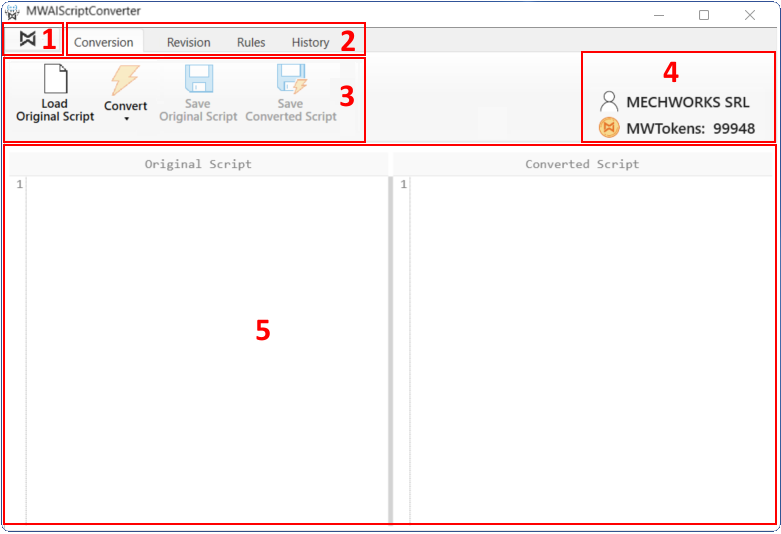
1)Menu Icon
2)PageTabs
3)Page Icons
4)MWTokens counter
5)Code Panels