BricsCAD integration

<< Click to Display Table of Contents >>

Navigation:  CAD/Application Integrations > BricsCAD integration >

BricsCAD integration

MWPDM BricsCAD integration installation

Requirements

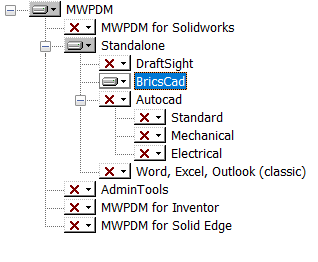
DBBricsCAD requires Mechworks StandaloneClient installed on the workstation.

Installation

A .reg file must be edited and run in order to install the DBBricsCAD integration.

The file is named <installFolder>\integration_autocad\DBBricsCAD\clickMeBB.reg and looks like followings:

Windows Registry Editor Version 5.00

[HKEY_CURRENT_USER\Software\Bricsys\BricsCAD\V22x64\en_US\Applications\DBBricsCAD]
"DESCRIPTION"="DBBricsCADLoad"
"LOADER"="C:\\Program Files (x86)\\MechWorks\\MechWorks_Pdm\\integration_autocad\\DBBricsCAD\\DBBricsCAD.dll"
"LOADCTRLS"=dword:00000002
"MANAGED"=dword:00000002

Make sure the version (V22x64) of BricsCAD and the installation language (en_US) are the same of the installed version (check against the already existing BricsCAD registry key)

If necessary, change the path of the DBBricsCAD.dll under the MechworksPDM installation folder (pay attention to the double \\ in the path). Finally, double click the .reg file to execut it and install the Mechworks dll into BricsCAD.