Description
Shows a smart radio-combo interface.
Syntax
Function DBWRadioCombo(title, label_title, radio_1_label, radio_2_label, default_radio, combo_values,
default_combo_value, combo_visible, byref radio_active, byref combo_value)
Parameters
title |
title of the form |
|---|---|
label_title |
title of the label |
radio_1_label |
label of the first radio button |
radio_2_label |
label of the second radio button |
default_radio |
radio button set as default (1 or 2) |
combo_values |
a string containing all the combo values divided by a vbCRLF char |
default_combo_values |
combo value set as default (its name) |
combo_visible |
set as TRUE show the combo, set as FALSE hides it |
radio_active |
radio button option checked |
combo_value |
the combo option selected |
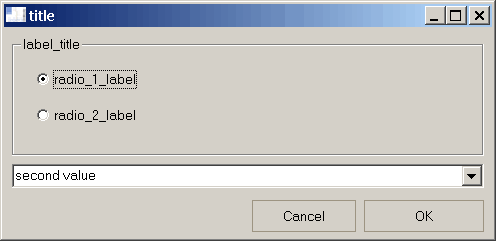
Return values
TRUE |
if the OK button was submitted |
|---|---|
FALSE |
if the CANCEL button was submitted |
radio_active |
contains the checked option at the moment of submission. |
|---|---|
combo_value |
contains the combo option at the moment of submission. |
Remarks
If the default_combo_value viariable is set with a string that not belong to the combo_values set, it is equally shown as the default one at run time.
Example
default_radio = 1
combo_values = "first" & vbCRLF & "second" & vbCRLF & "third"
default_combo_value = "second"
combo_visible = TRUE
resp= DBWRadioCombo ( "title", "label_title", "radio_1_label", _
"radio_2_label",default_radio, _
combo_values , default_combo_value , _
combo_visible, radio_active , combo_value )
if resp=true then
msgbox "radio " & radio_active & vbCRLF & "combo: " & combo_value
end if