How to debug a PS1 program running from MechworksPDM
Pre-requisites
It's assumed the PS1 engine is enabled on the workstation.
Testing and debugging the scripts (Utility/External scripts)
Testing a script is very easy using the windows integrated PowerShell ISE
It is necessary to have the PDM running in background (either integrated or standalone), and then the script can be run from the ISE as it would be from the PDM.
NOTE: when the script is run from the ISE there are no environment variables defined, so the variables DBWorksApiNetDll and DBWorksApplicationName must be either substituted with their values or assigned with a value in the ISE itself. The first one in a standard installation should point to "C:\Program Files (x86)\Common Files\Mechworks\Shared\MwPDMApi.dll"
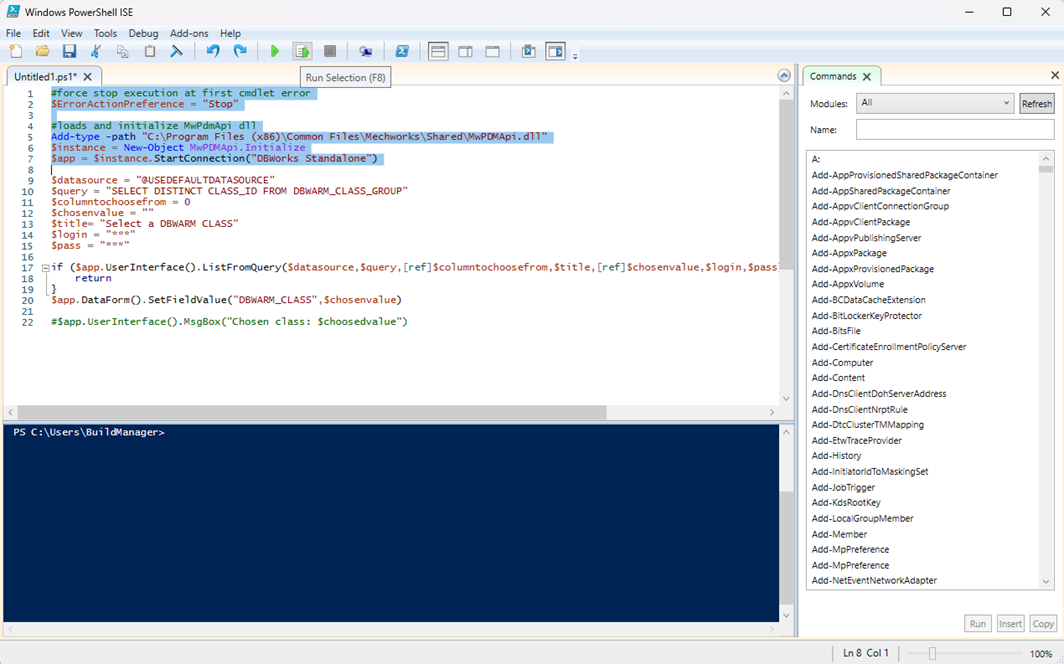
The ISE makes testing very simple: single lines of the script can be executed with the Run Selection button.
After the execution the variables can be inspected and modified in the console window (the lower part of the ISE); then the execution can continue by selecting and running following lines.
A complete command reference is always available with the Command Add-on (the list on the right in the image above).
Please note in the above example that the enviroment variables have been substituted with the desired values.
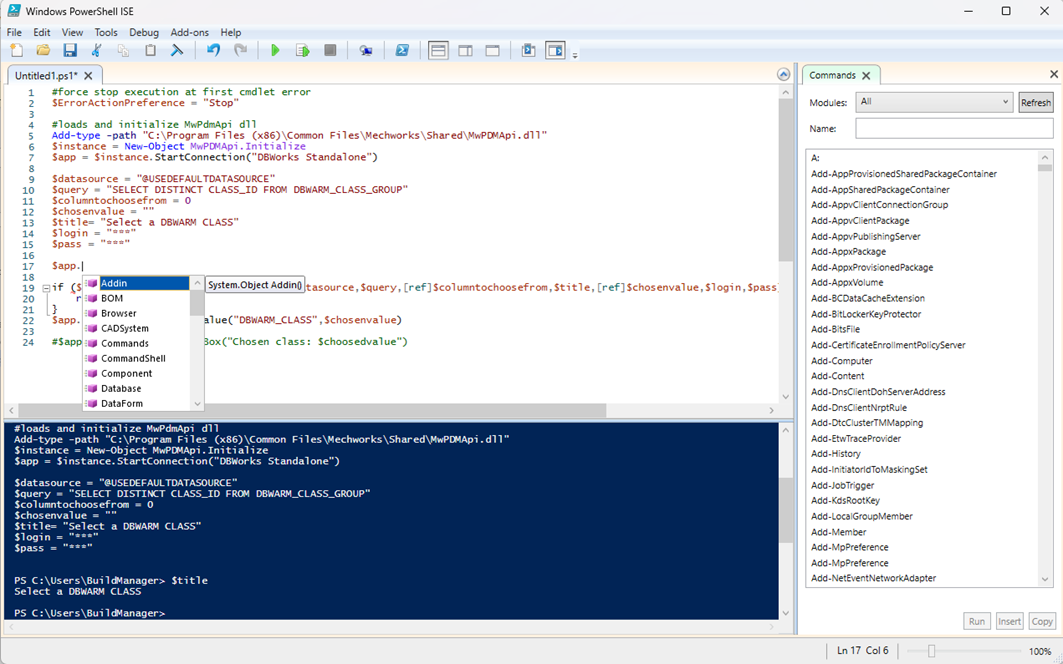
Another great improvement of this enhancement can be seen in the above image: after running the first initialization rows, which connect to the PDM, the ISE intellisense is helping the developer showing all the methods available in the .Net APIs dll.
Another help for debugging could be the use of simple .net MsgBox during the execution as the following:
Add-Type -AssemblyName System.Windows.Forms
[System.Windows.Forms.MessageBox]::Show('Hello')
[System.Windows.Forms.MessageBox]::Show($Env:DBWorksApiNetDll)
[System.Windows.Forms.MessageBox]::Show($Env:DBWorksApplicationName)
Testing and debugging the scripts (General/Events/PDM processing/Options/... scripts)
This method make the ISE connected directly to the running PS process.
In the link below some details:
https://blog.idera.com/database-tools/debugging-other-powershell-processes
Basically you have to
1.place a messagebox in the script adding info on the executing process (process ID, PID)
$app.UserInterface().MsgBox("stop! " + $PID)
2.in PowerShell ISE, in the prompt window, insert the following commands to get connected to the process (e.g. PID=15332):
$p = Get-Process -Id 15332
Enter-PSHostProcess -Process $p
Debug-Runspace -Id 1
3.in the displayed dialog press
4.the script is loaded in ISE ([Remote File]) and the user can debug the code.
Further documentation
For further documentation please refer to Microsoft online help. For example here you can find an example on how to build a custom input box in powershell
https://learn.microsoft.com/en-us/powershell/scripting/samples/creating-a-custom-input-box?view=powershell-5.1
New extension/directive (.mwnet) to manage directly .NET API customization
It is now possible to execute compiled .NET code implemented via MWPDMEvents without going through VBScript.
To take advantage of the new execution mode, the new .mwnet file extension/directive has been introduced:
•Utility script: for .NET script (.vbs), an empty file with the .mwnet extension should be placed in the LST folder For example, in case of DBWDemo class implemented in MWPDMEvents:
oprevious approach via VBScript was:
rename c:\MechWorks_Pdm_Server\lst\DotNETAPI\_ScriptTemplate_.vbs to c:\MechWorks_Pdm_Server\lst\DBWDemo.vbs
onew approach without VBScript:
create an empty c:\MechWorks_Pdm_Server\lst\DotNETAPI\DBWDemo.mwnet
•Event script: for .NET event (.lst) and field (.lst/.spt) customization, the .mwnet directive must be introduced at file (.lst/spt level)
For example, in case of Export2D class implemented in MWPDMEvents:
oprevious approach via VBScript was:
implements the LST\Export2D.LST (renaming c:\MechWorks_Pdm_Server\lst\DotNETAPI\On_ScriptTemplate_.lst):
'.x64
.VBSCRIPT
sub Main()
Set pDBWInit = CreateObject("MwPDMApi.Initialize")
Set pDBWAppl = pDBWInit.StartConnection(DBWorksApplicationName,DBWorksEventScriptType)
pDBWInit.EndConnection
end sub
onew approach without VBScript:
implements the LST\Export2D.LST: .MWNET Any existing implementation of MWPDMEvents module is fully compatible with both approaches: no changes about code customization and debug.