Explorer Project Tree Mode
This mode of the Project tree has the goal to reduce the loading of the project contents so to improve PDM performances and usability.
1.If the option User Interface → Tree  Explorer Project Tree Mode is enabled, the state of the opened subtrees is stored into memory, so when switching between projects in the main window, the previous state are maintained.
For each subtree, saved info are:
•opened projects
•expanded items
•last selected item
2.When the browser is closed the data of the last 10 opened projects is saved on the file <GPP>\USERS\<user>\SUBTREES_DATA.par and then reloaded when the browser is opened.
Thank to this, the last 10 projects will be reloaded in the exact state they've been set.
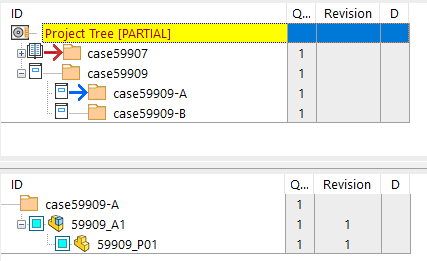
3.A blue arrow icon  , similar to the current project icon, has been introduced into the upper tree to highlight the currently expanded project in the bottom tree: