the Global Document Filter
This option allows to filter out documents from both the Tree and Grid User Interface.
The intent is to exclude from the visualization a set of documents based on some of their properties.
The filter is applied after all the other (implicit or explicit) filters have been applied.
The logic of filtering is: the records that match the query will be removed from the tree.
When the filter is active, an icon on the top right corner of the tree panel is shown, and the label of the filter is displayed above the tree root.
More, the shared filed PAR\DBWGDFCustomConditions.PAR is used for assigning the filter alias

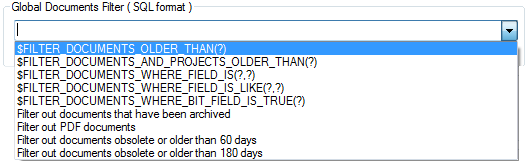
Predefined queries
A set of commonly used queries is available in macro format when assigning the Global Documents Filter option.
The predefined macros contain the '?' character to indicate that the parameter must be manually provided by the user before running the query.

some examples explained:
$FILTER_DOCUMENTS_OLDER_THAN(180): do not show documents (P,A,D and G) older than 180 days (6 months)
$FILTER_DOCUMENTS_AND_PROJECTS_OLDER_THAN(90): do not show any record older than 90 days (3 months)
$FILTER_DOCUMENTS_WHERE_FIELD_IS(SUPPLIER_ID,MECHWORKS):do not show records that has SUPPLIER_ID fields that's exactly "MECHWORKS"
$FILTER_DOCUMENTS_WHERE_FIELD_IS_LIKE(CATEGORY2,BOLT): do not show records that has CATEGORY2 field value set as "BOLT" (please note there's no need of quotes or double quotes marks)
$FILTER_DOCUMENTS_WHERE_BIT_FIELD_IS_TRUE(DBW_NO_WORKFLOW):do not show records with DBW_NO_WORKFLOW field (that's of bit type) set as TRUE.
By pressing the SHIFT key it is possible to temporary disable the Global Documents Filter for the current operation.
•pressing the SHIFT key while searching a document, it will search in all the documents without any filtering.
•pressing the SHIFT key while pressing the Default  button in the Tree Page will display all the database documents as if no Global Filter would have been set.
Custom queries
•A typical SQL clause filter may be the following (that must be localized for every database language):
(STATE IS NOT NULL AND STATE='OBSOLETE') OR (LAST_MODIFIED_DATE IS NOT NULL AND DATEDIFF( day, LAST_MODIFIED_DATE, GETDATE() ) > 180 )
With the above example, all the documents that are in state = OBSOLETE and/or that have the LAST_MODIFIED_DATE older than 180 days (6 months), will NOT be displayed in the Grids and Trees.
•Another example could be that of never showing PDF files in the Browser. For this case, the query should be:
(FILE_NAME IS NOT NULL AND FILE_NAME LIKE '%.PDF')
•Filter out any document/project older than one month or marked as obsolete – projects are discarded no matter if they are parent projects or child projects:
(STATE IS NOT NULL AND STATE='OBSOLETE') OR (LAST_MODIFIED_DATE IS NOT NULL AND DATEDIFF( day, LAST_MODIFIED_DATE, GETDATE() ) > 60 ) OR (LAST_MODIFIED_DATE IS NULL AND DATEDIFF( day, CREATION_DATE, GETDATE() ) > 60 )
•Filter out any documents where the ARCHIVE field ( declared as BIT ) is set to 1:
(ARCHIVE IS NOT NULL AND ARCHIVE=1 )
You can write clauses in the dialog using the fields of the DOCUMENT table.
Example
DESCRIPTION LIKE 'gauge%'
Please note that for fields declared as "nullable" in the DOCUMENT database table, if you filter FIELD = value, it will filter (i.e. it will not show) also all the records having FIELD=NULL; In order to avoid this behavior you've to add a check on the NULL:
FIELD IS NOT NULL AND FIELD=value
For example the above example should be changed in
DESCRIPTION IS NOT NULL AND DESCRIPTION LIKE 'gauge%'
Since all the projects have mostly STATE=NULL, when filtering on STATE field, please note you must add
STATE IS NOT NULL AND STATE='value'
otherwise the tree will be empty.
Support for Custom Conditions
It is now possible to add custom conditions to be used in the Browser's Global Documents Filter, by writing a text file named <Mechworks_PDM_Server>\PAR\DBWGDFCustomConditions.PAR.
The parameter file contains a list of lines with the format:
<condition title>=<SQL condition>
The <condition title> must be unique among all the conditions.
Comments are supported with lines beginning with the ; ( semi-column ) character
Example
;
;DBWGDFCustomConditions.PAR
; Format:
; <title>=<condition>
;
Filter out documents obsolete or older than 180 days=(STATE IS NOT NULL AND STATE='OBSOLETE') OR (LAST_MODIFIED_DATE IS NOT NULL AND DATEDIFF( day, LAST_MODIFIED_DATE, GETDATE() ) > 180 )
Filter out PDF documents=(FILE_NAME IS NOT NULL AND FILE_NAME LIKE '%.PDF')
Filter out documents obsolete or older than 60 days=(STATE IS NOT NULL AND STATE='OBSOLETE') OR (LAST_MODIFIED_DATE IS NOT NULL AND DATEDIFF( day, LAST_MODIFIED_DATE, GETDATE() ) > 60 ) OR (LAST_MODIFIED_DATE IS NULL AND DATEDIFF( day, CREATION_DATE, GETDATE() ) > 60 )
Filter out documents that have been archived=(ARCHIVE IS NOT NULL AND ARCHIVE=1 )
The result is:
In order to avoid any performance issue, the fields declared in the Global Documents Filter should be INDEXED in the DOCUMENT database table.