See also Word and Excel integration
Introduction
MechworksPDM includes an optional Microsoft Outlook Integration delivered as a standard Outlook addin.
With this integration you can register Outlook emails in the MechWorks PDM database.
The registered email gets automatically coded and you can control if it is added as a MechWorks PDM document or attachment.
Email attachments can also be added to the MechWorks PDM database.
Mapping is supported between the email objects (from, to, cc, body, etc.) and MechWorks PDM database fields.
Prerequisites
•MechWorks Standalone Client is required
•Make sure no Office instance is running on the pc and execute the Setup.msi file
[installation_folder]\office_templates\Office_Addin\
Starting from Release R26 SP 1.0, the Office integration components for MWPDM — Word, Excel, and Outlook add-ins —
are now fully managed by the PDM installer. Separate addin installations are no longer required.
The following components are managed directly by the MWPDM setup:
- MechWorks Word Add-in
- MechWorks Excel Add-in
- MechWorks Outlook Add-in
If any of the above products are already installed on your system, you must uninstall them before running the new MWPDM installer
To do so, go to System Settings → Add or Remove Programs and remove any of the above that are present on your machine.
Once removed:
- restart the MWPDM installer
- select feature Word, Excel, Outlook (classic)
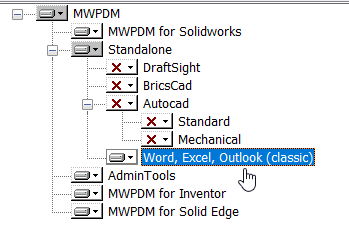
- complete the setup.
User interface
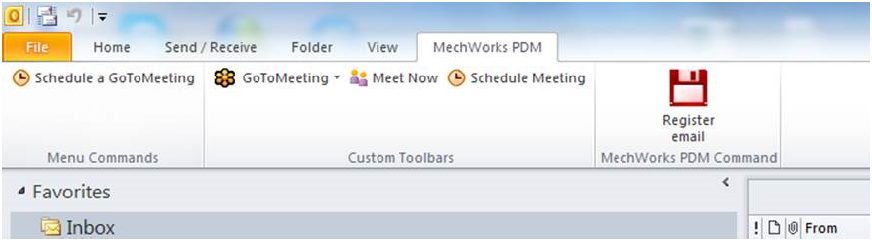
A Register email button is shown in the specific Mechworks PDM tab in Outlook interface
Parameters
Here below are enlisted the possible parameters you can specify in the PAR\MSOutlook.PAR
PROJECTS_ROOT
defines the root directory under which all emails will be saved
PROJECTS_ROOT=c:\temp
DBW_ID_PREFIX
defines the prefix that all registered email names
DBW_ID_PREFIX=OUTLOOKMSG
DBW_ID_COUNTER_DIGITS
defines the max numbers of digits for the email counter add after the prefix
DBW_ID_COUNTER_DIGITS=5
DBW_ID_ADD_USERNAME
allows to add the currently logged user name to the email prefix ( helpful to identify all emails registered from a specific user)
DBW_ID_ADD_USERNAME=1
SHOW_DATAENTR_INPUT
defines to stop on the dataentr form before email registration
SHOW_DATAENTR_INPUT=1
DBW_USE_ADDDOC
defines to register the email as a MechWorks_Pdm record (1) or a MechWorks_Pdm attachment (0)
DBW_USE_ADDDOC=1
DBW_SAVE_ATTACHMENT
defines to save in the email .msg its attachments
DBW_SAVE_ATTACHMENT=0
DBW_ADD_EMAIL_ATTACHMENTS_AS_DBW_ATTACHMENTS
defines to save as MechWorks_Pdm attachments the email attachments ( Valid only when DBW_USE_ADDDOC=1 )
DBW_ADD_EMAIL_ATTACHMENTS_AS_DBW_ATTACHMENTS=0
DBW_SUBJECT_FIELD
maps the content of the email subject to a MechWorks_Pdm field
DBW_SUBJECT_FIELD=DESCRIPTION
DBW_MAX_SUBJECT_LENGTH
defines the maximum chatacters length of the subject
DBW_MAX_SUBJECT_LENGTH=50
DBW_BODY_FIELD
maps the content of the email boby to a MechWorks_Pdm field
DBW_BODY_FIELD=NOTES
DBW_MAX_BODY_LENGTH
defines the maximum chatacters length of the body
DBW_MAX_BODY_LENGTH=255
DBW_FROM_FIELD
maps the content of the email sender to a MechWorks_Pdm field; multiple values are divided by space character.
DBW_FROM_FIELD=MYFIELD
DBW_TO_FIELD
maps the content of the email receiver(s) to a MechWorks_Pdm field; multiple values are divided by space character.
DBW_TO_FIELD=MYFIELD
DBW_CC_FIELD
maps the content of the email carbon copy receiver(s) to a MechWorks_Pdm field; mutiple values are divided by space character.
DBW_CC_FIELD=MYFIELD
DBW_SAVE_PREVIEW_AS_HTM
allows to save the email message as .htm file for preview MechWorks_Pdm if ALTPREVW.TXT
DBW_SAVE_PREVIEW_AS_HTM=0
if set to 1, the preview file is automatically deleted when not used anymore.
ID_SEPARATOR
defines the charater used as separator between Prefix,username and counter
ID_SEPARATOR=_
ADD_TO_CURRENT_PROJECT_IF_RULES_FAIL
defines if email can be registered in current project when all rules fails
ADD_TO_CURRENT_PROJECT_IF_RULES_FAIL=1
OUTLOOK_RULEn
defines a rule to calculate the project where the email will be registered
rules can use email elements such as subject, sender, body, cc, bcc and compare that content with string values
if the content matches the defined project will be used to register the email
OUTLOOK_RULE:
<ELEMENT>;<STRING_TO_MATCH;<STRING_CRITERIA>;<DBWORKS_PROJECT>;<IMPORT_ATTACHMENT>
ELEMENT |
subject, sender, body, cc, bcc |
|---|---|
STRING_CRITERIA |
WHOLE_FIELD, PART_FIELD |
DBWORKS_PROJECT> |
name of the DBWorks Project |
IMPORT_ATTACHMENT> |
1/0 : 1 import attachments, 0 don't import attachments |
Example
OUTLOOK_RULE1=subject;a;WHOLE_FIELD;Project1;1
OUTLOOK_RULE2=subject;B;PART_FIELD;Project2;0
Remarks
•If the toolbar is not visible, ensure that you have the MechWorks_Add-In enabled in "File → Options → Add-Ins → Manage COM Add-Ins.."