Introduction
MechworksPDM includes an optional Microsoft Word and Microsoft Excel Integration delivered as a standard Office addin.
With this integration you can register documents and sheets in the MechworksPDM database.
The registered documents will be managed as generic documents, as it is when adding an Office document from the PDM browser.
Prerequisites
•MechWorks Standalone Client is required
•Make sure no Office instance is running on the pc and execute the Setup.msi file
[installation_folder]\office_templates\Office_Addin\
Starting from Release R26 SP 1.0, the Office integration components for MWPDM — Word, Excel, and Outlook add-ins —
are now fully managed by the PDM installer. Separate addin installations are no longer required.
The following components are managed directly by the MWPDM setup:
- MechWorks Word Add-in
- MechWorks Excel Add-in
- MechWorks Outlook Add-in
If any of the above products are currently installed on your system, you must uninstall them before running the new MWPDM installer
To do so, go to System Settings → Add or Remove Programs and remove any of the above that are present on your machine.
Once removed:
- restart the MWPDM installer
- select feature Word, Excel, Outlook (classic)
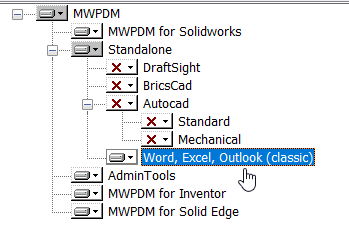
- complete the setup.
After the installation process, for Word and Excel integration will be placed a macro file in the corresponding startup path:
C:\Users\[User name]\AppData\Roaming\Microsoft\Word\STARTUP\MechWorks.dot
C:\Users\[User name]\AppData\Roaming\Microsoft\Excel\XLSTART\MechWorks.xla
User interface
Excel
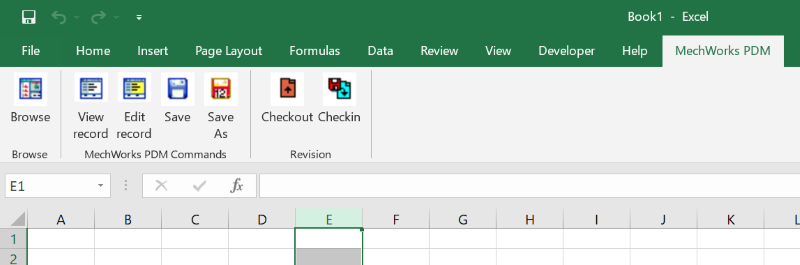
Word
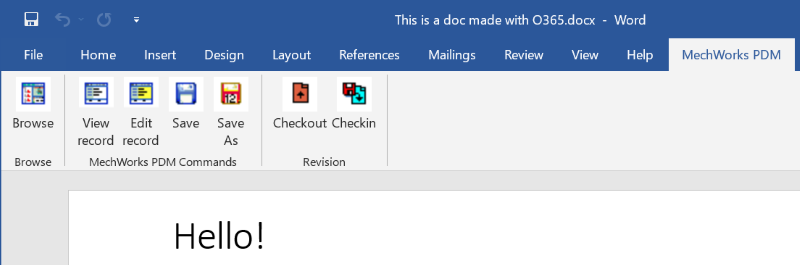
Remarks
•If the toolbar is not visible, ensure that you have the MechWorks_Add-In enabled in "File → Options → Add-Ins → Manage COM Add-Ins.."
•If the toolbar is visible but not responding, ensure that the macro file is in the corresponding Office startup path. If not found, you can copy it from the corresponding directory in
C:\Program Files (x86)\Common Files\Mechworks\office_templates