The life-cycle of a document
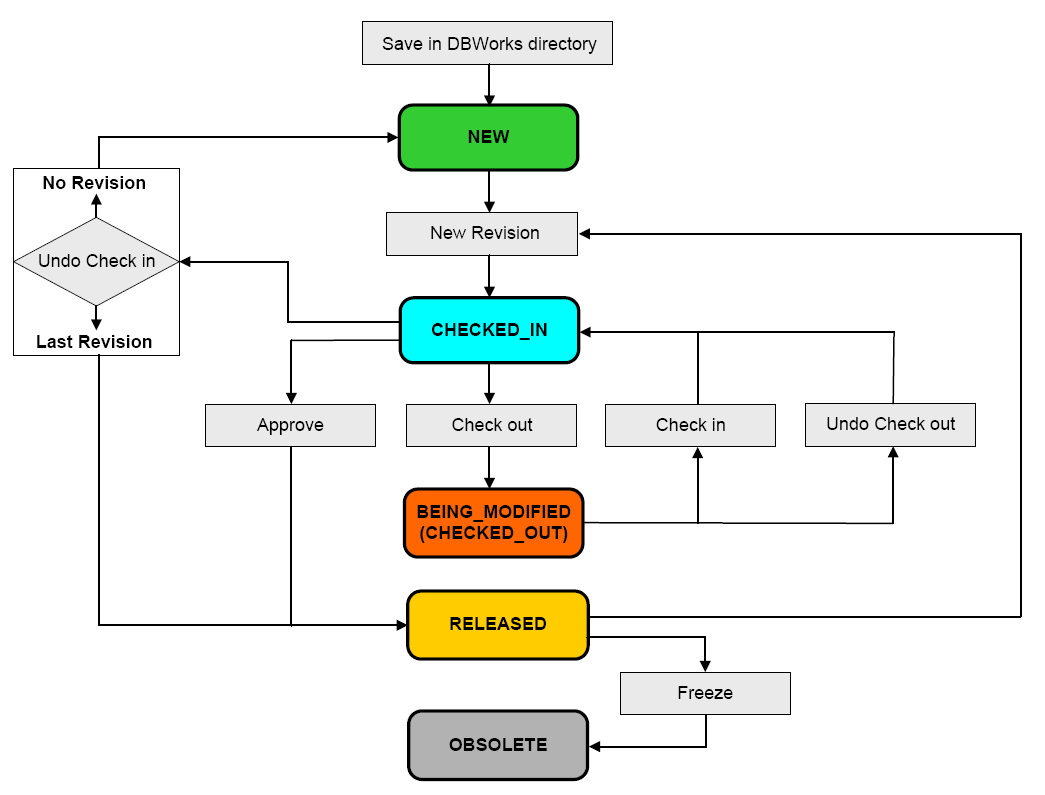
This is a schema that illustrates the process of revisions. Typically the revision process is a transposition of the designing process during which every document, namely a part or an assembly, changes it's state many times and every change of state, duly recorded by MechworksPDM, is a step in the life-cycle of the product.
The states in which a product, in this case a document, can be are:
|
NEW |
The product has just been created and it's revision process has not started yet |
|---|---|---|
|
CHECKED-IN |
The product has started it's revision process and is now available for any user on the network to start working on it |
|
CHECKED-OUT |
The product has started it's revision process and a user is currently working on it. The other users must wait until the one who started to work on it has finished. After being modified, the document returns to the check-in state (available for any user). |
|
RELEASED |
The product is ready for serial production so a copy of it is saved as a compressed file for future reference. It's like a snapshot of the current situation of the product. This snapshot can be eventually recalled but basically remains untouched. |
|
OBSOLETE |
The product has finished it's life-cycle and will not be enhanced anymore. Nevertheless all it's history and in particular all the 'snapshot' of the produced models are kept as a reference and can be eventually recalled but not modified. |


A complete reference for each state can be found at the topic States.
The colors beside definitions indicate the way MechworksPDM notifies you visually of the current state of every document in every grid.
Basic rules
•When not in NEW state, there is always a copy of the last revision approved of the document saved beside the original.
•The last revision of a document is given by the field REVISION.
•The field ACTIVE_REVISION indicates the current active revision if a revision different from the latest has been activated.
•All the revision files are always .GZ COMPRESSED and in READ-ONLY.
•An assembly does not automatically change it�s revision if anyone of it�s children documents change it�s own revision.
•The SolidWorks/Tools/Options/External reference option dialog MUST BE PRESET as follows:
[ X ] Don�t prompt to save read-only referenced documents ( discard changes )
��..
[ X ] Update component names when documents are replaced