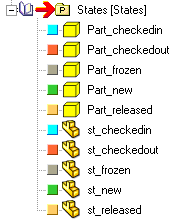
States
The state of a document in a revision process defines its availability for modifying and saving modifications brought by the user. Here's a detailed list of the possible states during the revision process. For a complete references of the actions that determine change of state, read the topic Revisions actions.
database behavior
field |
value |
|---|---|
DOCUMENT.STATE |
NEW |
DOCUMENT.CREATED_BY |
<creator name> |
Remarks
This state represents a newly created document; for compatibility with a working model where NO REVISIONS and NO LIFE CYCLE are involved, this is the DEFAULT state when saving a document for the first time. In this state the document is in any case added to the database, and is available to everybody in the local workgroup.
File state
<document name> READ/WRITE
Possible actions
database behavior
field |
value |
|---|---|
DOCUMENT.STATE |
CHECKED_IN |
DOCUMENT.CREATED_BY |
<creator name> |
DOCUMENT.LAST_MODIFIED_BY |
<team member name> |
DOCUMENT.CHECKED_OUT_BY |
NULL |
REVISION.CREATED_BY |
<project manager name> |
Remarks
This state represent a document for which the process to build a new revision has been started.
The project manager creates a new revision going in the EDIT functionality of the document (right-clicking it), pressing the NEW REVISION button and adding a new revision to the document.
File state
<document name> READ ONLY
Possible actions
Check out Approve Undo checkin
 The forbidden symbol indicates at a glance that the document is currently checked out by another user.
Note that the document is managed as read-only for the current user.
database behavior
field |
value |
|---|---|
DOCUMENT.STATE |
BEING_MODIFIED |
DOCUMENT.CREATED_BY |
<creator name> |
DOCUMENT.CHECKED_OUT_BY |
<employee name> |
DOCUMENT.LAST_MODIFIED_BY |
<team member name> |
REVISION.CREATED_BY |
<project manager name> |
Remarks
This state represent a document that is being modified by someone in the project team. A temporary copy of the original is made and the original document is made accessible only to the user that has checked it out. In this state a document will never be saved in the database.
File state
<document name> |
READ/WRITE |
|---|---|
__DBWUNCHK__< document name > |
READ ONLY |
Possible actions
Check in Undo checkout Approve
database behavior
field |
value |
|---|---|
DOCUMENT.STATE |
RELEASED |
DOCUMENT.CREATED_BY |
<creator name> |
DOCUMENT.LAST_MODIFIED_BY |
<team member name> |
DOCUMENT.CHECKED_OUT_BY |
NULL |
REVISION.CREATED_BY |
<project manager name> |
REVISION.APPROVED_BY |
<project manager name> |
Remarks
This state represent a document for which a revision has been approved. The document cannot be modified again without creating a new revision (so changing the state into CHECKED_IN). A .GZ copy of the document is written in the same directory of the document.
File state
<document name> |
READ ONLY |
|---|---|
<document name>.<id revision>.GZ |
READ ONLY COMPRESSED |
Possible actions
database behavior
field |
value |
|---|---|
DOCUMENT.STATE |
OBSOLETE |
DOCUMENT.CREATED_BY |
<creator name> |
DOCUMENT.LAST_MODIFIED_BY |
<team member name> |
DOCUMENT.FROZEN_BY |
<project manager name> |
REVISION.CREATED_BY |
<project manager name> |
REVISION.APPROVED_BY |
<project manager name> |
Remarks
This state represent an obsolete document, out of the production cycle.
File state
as it was when the document has been frozen, with all the revision files .GZ on the disk.
Possible actions:
no user interface actions available from this state
To go back from a frozen state you've to write a script that calls the UnFreeze shell command
States representation in grid interface
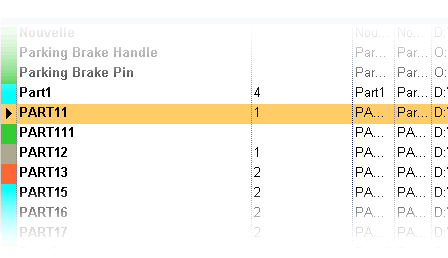
A document may have five states; every state is mapped with a different COLOR in the interface;
In the figure, Part111 is in NEW state, Part1 is in CHECKED_IN state, Part13 is in BEING_MODIFIED state (checked out), Part11 is in RELEASED state and Part12 is in OBSOLETE state (after a Freeze).
States representation in trees