Introduction
The tool has been designed to make sure the user won't miss any important information and it allows communication between colleagues.
It will inform the user of many background activities completed or actions performed by other users or tools that impact the users' work.
The Notification System interface has a messaging application style.
Requirements
Please note that, to enable the Notification System, the new table DBW_NOTIFICATIONS needs to be defined into the database.
DBW_NOTIFICATIONS |
|||
|---|---|---|---|
PK |
Field Name |
Data Type |
Allow Nulls |
NOTIFICATION_UID |
int |
|
|
TYPE |
int |
|
|
USERNAME |
varchar(100) |
|
|
MESSAGE |
varchar(MAX) |
|
|
DATE |
datetime |
|
|
CONSUMED |
bit |
|
|
EXPIRATION_DATE |
datetime |
|
|
SENDER |
varchar(100) |
|
|
DBWARM_GROUP |
varchar(100) |
|
|
SUBSCRIPTION_UID |
int |
|
|


Functionality
The Notification System is based on the the UI button in the bottom right corner of the tree page and on the notification manager dialog activated by such button.
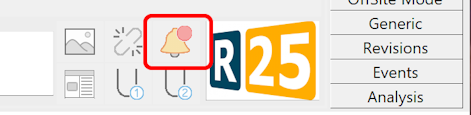
The button will be alarmed by an incoming new notification for the current user when the manager dialog is not activated:
 →
→
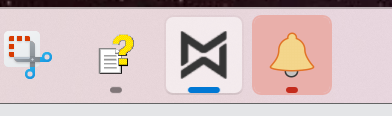
in case the dialog is active, the icon is not alarmed and the manager will blink in the taskbar:
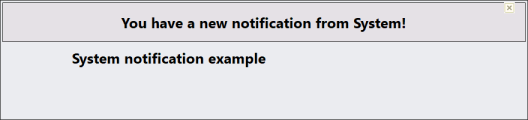
Whenever a new notification is raised a new popup will be displayed for few seconds showing the notification text.
Notification manager
By clicking the button the Notification Manager will be displayed as external dialog; it has been designed to show the notifications for the current logged user and let the user send messages to other users or DBWARM Groups.
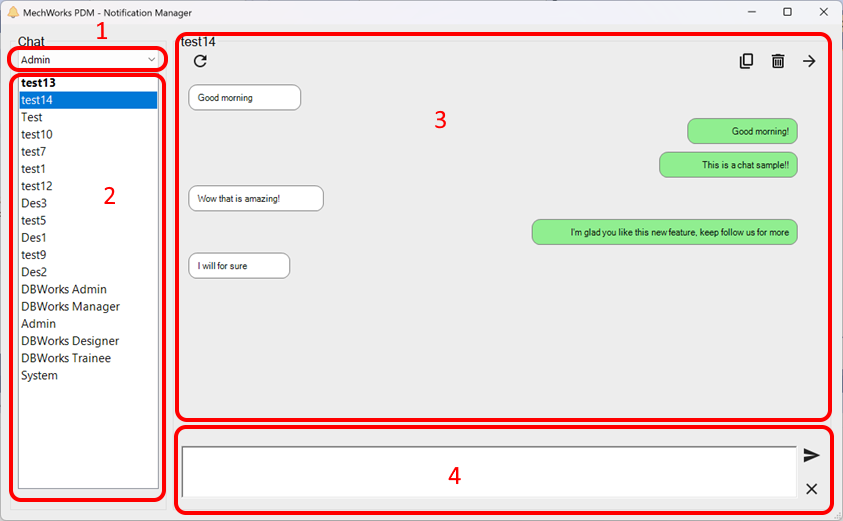
1. contacts: this dropdown list contains all the DBWARM users + all the DBWARM groups (composed by at least one user)
2. chats list: the list of the current chats;
3. conversation area: as in a chat application, you see here the messages between the current user and the correspondents (specified in the section title)
my messages are right aligned and with green color
other users' messages are left aligned and with white background
Some buttons allow you to:
•reload the chat content
•force reloading (default reload time is 5")
•delete messages (you're allowed to delete only message by you or by System)
•forward messages (one or more notifications to multiple users or groups)
4. compose message area: where you write messages to be sent; a couple of button allows you to send or cancel the text
The chat named System is used for notifications generated by the MechworksPDM and you can not reply to it.
Notification types
Here is the list of currently implemented notifications with their enumerative number (column TYPE in the database), many other could be implemented in future releases:
0.Reload: Notify the user a read-only component that is currently open in memory has been modified by another user. It is raised only if the dialog "Component Update Notify" is not shown.
1.Project User Assignment: Notify the user that an administrator has changed their project-user assignment. It is raised only if the related message box is not shown.
2.OffSite Mode: OffSite Mode related notifications such as the end of a file transfer using AsyncAgent.
3.Task Manager: Task Manage related notifications such as the completion of a submitted task.
4.Generic: Notifications raised by the PDM system.
5.Custom: Custom user notifications raisable via shell.
API: RaiseNotification
The Shell command has been implemented to create on demand notifications for the current user or for a specific user/DBWARM Group.
Parameters
NotificationMessge: The content of the notification
UserName (optional): If specified the notification will be sent to the specified user, otherwise it will be sent to the current user that is running the script. If the name of a DBWARM Group is specified in this parameter, a notification will be sent to all the user in the specified group.
.NET Example
...
Set pDBWInit = CreateObject("MwPDMApi.Initialize")
Set pDBWAppl = pDBWInit.StartConnection(DBWorksApplicationName)
pDBWAppl.Messages.RaiseNotification(notificationMessage)
...
vbscript Example
...
Call DBWShell("RaiseNotification " & chr(34) & "notification text" & chr(34) & " " & chr(34) & "User Name" & chr(34))
...
Notification options
A specific option section manages the notification storage behavior.