Introduction
Starting from R24 a Document Subscriptions System has been added to MechworksPDM environment.
The tool has been designed to allow a user to be notified about a specific document (subscribed) that's undergoing to a specific action.
For example, the user wants to be notified every time document A is chekedin by any user.
Document Subscription is referred to a file, rather than a record; you cannot be subscribed to just a single configuration record, you can subscribe to its file, that's the same for all the configuration.
Document Subscription System is not related to licensing
Requirements
Please note that, to enable the Subscriptions, the new DBW_SUBSCRIPTION table must be defined into the database as follows:
DBW_SUBSCRIPTION |
|||
|---|---|---|---|
PK |
Field Name |
Data Type |
Allow Nulls |
SUBSCRIPTION_UID |
int |
|
|
|
USER_ID |
varchar(128) |
|
|
DOCUMENT_UID |
int |
|
EVENT_MASK |
varchar(128) |
|
|


More, a column named SUBSCRIPTION_UID has to be present in the DBW_NOTIFICATION table:
DBW_NOTIFICATION |
|||
|---|---|---|---|
PK |
Field Name |
Data Type |
Allow Nulls |
... (see other fields' definition here) |
|||
SUBSCRIPTION_UID |
int |
|
|

Functionality
The Subscription System is based on the Notification System so the notifications are the way to be informed on the subscribed documents.
Events to subscribe
Here is the list of currently implemented subscription events; the dialog is available from RMB:
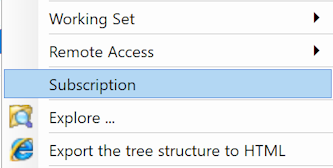
such entry shows a Subscription Event Selector (SES) to choose which event you want to subscribe for the currently selected document.
Subscription Event Selector (SES)
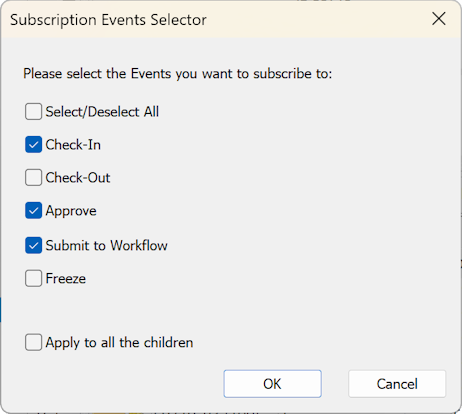
The available events for subscription are:
•Check-in
•Check-out
•Approve
•Submit to workflow
•Freeze
A further checkbox labeled Apply to all the children extends the choice to all the children documents.
Remarks
•If any subscription is already existing for the selected document, the SES will be preloaded with such previously selected events, otherwise it will be shown with NO event selected.
•If no event is checked when confirming the SES dialog, the subscription for such document will be removed.
•If the option Apply to all the children is enabled, a subscription will be created for the currently selected document and all the children (removing any previous subscription existing for any children document).
•In case of document multi-selection (more than one document is selected when opening SES), SES appears empty and a subscription will be created with the selected events for all the selected documents.
Previously created subscriptions on any of the document in the selection will be override.
Current user subscriptions
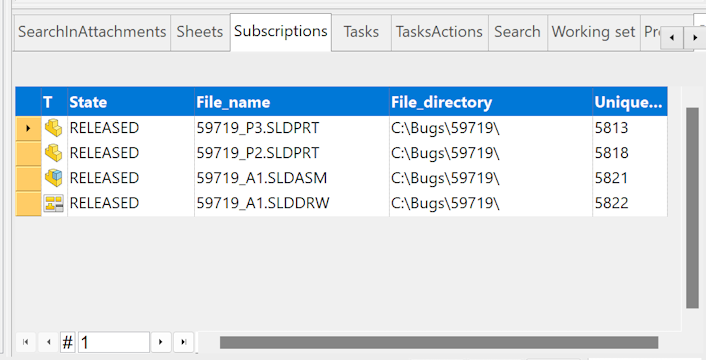
In the grids area of the TreePage, a grid named Subscriptions shows the currently subscribed documents for the current user:
Subscription options
A specific option section manages the enabling of the subscription system.