 The Tree Page
The Tree Page is the default page of the browser and contains a view that shows hierarchical relationships among the documents, starting from a root node and going down to its children or up to parents.
Layout of the sheet
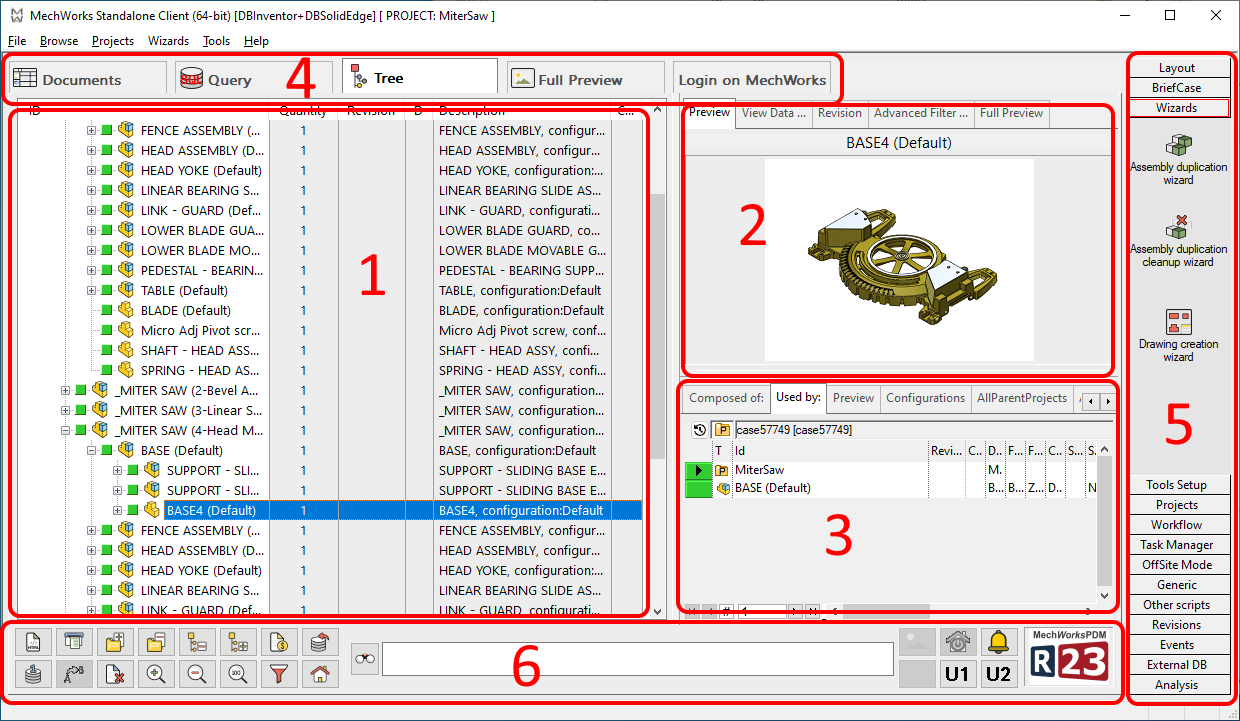
1. Project tree
2. Property window
3. Grids
4. Other tabs
5. Shortcut bar
6. Bottom buttons bar
How to obtain a child or parent tree of a document
Select a document in the Documents Page, right-click it and in the pop-up menu click child tree or parent tree.
The columns widths are persisted and are reloaded as they are after closing the browser.
Setting the layout for the Tree Page
The first two buttons of the Layout section of the rightmost toolbar in the Browser control the layout of the Tree Page if this is the currently activated browser page.
The Tree Page in detail
The Tree Page is opened with the Project Tree being displayed.
The Project Tree on the left is the main panel in this page. Documents are organized in expandable project folders.
The Tree Page shows two sections on the right:
An upper section, with the Properties of the currently selected object ( Preview, Record data, eDrawing, Full Preview).
A lower section, with the following set of Grids:
- Composed Of/Used By
- Search
- Working Set
- Parts/Assemblies/Drawings/Generics of the current project
Main operations you can perform in this view
•Handle revisions hierarchically