The Documents Window in the Tree Page
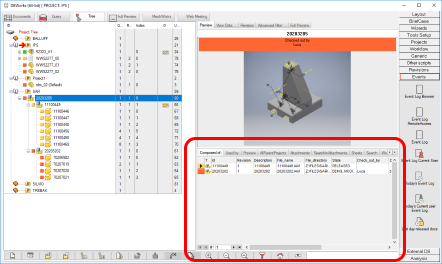
The Documents Window groups most of the window that are layed out in the Documents Page. The windows are organized in tabs, in a smaller, tidy interface complementary to the main tree panel on the left.

This section contains all the data available in the separate grid interface of the DocumentPage.
All the windows are available as tabs, obtaining a simple interface where all the information previous available at a glance is now available with a click.
The Working Set panel allows to perform batch operations without moving to a separate page as it was the case in previous versions of MechworksPDM.
The tabs titles are:
Composed of: |
This tab hosts the first level children of the current document. |
|---|---|
Used by: |
This tab hosts the first level parents of the current document. |
Preview |
It's just like the above panel preview; some user could find it more useful in the lower pane. |
Configurations |
If enabled, it show data of other configurations of the current record. |
AllParentProject |
It's the list of all the project the current record belongs to |
Attachments |
See specific topic about File Attachments. Please note this tab is controlled by OnCustomQueryTab_Attachment.LST script file |
SearchInAttachments |
To search in the Attachments tab results only. Please note this tab is controlled by OnCustomQueryTabSearch_Attachment.LST script file |
Sheets |
All the sheets of a drawing |
Search |
This tab hosts the results of searchs, either from the quick search below or the Integrated Advanced Filter. |
Working set |
This tab hosts the working sets created with the command or as results of a search made using the Integrated Advanced Filter. |
Previous Revisions |
A list with the previous revisions (if any) of the current document |
Parts |
All parts |
Assemblies |
All assemblies |
Drawings |
All drawings |
Other documents |
All non cad documents |
Script driven grids
Between all the grids of the TreePage lower panel, some of them are dynamic i.e. generated through a script that defines their result (please refer to Command Shell OnCustomQueryTab_<TabLabel>.LST script file topic).
Here is the list of such tabs and relative scripts:
AllParentProjects → OnCustomQueryTab_AllParentProjects.LST
Attachments → OnCustomQueryTab_Attachments.LST
SearchInAttachments → OnCustomQueryTab_SearchInAttachments.LST
Sheets → OnCustomQueryTab_Sheets.LST
Subscriptions → OnCustomQueryTab_Subscriptions.LST
Tasks → OnCustomQueryTab_Tasks.LST
TasksActions → OnCustomQueryTab_TasksActions.LST
SearchInAttachments → OnCustomQueryTabSearch_SearchInAttachments.LST
Such scripts are placed in <GPP>\LST\ folder and the user may customize them.
Starting from R26, the management of default OnCustomQueryTab_* and OnCustomQueryTabSearch_* has been modified to provide a faster execution.
In case of no customization of the above script in the LST_DIR, they can be safely removed since, by default, they are automatically managed/shown at PDM core level.
On the other hand, if any OnCustomQueryTab_XXX and OnCustomQueryTabSearch_XXX script have been customizedn in the LST_DIR folder, the .LST scripts will be used/executed as usual.
Since the above OnCustomQueryTab_XXX grid will be automatically visible in the TreePage, it is possible to define the set of visible grids through the option User Interface → Tree → Visible Grids in the TreePage.
Search History in Composed of and Used by grids
During a PDM work session, if a user selects a document in the TreePage and displays results in the Composed Of / Used By grids, the PDM allows the user to see grid results from documents previously selected.
If the Composed Of / Used By grid is active, by clicking the "History" button  , it is possible to see previously consulted documents grid results, without selecting the documents again.
Please note:
•History feature holds only for the Composed Of and Used By grids.
•History in the 2 grids is generally different, user can see results from one grid and not from the other one.
•A single history holds in a single PDM session (i.e. it is removed when the CAD or the StandAlone is closed).
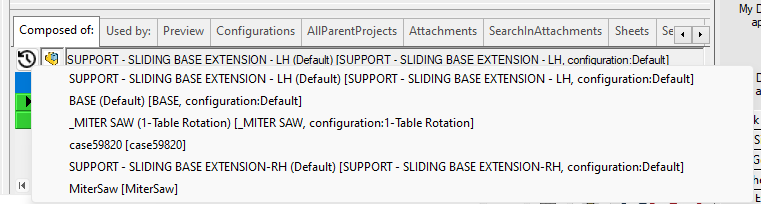
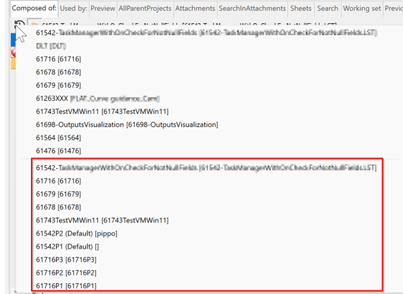
By clicking SHIFT + RMB button on the History Grid Back Button it is possible to see and select this:
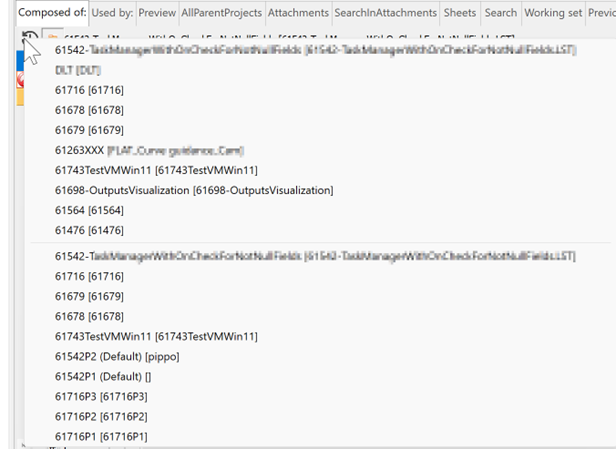
Please note in the upper part of the menu (before the separator), the last 10 items have been selected to generate the Composed of Grid content:
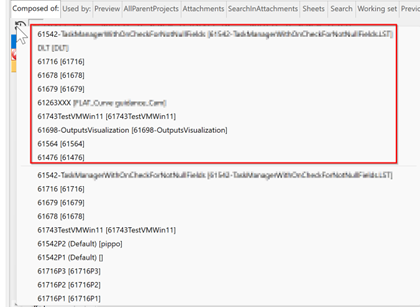
while in the lower part of the menu (after the separator), the last 10 items that have been selected to generate the Used by Grid content:
Retrieve a recent search
As for the main search button  , also for this search functionality is available the cache of the last (up to 20) entries on the RMB click: