The Excel BOM
MechworksPDM includes an enhanced Excel Bill Of Material. This BOM creation script introduces several enhancements.
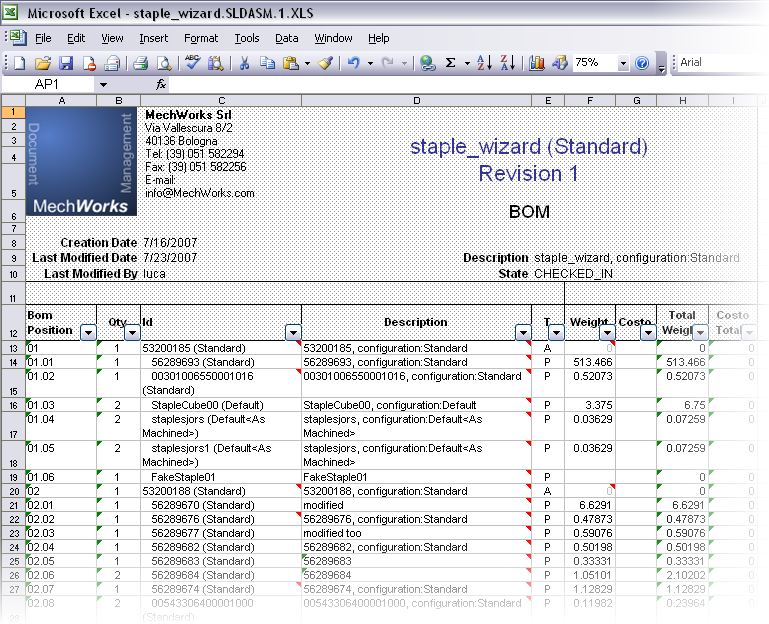
Main concepts underlying the Excel Bill Of Material
The Excel BOM is fully parametric. This means that you can create several BOM models, each having different headers, filtering data according to different conditions, displaying different information, performing different calculations and filling different Excel template sheets. At the moment of creation you select what kind of BOM you need to create and MechworksPDM fills the document accordingly.
You can display information related to the BOM items, but also to the containing projects and drawings, both in the header and in the body of the BOM. This means, for instance, that you can display for each BOM item the tree of projects to which the item belongs to or the sheet formats supported for printing it. The information can be either displayed normally in a column or as a hidden Excel note, that pops up when you move the mouse over it.
The BOM supports automatic calculation using Excel formulas and adding automatically totals at the bottom of the columns. For instance you can calculate automatically the total weight or the total cost or again the total length of a piping, provided you defined and updated a specific field in MechworksPDM.
The BOM allows for batch creation, where no user interaction is required and the parameters are passed by the calling script.
The creation of Excel BOMs does not require Microsoft Excel to be instaled on the workstation. In order to see the resulting BOM, if created in .xsl format, you need at least an appropriate viewer, that could be also Excel Viewer or Open Office.
The output can be of type .xslx, xls or .pdf.
Characteristics of the Excel sheet created
•Static
The Excel sheet is created from external code and doesn't include any macro. The BOM is therefore a snapshot of the situation at the moment of its creation and is not self-updatable. If it is mandatory to maintain an updated copy of the document, you can have a script recreate the BOM at each check in or at each approval.
•Calculations
The automatic calculations and the presence of totals and subtotals are defined in the parametric file. Excel formulas are supported.
•Filters The BOM activates Excel filters allowing to find or filter BOM items in large BOMs
•Notes
The secondary information can be displayed as notes, avoiding to create sheets too crowded with information.
•Indentations
The indented BOM displays graphically the indentation level of each item. In indented BOMs each item is assigned a position identifier that reflects its hierarchical position.
•Previews
Excel can reserve a column for the preview of each item
How the BOM is created
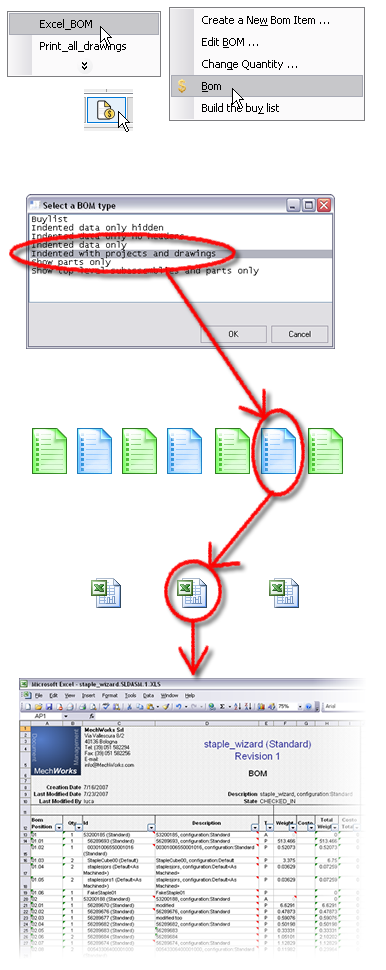
Click the Buy List button or select Excel BOM from the popup menu.
Select the BOM from a list of prepared models
MechworksPDM loads the model from ...\PAR\DBWBOM_model name.txt and interprets the commands and options contained
MechworksPDM load the empty Excel template file
MechworksPDM queries the databse and fills the template with headers, data and calculated fields, then saves the file and opens it (optional behaviour)