The Shortcut bar
Introduction
The shortcut bar is a programmable collection of queries and scripts located in the right panel in each PDM tab Page.
The look and feel are the same as in the Microsoft Outlook shortcut bar.
By default is enabled (through the option User Option→ Show <addin name> shortcut bar) and the bar is visible in every MechworksPDM Page, no matter the view.
Running some queries automatically switch the browser to the QueryPage (if enabled).
Thanks to the suboption
Display the shortcut as icon linst in narrow panel
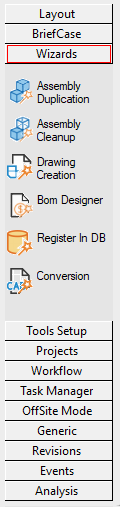
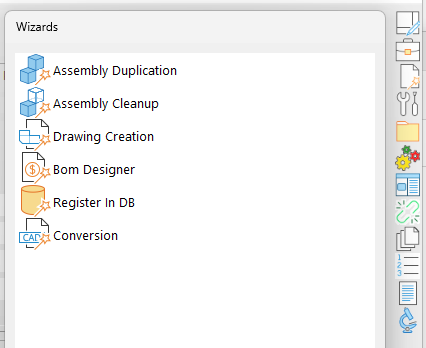
You can enable a more compact bar style with icons instead of text labels.
Legacy bar:
|
Narrow bar:
|
Dockability
A button in the top right corner allows the user to undock the bar:
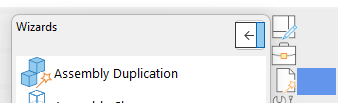
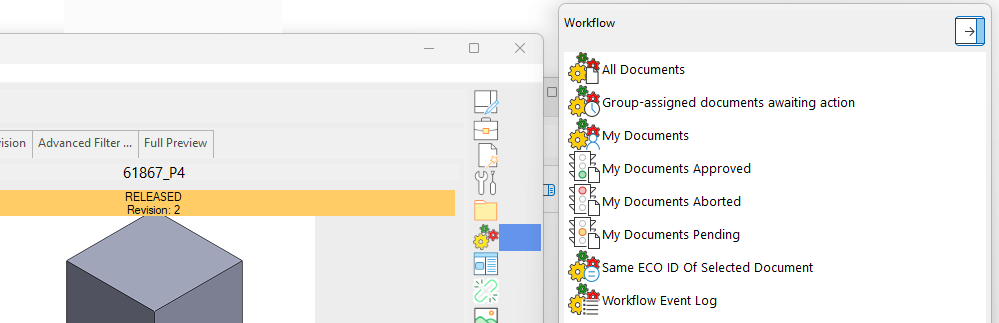
Once undocked (the button changes), the bar can be moved and resized, independently from the browser:
Customization
Admintools
The AdminTools include a specific tool to customize the shortcutbar, programs, icons and position.
Manual definition
If you prefer to edit the file manually, the short cut bar is defined in the text file <GPP>SCHEMA\DBWSCBAR.TXT; this file has the following format:
;===================================================================
;
; MechworksPDM (C)MechWorks Shortcut bar definition file
;
; Format:
; 01234567890123456789012345678...
; <GROUP1>
; <SHORTCUT1>
; <SHORTCUT2>
; ....
; <GROUP2>
; <SHORTCUT 5>
; <SHORTCUT 6>
; <SHORTCUT 7>
; ....
; ....
;
; <SHORTCUT N>::= <IDENTIFIER>,<FILE NAME>[,<IMAGE NUMBER> [,<TOOLTIP>]]
; <IDENTIFIER>::= [A..Z]
; <IMAGE NUMBER>::= [0..19]
; <TOOLTIP>::= [A..Z]
; <FILE NAME>::= <RELATIVE PATH> | <ABSOLUTE PATH>
; <RELATIVE PATH>::= <filename>.<EXTENSION>
; <ABSOLUTE PATH>::= <drive>:\<dir>\<filename>.<extension> |
; <dir>\<filename>.<extension>
; <EXTENSION>::= .VBS | .PS1 | .PY | .MWNET | .LST
;
;===================================================================
The file name can be a relative path as in this example, so that MechworksPDM will look for it in the SQL\ or in the LST\ directories. The file name can also be expressed as an absolute path (i.e.: F:\myqueries\query1.sql or \\myserver\myqueries\query1.sql).
The optional <IMAGE NUMBER> argument can be used to assign one image between 20 available to associate with the short cut file. By default, MechworksPDM associates predefined images to the standard .SQL, .VBS extensions of the short cut files, so you can also omit the <IMAGE NUMBER> parameter in your definition. To see all the available images you can try a short cut bar file like the following:
ALLIMAGES
test.vbs,test.vbs,0
test.vbs,test.vbs,1
test.vbs,test.vbs,2
test.vbs,test.vbs,3
......
test.vbs,test.vbs,19
Custom images in the shortcut bar
MechworksPDM loads custom images from .BMP files.
MechworksPDM looks in the directory SCHEMA for files named DBWSCBAR50.BMP, DBWSCBAR51.BMP,... (up to DBWSCBAR149.BMP defineable allowed ), and if present, loads the shortcut bar item image from the assigned file.
The allowed images must have 16 colors and size equal to 26x26 pixels (A default template named DBWSCBAR39.BMP is provided in the SCHEMA sub-dir). In the shortcut bar definition file DBWSCBAR.TXT, you can assign the custom images starting from number 39 ( the previous 38 are already reserved).
Admintools specific setup is compatible with the selection of the bitmaps, nevertheless it handles only bitmaps already in place and does not edit them so it is up to you to create them and name them correctly.
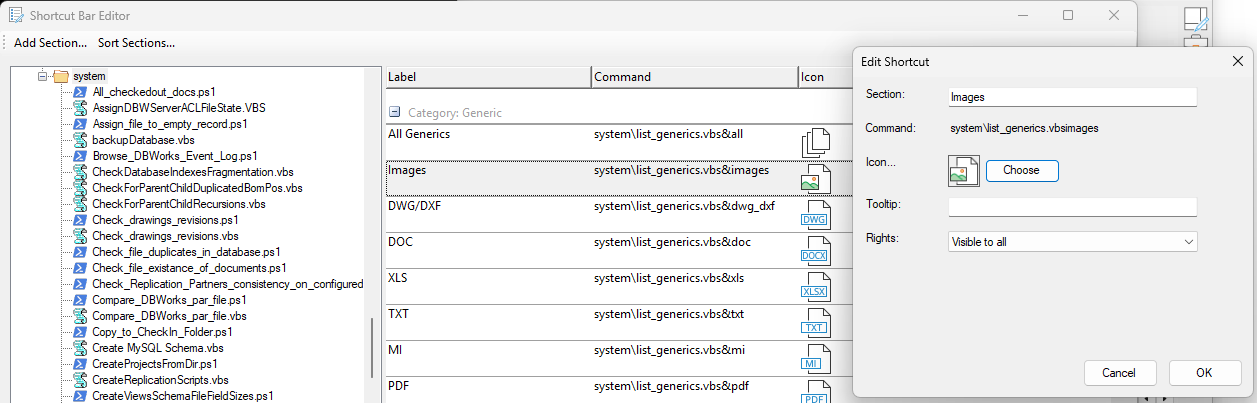
Section Icons in the narrow shortcut bar
The Narrow shortcutbar displays icons rather than labels for the command section.
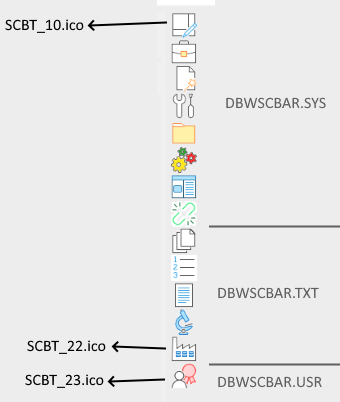
Such icons are stored as files named <GPP>\SCHEMA\IMG\SCBT_xx.ico where xx is a number between 10 and n
•SCBT_00.ico default icon
•SCBT_10.ico .. SCBT_17.ico are called by DBWSCBAR.SYS (Layout - OffSite Mode)
•SCBT_18.ico .. SCBT_21.ico are called by DBWSCBAR.TXT (Generics - Analisys)
You can create your own icons with the same filename format and call it from optional further shortcutbar definition file (such as DBWSCBAR.USR).
Example
In the DBWSCBAR.TXT file (that's shared for all the company) a new section ACME Tests has been added with a new icon 22 (referring the file SCBT_22.ico):
Analysis,21
Documents With No Drawing,system\DocumentsWithoutAnyDrawing.vbs,195
...
Find Models/Drawings With Not Similar ID,SYSTEM\FindIDmismatchBetweenModelsAndDrawings.vbs,195
ACME Tests,22
TestCompany,system\myCompanyScript.exe,195
More, in the DBWSCBAR.USR file (that's private for the single user) a new section Bob's Tests has been added with a new entry marked with icon 23 (SCBT_23.ico):
Bob's Tests,23
TestUser,system\Check_drawings_revisions.vbs,195
The result is like follwings:
Custom shortcut bars for separate users
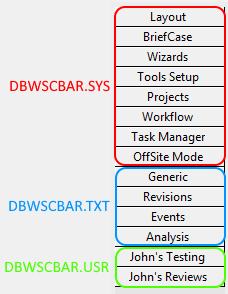
MechworksPDM loads, if present, a file named DBWSCBAR.USR from the USERS\<user> directory, allowing the MechworksPDM Administrator to assign different shortcut bars (with different set of commands) to the users in the network.
The order with which the short cut bar definition files are loaded is:
1.the shared <install>\SCHEMA\DBWSCBAR.SYS (sections from Layout to Offsite Mode)
2.the shared <GPP>\SCHEMA\DBWSCBAR.TXT (sections from Generic to Analysis + customizations)
3.the user-specific <GPP>\USERS\<user name>\DBWSCBAR.USR (if existing)
Admintools allow to edit only the mid section (<GPP>\SCHEMA\DBWSCBAR.TXT), while the first section (<install>\SCHEMA\DBWSCBAR.SYS) is managed by the system and must not be modified (otherwise it will be overwritten with system defaults at next software update).
It is also possible to use scripting in order to create hyperlinks that display web pages inside the Browser.
Shortcut bar items visibility depending on the DBWArm Group
To show certains items only for users belonging to a specific DBWArm group, you have to mark the entry in the definition file (<GPP>\SCHEMA\DBWSCBAR.TXT or <GPP>\USERS\<user>\DBWSCBAR.USR) as below:
[DBWARM:Group:<DBWArm Group>]
Example
...
Analysis
Check for parent-child duplicated BOMpos,SYSTEM\CheckForParentChildDuplicatedBomPos.vbs,185
[DBWARM:Group:DBWorks Admin]Fix wrong record type, SYSTEM\FixWrongRecordsType.vbs,194
Find models and drawings with not similar ID,SYSTEM\FindIDmismatchBetweenModelsAndDrawings.vbs,194
...
Tooltips
It is possible to specify a tooltip that will appear when the mouse pointer is over the icon area:

Example
...
Conversion,bin\DotNetWizards\ConversionWizard\ConversionWizard.exe,86,"Convert old documents to a newer CAD format"
...
Layout section
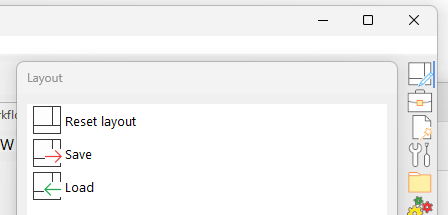
The Layout section is mainly intended for the DocumentPage, where the grids are the main elements of the browser, so you can enlarge/highlight the preferred ones.
In the TreePage all the Layout buttons have no effect except the first button All that resets the page splitters to the default position.
Direct exe script running
While in previous MechworksPDM releases you were able to run .exe script only by invoking it through a .vbs, starting from R25 it is possible to execute .exe programs in a direct way. The path could be either an absolute path or a path relative to the PDM installation folder.
When the application is called, 2 parameters are added: the calling application type and its main window handle.
Please note that the called program is responsible for attaching as modal to the main window.
Example
...
Tools Setup,13
[DBWARM:Group:DBWorks Admin]Edit Material Database,bin\DotNetWizards\MaterialWizard.exe,121
[DBWARM:Group:DBWorks Admin]Custom Property Manager,bin\MwScBarTools\MwScBarTools.exe&/customprop,53
[DBWARM:Group:DBWorks Admin]Office Integration Parameters,bin\MwScBarTools\MwScBarTools.exe&/officeparams,52
[DBWARM:Group:DBWorks Admin]Define Revision Schema,bin\MwScBarTools\MwScBarToolsWf.exe&/revisionschemaeditor,56
[DBWARM:Group:DBWorks Admin]ME10 Integration Parameters,bin\MwScBarTools\MwScBarTools.exe&/me10params,139
[DBWARM:Group:DBWorks Admin]Visual Cues Manager,system\visual_cues_manager.ps1,57
Visual Cues Selector,system\visual_cues_selector.ps1,71
[DBWARM:Group:DBWorks Admin]Rebuild Database Indexes,system\Rebuild_Database_Indexes.ps1,126
Assign File To A Record With Non-existing File,system\Assign_file_to_empty_record.ps1,58
...