MechworksPDM allows you to plot the documents directly.
A plotted document is meant as a print of the part or assembly itself and not of the related data or of the lists of related documents. If you need to print only the data please refer to the print command.
To print on a sheet selected database fields values as well as the part or assembly itself, you need to prepare a drawing template to include the needed database information. Please refer to the topic variant notes for the details.
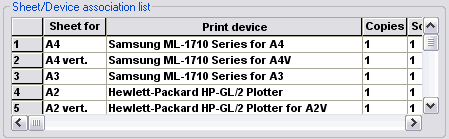
To set up a plotter and associate it to a paper format or print to file, read the topic Plotter setup.
To activate a script in order to handle plotting for non CAD documents, read the topic ONPLOTG.LST.
To select a list of document for batch plotting, read Selecting the documents to be plotted.
Please note Mechworks StandaloneClient prints/plots through eDrawing API print/plot functionality, so it's able to perform print/plot tasks as eDrawings would do.
As a workaround for printer/sheet format association issue, we suggest to create different istances of the same printer/plotter but with different settings for the various sheet formats/orientation/scale/...
Plotting action logs are recorded in a specific logfile named DBW_PlotDocument_<date>_<time>.LOG.