BOM_GROUP Substitute Parts for Assemblies
Introduction
When managing structures, it's possible to use a substitute Part for an Assembly.
This new feature is intended for speeding up the loading of very large assemblies, where the current optimization techniques provided by the CAD vendors are not sufficient for getting a reasonable performance.
Prerequisites
1.A new field named DBW_BOM_GROUP_REF_ID is added to the DOCUMENT table - its type is typically a VARCHAR(50) with NULL values allowed
2.The PART Database View must be updated for showing the DBW_BOM_GROUP_REF_ID field
3.The SCHEMA\Tables2.DFL must be modified for adding the new field in the PART/Composed Of/Used By/Working Set/Search sections
4.The SCHEMA\DataEntr2.TXT must be modified for adding the DBW_BOM_GROUP_REF_ID, so allowing its input from the Data Input form
Procedure
Assume we have an assembly A1 composed of the parts P1, P2 and P3.
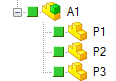
After having reviewed our load times and memory usage, we decided that it would be better for the performance of top assemblies using this A1 assembly if the A1 itself could be replaced, in the top assemblies, by a substitute part (let's name it A1simplified), that will have a similar geometry to that of the assembly A1, but which load time and size will be much better if compared to the original A1 assembly.
We'll create such part as a physical part (e.g. saving the assembly as part and lightnening it), naming it A1simplified and assign the value A1 to the field DBW_BOM_GROUP_REF_ID:
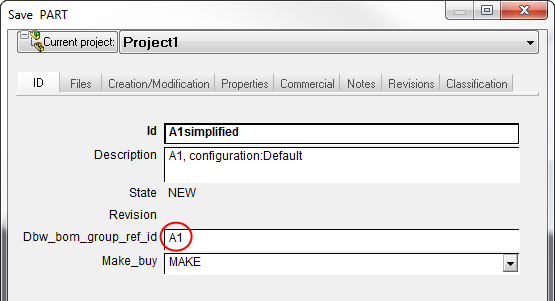
Now click in the Data Input form: Mechworks PDM will automatically force the MAKE_BUY field to assume the value "BOM_GROUP" if the DBW_BOM_GROUP_REF_ID is entered and not null.
The PDM will also check if the assigned value (in this case the ID of the assembly that we want to substitute) is already existing in the main database, and warn the user if not.
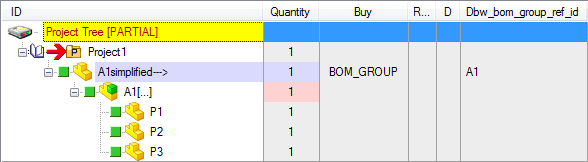
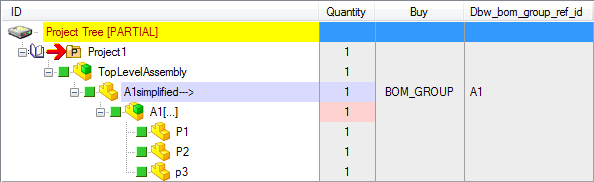
Mechworks PDM has created a fake relation in the PARENT_CHILD for the referenced A1 assembly, marking this PARENT_CHILD relation with PARENT_CHILD_RELATION_TYPE = "BomGroupRef"
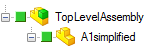
This newly created part A1simplified will then be used for building larger top assemblies, so that a top Assembly structure would have the following GEOMETRIC structure:
The new support added in Mechworks PDM will automatically show (only at Database level) the referenced assembly directly in the Tree, and will mark the BOM_GROUP → part with a different color:
BOM behavior
More than this features, Mechworks PDM will also:
1.show the referenced assembly A1 when executing a Child Tree of the A1simplified part
2.edit the BOM of the referenced assembly A1 when executing a "Edit BOM ..." of the A1simplified part
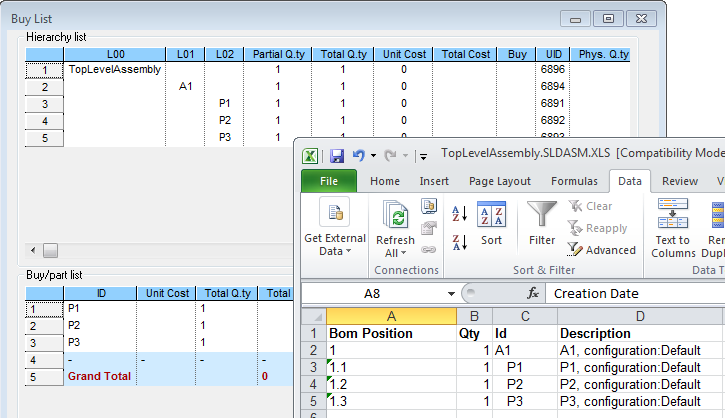
Finally, since of the BOM_GROUP attribute, the BOM for the TopLevelAssembly will result as if the A1simplified part would not exist: