Commercial property MAKE/BUY depending on the assembly context
 Users only
DBWorks has the ability to manage MAKE_BUY information depending on the context assemblies. With a simple example, the same component can be listed in the BOM of an assembly and not listed in the BOM of a different assembly. This feature is currently available only in the BUY LIST command and in the EXCEL_BOM output.
Note: This feature takes into consideration the value of the option:
General → Assemblies → Force Parent-Child Make/Buy attribute from SW assembly components option:'[X] Excluded from BOM'
and acts consequently.
This feature integrates with the ability of SolidWorks to mark specific components as to be excluded from the BOM:
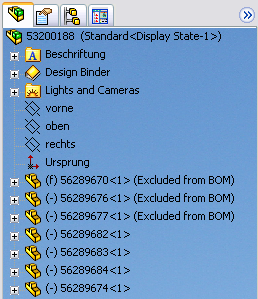
In order to store this information in the DBWorks database, a new field (language dependent) has been introduced in the PARENT_CHILD table or can be added using DBCustomizer.
The name of the field is:
ENGLISH |
PARENT_CHILD_MAKE_BUY |
VARCHAR(30) |
|---|---|---|
ITALIAN |
PARENT_CHILD_FAI_ACQUISTA |
VARCHAR(30) |
GERMAN |
ELTERN_KIND_KAUFTEIL |
VARCHAR(30) |
FRENCH |
PARENT_FILS_PRODUIRE_ACHETER |
VARCHAR(30) |
SPANISH |
PARENT_CHILD_FABRICAR_COMPRAR |
VARCHAR(30) |
The record-specific value of MAKE_BUY is always used when the parent-child specific value is NULL, else the parent-child specific value is dominant.
The value of PARENT_CHILD_MAKE_BUY field can be set in the RMB→Edit BOM ... dialog
Example
DOCUMENT table
P1 |
MAKE_BUY=MAKE |
PARENT_CHILD table
A1-P1 |
PARENT_CHILD_MAKE_BUY=NULL |
→ |
resulting MAKE_BUY=MAKE |
|---|---|---|---|
A1-P1 |
PARENT_CHILD_MAKE_BUY=NO_BOM |
→ |
resulting MAKE_BUY=NO_BOM |