Adding virtual (fake) entries to the Bill Of Materials
It could be useful, sometimes, to be able to add entries that will appear in the final Bill Of Material but that do not exist as designed documents or objects.
This is the case for packaging, that should appear as a cost but not as an existing object.
MechworksPDM allow you to add virtual entries to the Bill of Materials as follows:
1.Select the object that must contain the new entry, i.e. an assembly
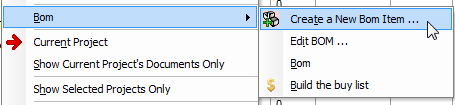
2.Right-click it and in the popup menu select Create a New BOM Item
3.In the dialog, adjust the settings:
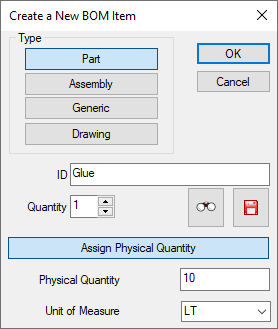
The type indicates how the new virtual entry will be displayed and considered by MechworksPDM in the BOM.
No 'real' new part or assembly is generated as a file.
The ID has to be entered manually, or you may use the wizard to save the new virtual entry, in which case the ID is automatically set at the end of the process
you may also want to allow the creation of the ID through the wizard only (see option General→More...→ Always use DataEntr.LST when creating a new BOM item)
The quantity indicates how many virtual items are to be counted inside the parent element
The wizard allows you to range the new item within a system of categories and determine most of its properties automatically.
To make the MechworksPDM search dialog appears when pressing the search button in the dialog, the script file OnSearchBOMItems.lst must exist in LST folder.
A physical quantity value and unit of measure can be assigned for the new BOM item.
A physical quantity of "0" will reset the physical quantity and unit of measure assignments
4.Whether or not you choose to use the wizard, optionally you could see the final dialog
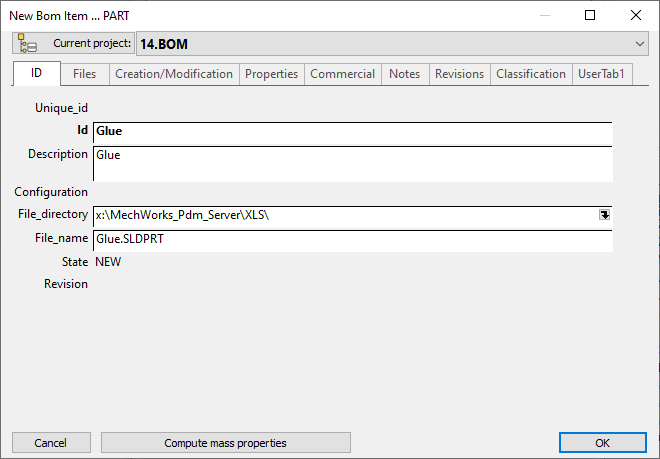
that allows you to set the item's properties.
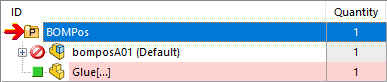
As a result, the new entry is enlisted as a direct child:
The command is available also for parts
When a new BOM item is inserted, MechworksPDM performs the automatic calculation of the next index value
Direct assignment of file name for a new Bom item
When you create a new BOM item using the menu command Create a New Bom Item . from a tree, you can assign the file name directly from the Input Form mask, instead of creating a DataEntr.LST script for this purpose.
The FILE_NAME and FILE_DIRECTORY fields are kept in read-only state, allowing this operation only from a script.
What is needed is to create a LST\FILE_NAME.LST script ( localized for different database languages ), similar to the following:
.VBSCRIPT
sub main()
DBWInit(TRUE)
rootdir = "E:\test\"
myfilter = "JPG (*.jpg)|*.jpg|TIF (*.tif)|*.tif|More Pictures (*.bmp;*.pcx)|*.bmp;*.pcx"
res = DBWSelectFile(rootdir,myfilter)
if res = "" then
exit sub
end if
DBWOutput "@DOCUMENT_PATHNAME",res,ForAppending
end sub
As you can note, the special output variable @DOCUMENT_PATHNAME is used to send back to MechworksPDM the information that the main key of the document record (the file name) has changed.
In the above example, the file selector displays only image files, you can adapt it to any type you need.