Assemblies options
Force PARENT_CHILD.MAKE_BUY field to value: 
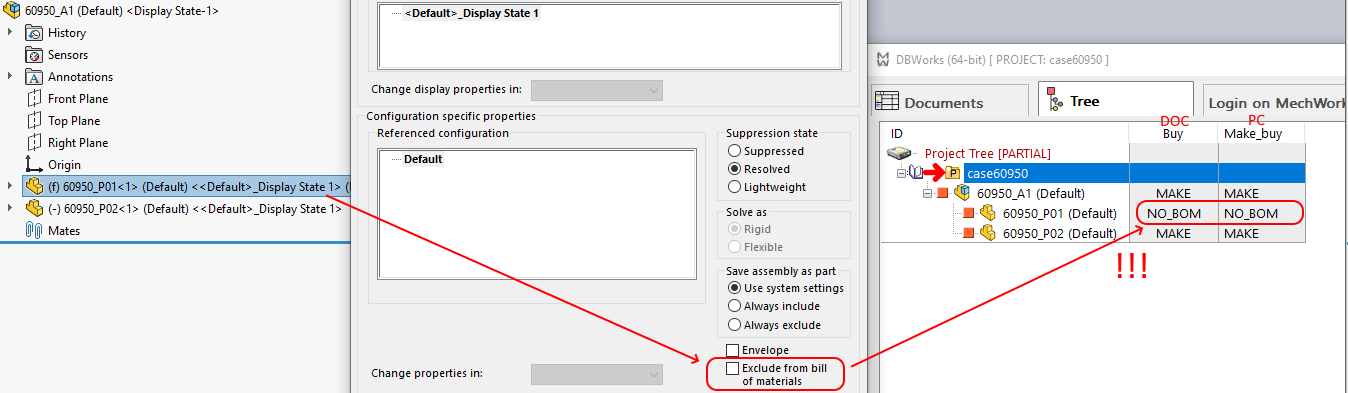
 When Solidworks 'Excluded from the bill of materials' attribute is set
When checked, at save time MechworksPDM assigns the PARENT_CHILD_MAKE_BUY field value to that defined in the option Attribute to assign (NO_BOM if blank).
This option is enable only if the following one "Force PARENT_CHILD_MAKE_BUY attribute for any SolidWorks Assembly Envelope" is disabled
This option always updates the value of the database attribute at every save of the CAD document, so any previously assigned value would be overwritten.
Please note this option ALWAYS force a value, not only when the model is marked as '[X] Excluded from BOM' in the CAD.
•case [X]Excluded from BOM: it forces the PARENT_CHILD_MAKE_BUY having the value provided through the dropdown list below in the options.
•case [ ]Excluded from BOM: it forces the PARENT_CHILD_MAKE_BUY to NULL value (so in the tree the DOCUMENT.MAKE_BUY is shown as value also in PARENT_CHILD_MAKE_BUY).
Limitation1: MechworksPDM is not able to properly detect every single instance in case of assemblies with the same component being placed, at the same time, as a normal component AND as suppress/excluded_from_bom/envelope component.
•if ALL the component's instances are marked as Excluded from BOM in the CAD, then the parent-child relation has the quantity equal to the number of instances, and the parent_child_make_buy attribute set to NO_BOM;
•in case at least one component instance is NOT marked as Excluded from BOM in the CAD, then the parent-child relation has the quantity equal to the number of instances not Excluded from BOM, and the parent_child_make_buy attribute is then reset to blank
Example
Suppose the options are set like followings: 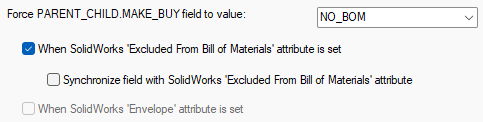
All the instance are Excluded from the BOM:
|
Not all the instances are Excluded from the BOM:
|
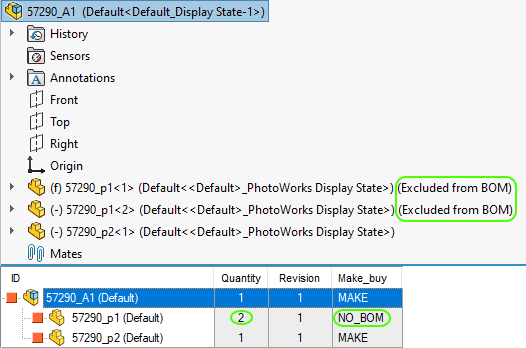
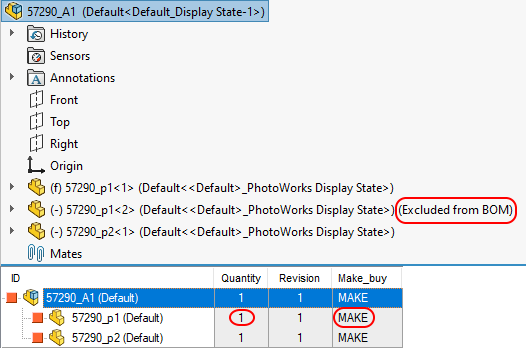
Limitation2: MechworksPDM is not able to save the history of the MAKE_BUY field
When the MAKE_BUY field is set as effect of the option, its previous value is not saved.
There's no sync between the CAD value to the PDM and viceversa, it's just a one-way setting, from the CAD to the PDM. For this reason, when you have the option set, there's no other way the change the MAKE_BUY field than Edit PARENT_CHILD data.
Example
Suppose again the PDM option is set like followings:
When you enable the CAD property Exclude from bill of materials and save, the PDM value for the MAKE_BUY field changes to NO_BOM:
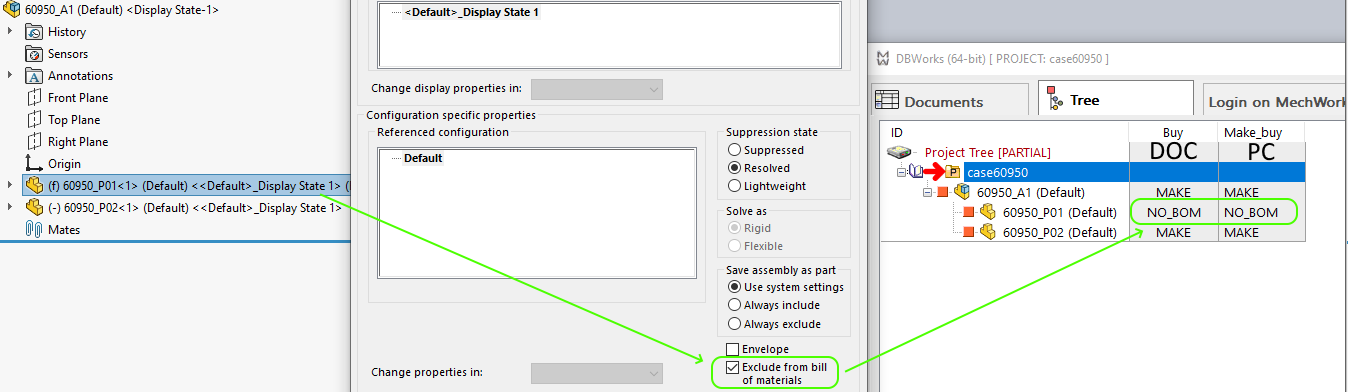 if you disable the CAD property
  Exclude from bill of materials and save, the PDM value for the MAKE_BUY field does not change back:
Synchronize field with Solidworks 'Excluded from Bill of materials' attribute
This option lets the user keep the PARENT_CHILD.MAKE_BUY field synchronized with the Exclude from bill of materials attribute in Solidworks, so that if the CAD attribute is removed, the PARENT_CHILD.MAKE_BUY attribute will be set to NULL.
This option synchronizes the Solidworks attribute Exclude from bill of materials with the PARENT_CHILD.MAKE_BUY field for the selected attribute to assign.
Example
If the user manually set PARENT_CHILD.MAKE_BY = NO_BOM but does not set the Solidworks attribute [ ] Exclude from bill of materials, the next time the assembly will be saved the field PARENT_CHILD.MAKE_BY will be reset to NULL.
When Solidworks 'Envelope' attribute is set
When checked, any SolidWorks Assembly Envelope is marked with PARENT_CHILD_MAKE_BUY=<Attribute to assign>, instead of being completely unmanaged.
This option is enable only if the previous one "Force Parent-Child Make/Buy attribute from SW assembly components option:'[X] Excluded from BOM'" is disabled
Force DOCUMENT.MAKE_BUY attribute from SW assembly cfg option: 'Child component display when used as subassembly'
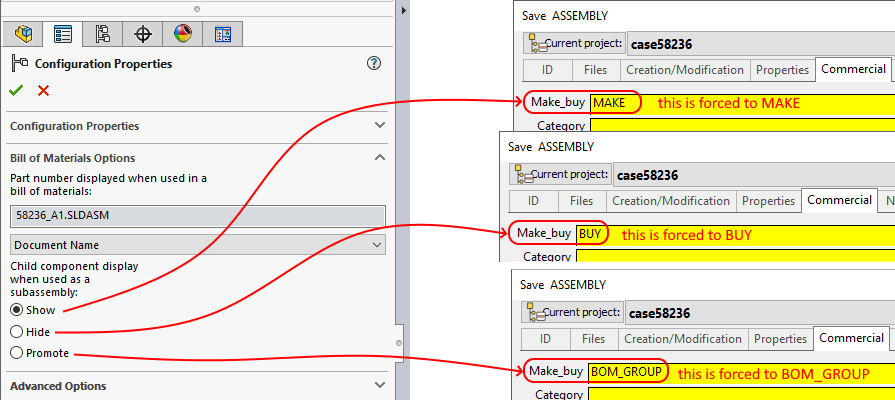
If checked, forces MechworksPDM to set the value of the attribute MAKE_BUY of the assemblies, considering the value of the configuration advanced option of SW '[X] Don't show child components in BOM when used as a sub-assembly'.
When this option is checked, an assembly of SW, if listed as a sub-assembly in the BOM of a drawing, shows it's name but doesn't display any of it's components.
This behaviour reflects the assignment of the BUY attribute for the DBWorks BOMs. and the BOMs generated by SW and those produced by DBWorks are equal.
This option always updates the value of the database attribute at every save of the SW document, so any previously assigned value would be overwritten.
Support for 'Promote' case in Configuration Properties
when this option is checked, Assemblies with the Configuration Properties set as Child component display when used as a subassembly: (*) Promote will be saved with MAKE_BUY=BOM_GROUP
Example
Suppose you set the MAKE_BUY = NO_BOM for an assembly; then you open the assembly in the CAD and you save it.
Here is the expected behavior depending on the Solidworks setting:
Insert Folder Name into PARENT_CHILD field
With this option is possible to populate a custom-defined PARENT_CHILD field with the names of the SolidWorks Feature Manager Folders that contains the assembly components.
Example
Suppose to have set the option in this way:

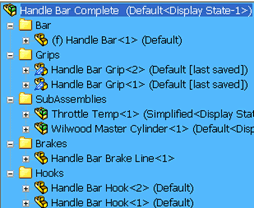
From a SolidWorks folder structure like this:
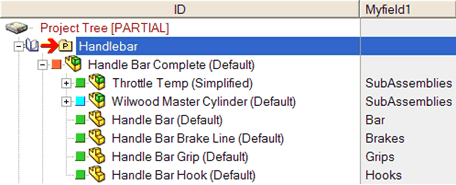
you can populate a PARENT_CHILD custom field
Save virtual components as distinct records
This option allows to create distinct records for each Virtual Component in assemblies.
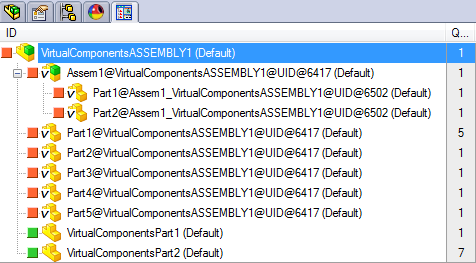
The Virtual Components have a special file name extension:
•.SLDPRT@VC if parts
•.SLDPRT@VC if assemblies
Their ID by default is composed of:
<the Virtual Component name>@<the Parent Assembly name>@UID@<the Parent Assembly UNIQUE_ID>
The Virtual Components follows the status of their Parent Assembly - every life status operation must be started from the Parent Assembly
When a Virtual Component is saved into an External File, the Parent Assembly structure is updated only at the next saving of the Parent Assembly.
It is not possible to save separately the Virtual Components - their records are created/managed only when the Parent Assembly is saved.
Ignore saved configuration when inserting SolidWorks routing components
If enebled, when inserting a routing component from the DBWorks Component Selector dialog (that pops up automatically when a new assembly is created), with the routing component already registered in the DBWorks database, DBWorks will not automatically apply the registered configuration, but it will let SolidWorks display the configuration selection dialog
Force PARENT_CHILD_MAKE_BUY attribute from Inventor 'BOM Structure' attributes
When checked, DBInventor forces the PARENT_CHILD_MAKE_BUY attributes depending from the Inventor BOM Structure attributes, with the following mapping:
Inventor |
DBInventor |
|---|---|
Normal |
MAKE |
Purchased |
BUY |
Inseparable |
BOM_NO_EPXAND |
Phantom |
BOM_GROUP |
Reference |
NO_BOM |
Use Inventor Structured BOM View when saving
With this option you can set Inventor Assembly native BOMs to be used for the BOM position numbers when saving.
DBInventor will use only one type of BOM, picking the 1st available and enabled Inventor BOM of the type choosen by the user.
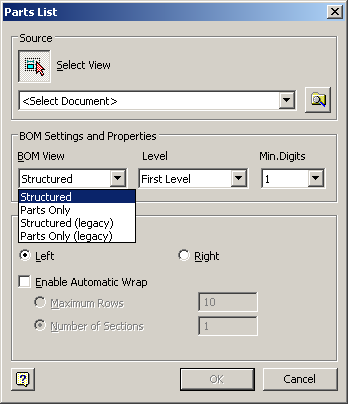
the Inventor "Structured BOM View" can have different values of the Item Numbers depending from the context of the assembly (if inserted into higher level assemblies or not) - the "Parts Only View" is a flat representation that matches better the flat structure of the Mechworks PDM parent-child relations.
Use Inventor Parts Only BOM View when saving
With this option you can set Inventor Assembly native BOMs to be used for the BOM position numbers when saving.
DBInventor will use only one type of BOM, picking the 1st available and enabled Inventor BOM of the type choosen by the user.
Force PARENT_CHILD_MAKE_BUY attribute for any Internal Component
When checked, any Solid Edge component is marked with PARENT_CHILD_MAKE_BUY=<Attribute to assign>.
Please note an Internal Component has the assembly file name as parent folder in its path.
