General options
 Use Database localization
Specify the language of the database explicitely. Read more.
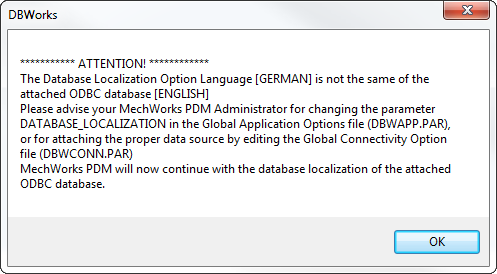
MechworksPDM checks (at startup) if the currently assigned Database Localization option is the same of the currently attached ODBC database and shows warning messages if not, in which case the PDM continues the execution using the currently attached ODBC database localization:
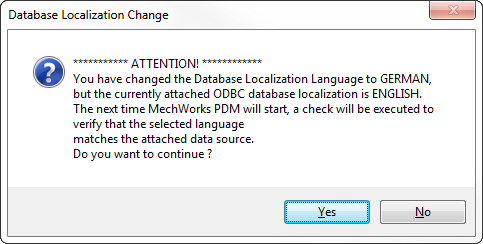
A warning message is also displayed when changing this option, for reminding the administrator to coherently change also the attached ODBC data source:
Use Database User Interface Localization
Specify the language to be used to display the database fields and interface. Can be very useful also to display custom column headers in the interface. Read more.
It's necessary to restart the application to see the change of the user interface.
Enable Unicode Secondary Language
Main option to enable Unicode Secondary Language support. It loads specific dictionaries on memory.
See Unicode Secondary Language support specific topic help.
Language
Mechworks PDM will look for specific files into the sub-folder LANG\UNICODE:
•<Secondary Language Identifier>.UMSG
•<Secondary Language Identifier>.UDBWUI
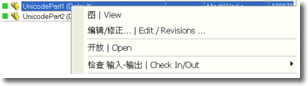
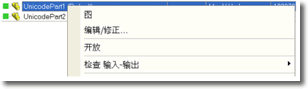
Display both Primary and Secondary Language
When checked, MechworksPDM will display both the Primary Language string and the Secondary Language string for each user interface element.
|
|
 Manage only Variant Notes and File Property mapping
When checked, MechworksPDM will use the Secondary Language support only for creating/updating the Variant Notes and File Properties
The User Interface elements will not be altered.
Don't associate PRT,ASM and DRW extension to the CAD system
This option can be useful for Autocad or ME10 installations, where SolidWorks files should not be considered strictly as CAD documents
Only store/Do not store records for documents within the following directories
This option allows to enlist a list of directories that are considered valid when documents are saved.
When this option is enabled documents saved in the enlisted directories and all their subdirectories are taken into considerations and a record is created/updated in the database; documents saved elsewhere are ignored by MechworksPDM.
This option allows the models to be saved with an extension different from the standard ones (.SLDPRT, .SLDASM, .SLDDRW) out of the assigned list of directories. For example, it is possible to save a model as a .TIFF outside of the assigned directories.
When this option is disabled, DBWorks defines valid directories by explicit exclusion.
The option Do not store records for documents in the following directories accepts C:\, and since the C:\Program Files (x86)\MechWorks is handled separately by the option, the C:\ drive can be declared in the list:

Support for regular expression
It is possible to populate the list with entries that contains regular expressions like:
*\TEMP\*
With the above example, all the directories that have the "\TEMP\" sub-string will be excluded/included from/into the database registration.
At least a * character must exists in order to activate the Pattern Matching engine when processing the directory names
@NO_NEW@ prefix for assigned directories
It is possible to identify a set of directories whose files are allowed to be managed as external references and maintained in the database, but that are not allowed to be created as new records in the database.
This means that if a file, residing in a @NO_NEW@ directory, is already existing in the database, then all the parentchild relations will be maintained and updated in the parent assemblies, but if the same file is still not existing in the database, then MechWorks PDM will avoid that new records pointing to that directory will be created in the database.
Example
Let consider an assembly Assem-to-register.SLDASM with two components:
1.do-NOT-register.SLDPRT in the directory ONE, that is NOT allowed to be managed in the database, except if the document is already existing before declaring as @NO_NEW@ the ONE directory
2.please-register.SLDPRT in the directory TWO, that is allowed to be managed in the database
In order to get the desired behavior, the option must be set as follows:
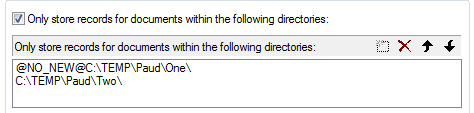
the @NO_NEW@ string must be inserted manually by editing the table row
The Activity Console will show a warning message if the save process will face any @NO_NEW@ case:
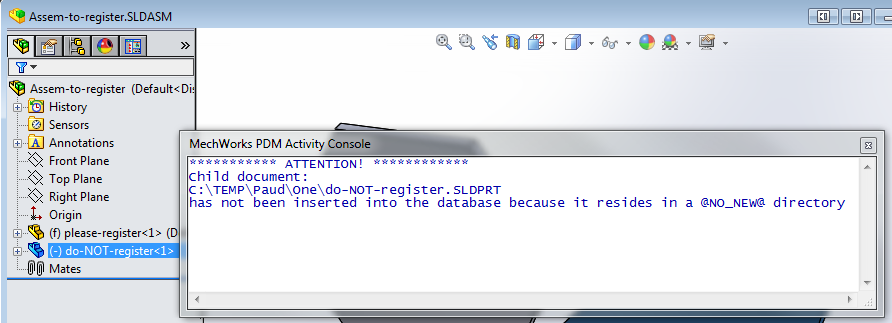
Show a warning when saving a document in a no-database directory
If checked, MechworksPDM displays a warning message everytime a document or a referenced document (i.e. an assembly component) is being saved to a no-database directory, as per the settings of the list General, Do not store records for documents in the following directories.
An Event is also added to the EVENT_LOG table with Action = DOCUMENT_SAVED_IN_NO_DB_DIRECTORY.
Manage as 'Standard Parts' components with...
Using this option you can define a pattern that identifies Standard Parts. The value that distinguish the standard parts can be matched against any available field.
To read on how to exclude documents from the revision process based on their path, see the revisions options.
The expression for defining the Standard Parts can contains OR conditions or AND conditions (never mixed, only ORs or ANDs), is defined as follows:
| (vertical bar character) defines an OR condition
& (ampersand character) defines an AND condition
Example
Suppose you need to define objects located in directory:
M:\Dir1\*
M:\StdPart1\*
Z:\OtherStandardParts\*
In this case you can write the definition as:
FILE_DIRECTORY=M:\Dir1\*|M:\StdPart1\*|Z:\OtherStandardParts\*
Example
Suppose you need to define as Standard Parts objects where the field ID begins with the sequence 801-, but must end with the sequence -00:
In this case you can write the definition as:
ID=801-*&*-00
Every field that identifies a standard part must be declared in the list of fields for that specific grids, otherwise the standard part icon is visible only in tree structure.
For example, if the definition for standard parts is CATEGORY="xxx" you have to add the field CATEGORY to the grids definition file SCHEMA\Tables2.dfl to see the icon both in trees and in grids.
No Standard Parts in Working Set
When checked, the Working Sets never contain Standard Parts. Many times you don't define a Working Set explicitly indicating the items one by one and if you define working sets using queries of any kind, this options ensures that the following batch operations on the set are not performed on standard parts that are meant to remain to most users static documents.
No Updates for Standard Parts
When checked, any update operation (such as Editing or Re visioning) are denied for Standard Parts.
Same as above: since Standard Parts are to be considered static for most users, with this option you make sure the users don't edit those parts.
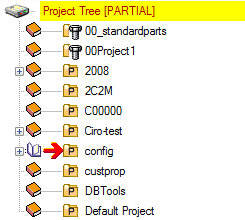
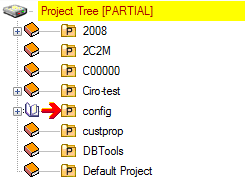
Do not show Projects that are 'Standard Parts' records in Trees/Grids
If checked, the Standard Parts Projects (project satisfying the standard part definition) are not displayed in the Trees.
Consequently they're not easily shown in grids too.
This can lead to a significant performance improvement when many standard parts are inserted in the database.
Standard Parts (documents and projects) can anyway be found using the many Search features.
Note that the Standard Parts administrators and designers must keep this option unchecked in order to work efficiently.
Example
|
|
Never delete Standard Parts
self explaining.
Allow Standard Parts out of DB Directories
When checked, a Standard Part can be saved into a not-allowed DB Directory.
In order to be managed, a Standard Parts needs to be saved in the not-allowed DB Directory when the option for not allowing any save out of the allowed directories is NOT activated.this means that a DOCUMENT record is required for the Standard Part itself, for being managed by this option.
Execute Scripts without any Message Boxes and writing %TMP%\DBWMSG.LOG
If checked, when executing any script, the standard PDM MessageBoxes (when errors or warnings occur) are not displayed, but their content is instead written in the file %TMP%\DBWMSG.LOG. The file DBWMSG.LOG is never deleted, so to permit the message log over multiple sessions of SW; it is the task of the PDM admin to delete it before starting huge batch tasks.
Please note the DBWMsgBoxes in the script source code are not affected by this behavior.