Localization files in MechWorksPDM
The file that contains all the messages for MechWorksPDM localization is the file DBWorks.MSG located in the installation folder (usually c:\Program Files (x86)\MechWorks\MechWorks_Pdm\).
This file contains all the messages and optionally you can intervene and modify some of the interface messages, if you like. Mind, though that important messages containing the name of the tables, the name of the fields, revision states, etc... should not be edited as this could cause serious malfunctioning. In any case, always make a backup copy of the file before editing for eventual reset if something goes wrong.
You can find more detailed information in the paragraph below.
Custom .MSG files
MechWorksPDM checks at the start up for the presence of files named DBWORKS_*.MSG in the installation directory. If these files exist, they are loaded in the main dictionary of MechWorksPDM, overwriting any string declared in the DBWORKS.MSG file.
To understand the utility of this feature, consider the following example.
Suppose you want to customize the User Interface, and you want that the menu entries:
Open For Browsing �
Open For Updating �
appear as
Browse �
Update �
What you need to do is to create a file named, suppose, DBWORKS_CUSTOM.MSG containing the following two lines:
MENU_BROWSE "&Browse ..."
MENU_UPDATE "&Update ..."
The MSG file must now be put in the same directory where is the main DBWORKS.MSG file.
Rules for customization
1.Only the right part of the message must be customized; the identifier on the left must be exactly the same of the original one
2.The string on the right must be enclosed between double apexes (" �. " )
3.Any parameter %s in the strings must be preserved in any customization:
In the following case:
MSG_ADD_TO_PROJECT_PROMPT "Do you want to add the document '%s' to the project '%s' ?"
A possible customization is:
MSG_ADD_TO_PROJECT_PROMPT "The document '%s' will be added to the project '%s'. Confirm ?"
Please note how the two %s are preserved in the customized string.
4.The overall length of the string must be about the same of the original one
5.For the database fields ( identifiers NAME_FIELD_� ) no space or special characters are allowed in the field names; please use the underscore ( _ ) character as separator ( ex: 'My New Field' must be written as 'My_New_Field' )
6.For the database fields of type Date, the suffix _DATE must be preserved in the customization
User Interface independence from database language
It is possible to work with the database in a language and the user interface in another, and to customize the appearance of the titles of the fields both in the data input form and in the Browser grids.
To achieve this goal the message file DBWORKS.MSG does not contain anymore the necessary information on database fields. This information is stored in files named DBFIELDS.MSG, under the LANG\<language>\ directory, so these set of files (LANG\....) is now MANDATORY to be present on every workstation.
With this enhancement, it is possible to share the same database among different countries, using the MechworksPDM Database Replication Model, while maintaining user interfaces each mapped in the local language.
The database localization is controlled by two options in the General tab:
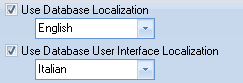
The first assigns the language of the database pointed by the DBWORKS_DSN datasource declaration in the DBWCONN.PAR parameter file.
The second assigns the file to be used for the database user interface titles. The file is named DBWUI.MSG, and, dependently from the user interface language choosen, will be searched again in the sub-folder LANG\<language> of the installation path of MechworksPDM.
To be more clear with an example, suppose you want to use an English database and a German user interface:
- the database fields definition will be loaded from LANG\ENGLISH\DBFIELDS.MSG
- the database user interface definition will be loaded from LANG\GERMAN\DBWUI.MSG
The usefulness of the DBWUI.MSG file is that you can display the strings you want as titles of the fields, so it can be useful also for changing the titles in the same database language.
With an example for the English database, without this option your data input mask will typically appear as:
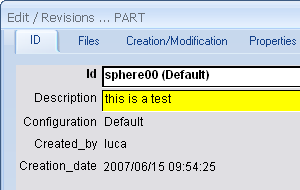
Enabling the user interface option for the database, it could appear as:
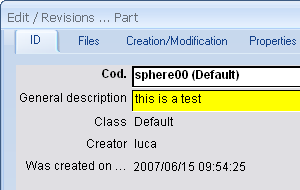
The structure of the DBWUI.MSG is very simple; it is a list of lines of the type:
UI_<dbfields.msg field identifier> |
"title for the field …" |
|---|---|
UI_<dbfields.msg field identifier> |
"title for the field …" |
UI_<dbfields.msg field identifier> |
"title for the field …" |
For the above sample, the DBWUI.MSG will contain the following lines:
...
UI_NAME_FIELD_ID"Cod."
UI_NAME_FIELD_DESCRIPTION"General description"
UI_NAME_FIELD_CONFIGURATION"Class"
UI_NAME_FIELD_CREATED_BY"Creator"
UI_NAME_FIELD_CREATION_DATE"Was created on …"
...
If the entry for a specific field will not be found in the DBWUI.MSG, the title will always be displayed with the database field name.
Differentiate commonly named fields between the DOCUMENT and REVISIONS tables
Localization of added database fields (custom fields)
If you add a new database fields and want to display it differently across a multilingual installation, you have to run the Localization Manager of the Administrative Tools (User interface section).
It adds the required entries to the parametric files LANG\<LANGUAGE>\DBFIELDS_CUSTOM.MSG and LANG\<LANGUAGE>\DBWUI.MSG for all the required language.
Example
If you add a field named My_custom_Field to the database, then you localize it to be shown in english as "My Custom", the Localization Manager will add entries in this way:
to file DBWORKS_SERVER\LANG\ENGLISH\DBFIELD_CUSTOM.MSG:
NAME_FIELD_MY_CUSTOM_FIELD "My_custom_Field"
to file DBWORKS_SERVER\LANG\ENGLISH\DBWUI.MSG:
UI_NAME_FIELD_MY_CUSTOM_FIELD "My Custom"
Please note NAME_FIELD_MY_CUSTOM_FIELD and UI_NAME_FIELD_MY_CUSTOM_FIELD must be uppercase
DBFIELD_CUSTOM.MSG file is loaded only when using the option Use database localization, for this reason if you want to localize a custom field, you've to enable both
General→ Use database localization
and
General→Use Database User Interface Localization
UI_SCRIPT_xxx entries for localization of script file names
The LANG\<language>\DBWUI.MSG file supports now entries of the type:
UI_SCRIPT_<file name> "Menu item to be displayed"
where <file name> is the script file name (no extension) with any blank character " " replaced by the underscore character "_".
This feature allows to display the same scripts with different language localizations.
The DBWUI.MSG is loaded only when the General→Use Database User Interface Localization option is checked.
Example
Let’s say that under LST\Anytype we have a directory/file structure as follows:
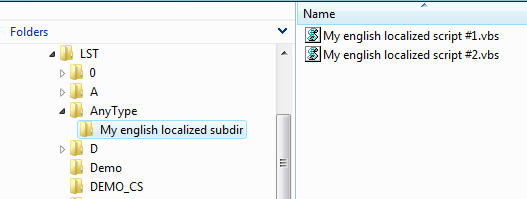
We want to create the following map for the English localization:
"My english localized subdir" → "A useful sub-dir"
"My english localized script #1" → "A useful script #1"
"My english localized script #2" → "A useful script #2"
In order to apply the above mapping, we will create the following entries in the LANG\English\DBWUI.MSG :
...
UI_SCRIPT_My_english_localized_subdir "A useful sub-dir"
UI_SCRIPT_My_english_localized_script_#1 "A useful script #1"
UI_SCRIPT_My_english_localized_script_#2 "A useful script #2"
...
Please note that for scripts the case matters.
The strings displayed in the RMB popup menu will be:

Fields that are not localized
Some fields must not be localized, so they've to be managed in english only.
here is the list:
PARENT_CHILD_RELATION_TYPE
PARENT_CHILD_COMPONENT_REFERENCE
PARENT_CHILD_INSTANCE_ID
PARENT_CHILD_REVISION_DIRTY_STATUS
COMPANY_ID
OWNER_COMPANY_ID
REPLICATION_PARTNERS
FILE_ATTACHMENT
WORKING_SET_ID
ECO_ID
ECR_ID
DBW_NO_LIFE_CYCLE
DBW_BOM_GROUP_REF_ID
DBW_NO_WORKFLOW
DBWARM_CLASS
REPLICATION_DIRTY
DBW_PREVIEW_IMAGE
DBW_DENY_TRANSFER_OWNERSHIP
DBW_TASKS_UNIQUE_ID
Nevertheless you can create a different label to be shown in the data forms; let's see how:
1.make sure the option General→Use Database User Interface Localization is enabled
2.go to the shared <server folder>\LANG\<language> folder
3.For every no database translated field like PARENT_CHILD_COMPONENT_REFERENCE (see above list) 2 editings are required:
•edit/create the DBFIELDS_CUSTOM.MSG and add a line like:
NAME_FIELD_PARENT_CHILD_COMPONENT_REFERENCE "PARENT_CHILD_COMPONENT_REFERENCE"
•edit/create the DBWUI.MSG and add a line like
UI_NAME_FIELD_PARENT_CHILD_COMPONENT_REFERENCE "MyNameForParentChildComponentReference"