Linked Database Tables
Introduction
Parameters
Data entry definition file
Access the linked tables fields
Features
Dataentr.LST support
Limitations
$LINKED_FIELD macro
Linked Database Tables specific .LST files
A case study
Ability to display Linked Database Table dialog from inside the main Data Input Form
@SUBCLASS specific form definition file
Introduction
Mechworks PDM can manage tables different from the DOCUMENT table, linked to the DOCUMENT table through a relation between primary keys.
This feature allows the DOCUMENT table to be split in more than one table, depending from the nature of the data, so allowing the maintainance of a common set of fields into the DOCUMENT table itself, and to keep custom data into separate tables.
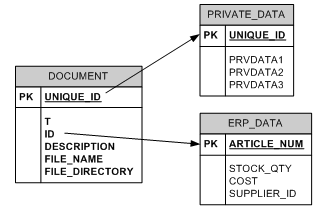
The tables must be declared in a file located in the shared SCHEMA directory and named DBWLinkedTablesDef.TXT, with the following format:
"<table name>","<primary key>","<DOCUMENT table access key>"[,"Attributes",["Filters"]]
Any table declared in the DBWLinkedTablesDef.TXT must exists in the database.
Parameters
Attributes
If no value is specified for attributes, the default management for the table is in view/edit.
•ViewOnly
•NoView
•Autoinsert
this attribute is case sensitive; when declared, the Linked Database Table record is automatically created at each new record of the DOCUMENT table.
Example
;--------------------------------------------------------------
; DBWLinkedTablesDef.TXT
;
; DBWorks Linked Database Tables Definition File
;
;--------------------------------------------------------------
; "<table name>","<primary key>","<DOCUMENT table access key>"[,<Attributes>[,<Filters>]]
;
"PRIVATE_DATA","UNIQUE_ID","UNIQUE_ID","Autoinsert"
Filters
•<FieldName>=<MatchingExpression>
It allows to define an expression for filtering the display of the Linked Database Tables list depending from the value of any field in the database; such field must be EXPOSED to any database view (PART/ASSEMBLY/DRAWING/GENERIC/PROJECT) that will require the filtering.
Example
;--------------------------------------------------------------
; DBWLinkedTablesDef.TXT
;
; DBWorks Linked Database Tables Definition File
;
;--------------------------------------------------------------
; "<table name>","<primary key>","<DOCUMENT table access key>"[,<Attributes>[,<Filters>]]
;
"PRIVATE_DATA","UNIQUE_ID","UNIQUE_ID","","CATEGORY=Private*"
"ERP_DATA","ARTICLE_NUM","ID","ViewOnly"
•@SQLCONDITION
It is possible to define a SQL statement as filter for a Linked Database Table; More, the condition supports macros of type $(...)
Example
;--------------------------------------------------------------
; DBWLinkedTablesDef.TXT
;
; DBWorks Linked Database Tables Definition File
;
;--------------------------------------------------------------
; "<table name>","<primary key>","<DOCUMENT table access key>"[,<Attributes>[,<Filters>]]
;
"PRIVATE_DATA","UNIQUE_ID","UNIQUE_ID","","@SQLCONDITION=CATEGORY=Office Documents AND CATEGORY1=Private*"
"ERP_DATA","ARTICLE_NUM","ID","ViewOnly"
Data entry definition file
For each table it is possible to create a Data Entry Definition File in the shared SCHEMA folder, with the same format of the standard DataEntr2.TXT.
Each file must be named as
LKDT_DATAENTR_<table name>.TXT
Example
Table name |
Data Entry Definition File |
|---|---|
ERP_DATA |
LKDT_DATAENTR_ERP_DATA.TXT |
PRIVATE_DATA |
LKDT_DATAENTR_PRIVATE_DATA.TXT |
File LKDT_DATAENTR_ERP_DATA.TXT:
@ROWHEIGHT 22
@CHARHEIGHT 9
Article
ARTICLE_NUM
ITEM_CODE 25,tooltip=This|is|a|field|tooltip\non|three|lines\nof|text
MATERIAL_CLASS
MATERIAL_TYPE
TYPE
TYPE_DESCRIPTION
ORIGIN
LOCATION
REPLACEMENT_FOR
REPLACED_BY
BASE_PART_NR
RAW_MATERIAL
Supplier
SUPPLIER_ID
Commercial
COST
CLIENT_ID
Access the linked tables fields
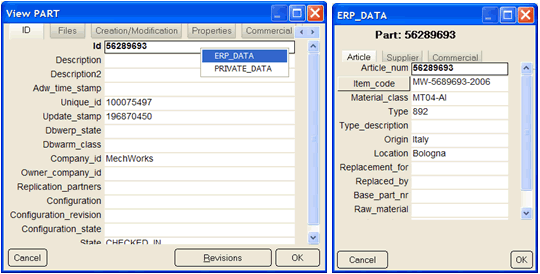
It is possible to access the record of a Linked Table by right-clicking on any field in the main Document Data Entry mask.
A popup menu will display the list of available tables, and by selecting the desired one, MechworksPDM will open the Linked Database table Data Entry form:
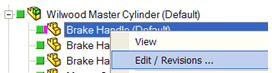
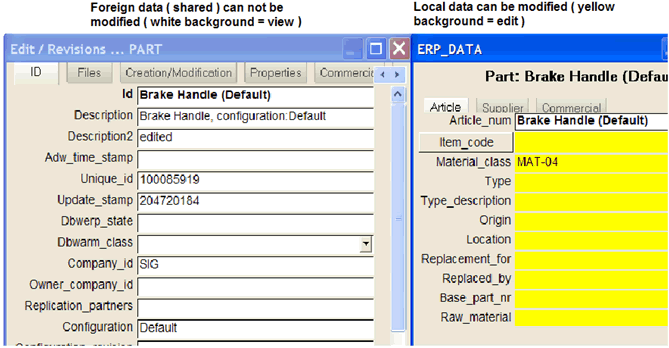
The purpose of the Linked Database Tables functionality is to be used in a Remote Access Environment for maintaining a set of Local Data linked to shared global data; for this fact it is also possible to Edit a Foreign Record and still continue to modify the local data contained in the Linked Database. Table:
Features
•Insert/Update
Linked Tables records follows one-to-one DOCUMENT table records
•Delete
If the key is the UNIQUE_ID, the delete is also applied on any Linked Database Table Record.
•Enhanced Tooltips
It is possible to define a Linked Database Table field in the SCHEMA\DBWEnhancedTooltipsFields.txt definition file. The format is: <table name>.<field name>
Example
;====================================================================
;
; DBWorks (C)MechWorks Enhanced Tooltips Fields definition file
;
;====================================================================
...
...
ERP_DATA.ARTICLE_NUM
...
•Visual Cues
It is possible to define a condition on a Linked Database Table field in the SCHEMA\IMG\DBWVisualCuesDef.txt definition file. The format used is the same for a generic “@SQLx” type visual cue definition, passing the table name and the condition.
Example
;--------------------------------------------------------------
;
; DBWorks Visual Cues Definition File
;
;--------------------------------------------------------------
"@SQL1","(ERP_DATA)MATERIAL_CLASS='2-6506'","class2-6506.bmp",20,1,-55,0
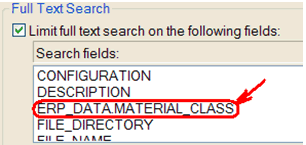
•Full Text Search
It is possible to use the Full Text Search functionality for searching into the Linked Database Tables. The fields on which to search must be explicitly defined in the
Options→User Interface→Browser Behavior→Full Text Search→Limit full text search on the following fields
list, in the format <Linked Database Table Name>.<Field Name>
Example
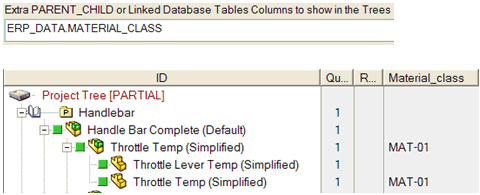
•Tree Columns
It is possible to show the Linked Database Table fields in the Tree Columns.
The fields must be defined, in the format <Linked Database Table Name>.<Field Name>, in the option
Options→User Interface→Tree→Extra PARENT_CHILD or Linked Database Tables Columns to show in the Trees
Example
•OnOK.LST
It is possible to output Linked Database Table fields from the OnOK.LST script.
This feature allows to populate the Linked Database Tables with values depending from the actual values in the DOCUMENT table. If the records are still not existing in the Linked Database Tables, they will be created.
The output fields must be defined in the format <Linked Database Table Name>.<Field Name>, as in the following example.
Example
.VBSCRIPT
Sub Main()
DBWInit(TRUE)
...
DBWOutput "@OKDATA","1",ForWriting
DBWOutput "ERP_DATA.MATERIAL_CLASS","MAT-02",ForAppending
DBWOutput "ERP_DATA.MATERIAL_TYPE","T03",ForAppending
End Sub
Dataentr.LST support
From Dataentr.LST script it is possible to output a field for a Linked Table
Limitations
1.MSAccess databases are not supported
2.Nesting of Linked Tables is not supported
3.Import/export from/to the Custom Properties is partially supported in a native way by the Linked Tables (Custom scripting is required)
4.Linked Tables fields are partially supported in the DBWorks Variant Notes (Custom scripting is required)
5.Advanced Filter does not support Linked Tables
6.WebViewer client does not support Linked Tables
7.DBCustomizer does not support Linked Tables
8.Link Mode does not support Linked Tables
9.Linked Tables fields can’t be displayed in the Browser’s Grids (Tables2.DFL)
10.Released Database Mode does not support Linked Tables
11.Briefcase does not support Linked Tables
$LINKED_FIELD macro
Linked Database Tables specific .LST files
It is possible to name a .LST file with the prefix equal to a name of a Linked Database Table for having the script being executed only for the Linked Database Table field.
Example
Linked Database Table name: ERP_DATA
ERP_DATA.DESCRIPTION.LST
the script will be executed only when clicking on the DESCRIPTION field in the ERP_DATA table
A case study
Read here how to have different sub layout with the same field but different names (translated) for each Layout, using SQLServer views and linked tables.
Ability to display Linked Database Table dialog from inside the main Data Input Form
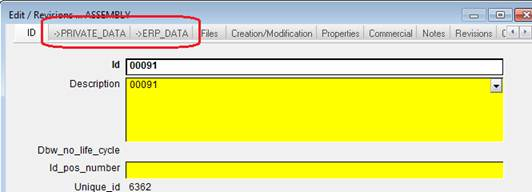
Starting from R13sp2.0 it is now possible to declare special tab names in the SCHEMA\Dataentr2.txt Form definition file, so that, if a corresponding linked table name is found, its dialog its displayed docked into the Data Input Form.
The Tab Names must begin with the "->" sequence.
Example
;--------------------------------------------------------------
; DBWLinkedTablesDef.TXT
;
; DBWorks Linked Database Tables Definition File
;
;--------------------------------------------------------------
; "<table name>","<primary key>","<DOCUMENT table access key>"[,<Attributes>[,<Filters>]]
;
"PRIVATE_DATA","UNIQUE_ID","UNIQUE_ID","Autoinsert"
"ERP_DATA","ARTICLE_NUM","ID","Autoinsert"
To display the two dialogs data from inside the Data Input Form dialog, we can modify the SCHEMA\Dataentr2.txt definition file as follows:
;===================================================================
;
; DBWorks (C)MechWorks Data Entry groups definition file
;
...
;===================================================================
@ROWHEIGHT 22
@CHARHEIGHT 9
ID
...
->PRIVATE_DATA
->ERP_DATA
Files
...
...
Creation/Modification
...
...
After opening the Data Input Form, it looks as follows:
Clicking now on the ->PRIVATE_DATA tab, the Linked Table data will be displayed:
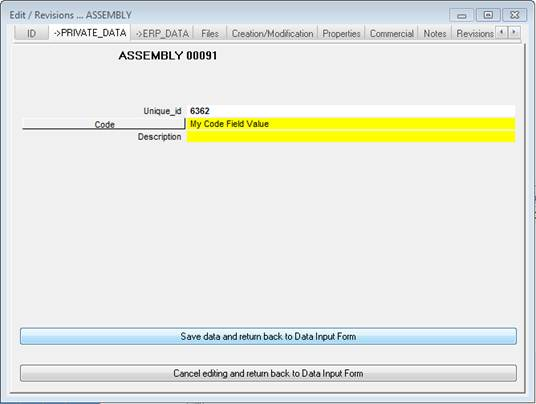
To confirm the editing of the data, the button must be pressed.
If you want cancel the editing session for the PRIVATE_DATA Linked Table, press the button.
When pressing either of the two buttons, the last Data Input Form tab (not being a Linked Table tab) will be displayed.
Please note the visualization of the linked tables data in the upper pane of the TreePage doesn't show the tab sectioning that instead visible in the RMB edit form:
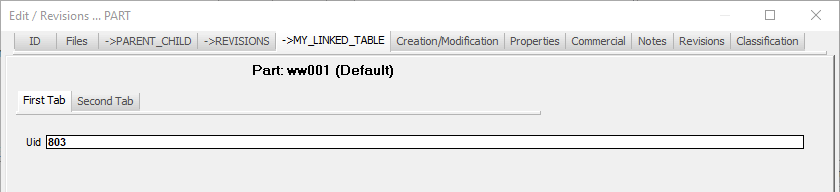 The edit form dialog: please note there are 2 tabs with one field each
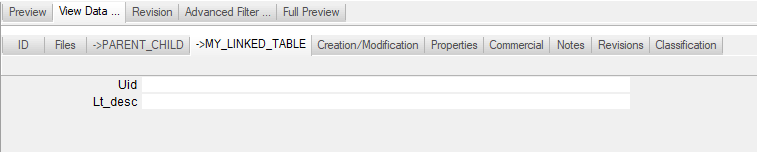 The linked table data in the TreePage upper pane: please note no tab is shown and all the fields are enlisted together
@SUBCLASS specific form definition file
It is possible to define a @SUBCLASS specific definition file also for the Linked Database Tables.
Example
Suppose I want to define a specific Linked Table PRIVATE_DATA form definition file for PART documents where the CATEGORY field is equal to "FAM1"
My main Dataentr2_P.txt file will contain:
...
@SUBCLASSFIELD CATEGORY
@SUBCLASS_FAM1 FAM1
...
My class-specific Part form will be named as Dataentr2_P_FAM1.txt and it will be loaded for Part records where the CATEGORY=FAM1
Now, suppose I want to display the PRIVATE_DATA Linked Table in the Dataentr2_P_FAM1.txt - I will add it as:
FAM1
ID
DESCRIPTION 75
...
STATE
REVISION
->PRIVATE_DATA
...
I can now prepare a specific "FAM1" form definition file for the Linked Table "PRIVATE_DATA" and name it as LKDT_DATAENTR_PRIVATE_DATA_P_FAM1.txt
If the form file does not exist, DBWorks will then search for LKDT_DATAENTR_PRIVATE_DATA_P.txt and for LKDT_DATAENTR_PRIVATE_DATA.txt