Tabs in the Data Form
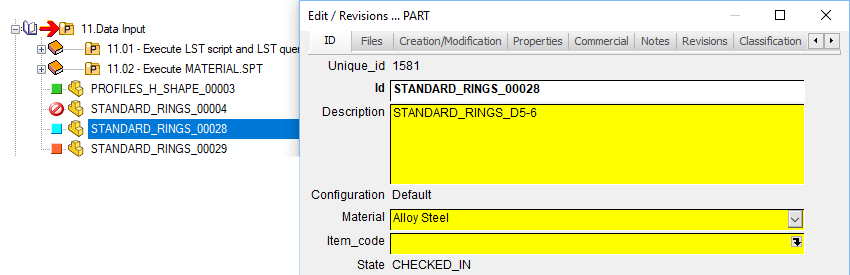
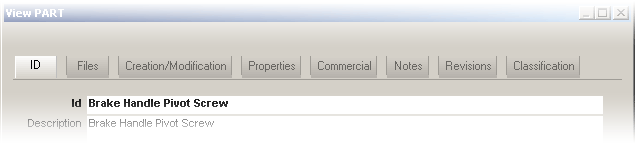
The Data Form displays the fields related to a single document grouping them in tab sheets. MechworksPDM offers a default tab grouping that can be customized to rearrange the existing fields and to include custom ones.
Customization
The DBCustomizer offers you a specific tool to rearrange the entries inside the tab, so that the following information is displayed as a technical reference only. To know more about how to edit the entries in a graphic environment, read the Chapter DBCustomizer.
MechworksPDM stores the tab groups structure in the text file Dataentr2.txt which you can edit with Notepad. The file location is the SCHEMA directory as mapped in the path options.
Example
;===================================================================
;
; DBWorks (C)MechWorks Data Entry groups definition file
;
; Format:
; 01234567890123456789012345678...
; <GROUP1>
; <FIELD 1>
; <FIELD 2>
; <FIELD 3>
; <FIELD 4>
; <GROUP2>
; <FIELD 5>
; <FIELD 6>
; <FIELD 7>
; <FIELD 8>
; ....
;
;
; Special commands:
; @command [<arg1> [<arg2>...]]
;===================================================================
@FITROWS
;@ROWHEIGHT 40
@CHARHEIGHT 11
ID
ID
DESCRIPTION
CONFIGURATION
ITEM_CODE
STATE
REVISION
Files
FILE_NAME
FILE_DIRECTORY
Creation/Modification
CREATED_BY
CREATION_DATE
LAST_MODIFIED_BY
LAST_MODIFIED_DATE
Properties
LENGTH
SURFACE
VOLUME
WEIGHT
MATERIAL
SCALE
SHEET_FORMAT
NO_OF_SHEETS
Commercial
CATEGORY
SUPPLIER_ID
CLIENT_ID
COST
MAKE_BUY
Notes
NOTES
Revisions
STATE
REVISION
ACTIVE_REVISION
CHECK_OUT_BY
CHECK_OUT_DATE
FROZEN_BY
FROZEN_DATE
Let's analyze the lines of this file:
Remarks/Comments
The first lines, all started with ";" are remarks that will remind you the basic rules when you're modifying the files. If you want to add your own remarks remember to include in the line ";" or Mechworks PDM will read through it and try to interpret your sentence as a command, causing an error.
If you want to enter some remarks in the file always do so in separate lines:
ID
; this is the group displayed by default
ID
;this is the id
DESCRIPTION
CONFIGURATION
SUPPLIER_ID
ITEM_CODE
STATE
;Ciro added revisions on May '99
REVISION
;The following fields are custom...
FILES
FILE_NAME
FILE_DIRECTORY
...
The rows interpreted as remarks by MechworksPDM are in blue. The null lines (just a carriage return with no space) are skipped.
Grid format
You can modify this script to change the way grid rows are displayed. You have two basic possibilities: have the rows automatically fit to the vertical space available in the grid (default option) or set the height of each row, which will not necessarily fit into the given space. When you edit the layout of the fields using DBCustomizer, it displays in real time the layout of the fields.
Commands available
@ROWHEIGHT <value> |
sets the row height to the assigned value in pixels (row height is fixed) |
|---|---|
@FITROWS |
fits the row height to fill the vertical space available in the grid |
@CHARHEIGHT <value> |
sets the character size |
in the example
@FITROWS
;@ROWHEIGHT 40
@CHARHEIGHT 11
rows are set to fit, the rowheight command is not active as a ";" ensure that MechworksPDM skips the line and finally the characters height is set to 11.
Tab names and field groups
The general format for indicating tab names and included fields is:
<GROUP1>
<FIELD 1>
<FIELD 2>
<FIELD 3>
<FIELD 4>
<GROUP2>
<FIELD 5>
<FIELD 6>
<FIELD 7>
<FIELD 8>
.....
The field groups names must start in the very first column of the row, i.e. no spaces or tabs are allowed before the group name. They are followed by the fields names where each field line starts with at least a space or a tab. You cannot use the character ";" in a group name or the line is skipped
Group names may include spaces (My Group is a valid tab/group name).
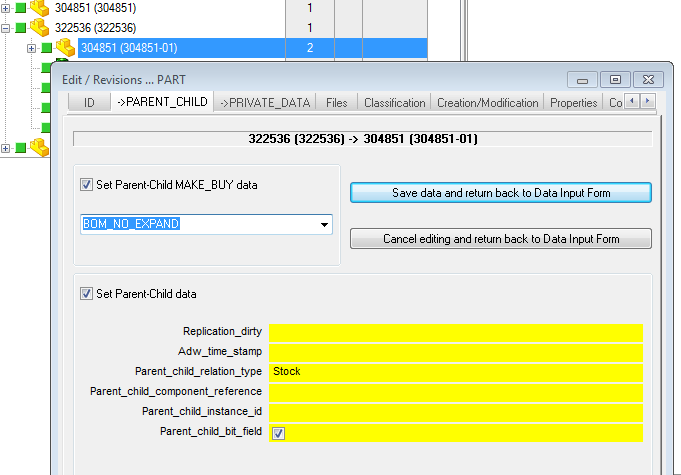
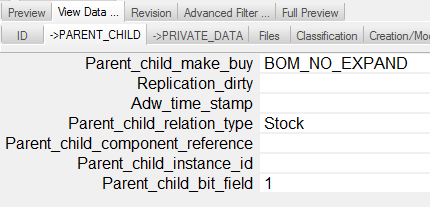
Starting from R14 you can include also PARENT_CHILD fields to be visualized in Edit/Revision Data form.
It is possible to declare a tab named "->PARENT_CHILD" (where PARENT_CHILD must be localized for each supported language) for being able to edit/view directly the Parent-Child data when the Edit/View operation is started from a Tree node (so only when the Parent document is uniquely identified).
Example
Suppose you declare the following Dataentr2.txt data:
ID
ID
DESCRIPTION 75
...
->PARENT_CHILD
Files
FILE_NAME
FILE_DIRECTORY
...
then you'll be able to edit the Parent-Child data from within the main Data Input Form:
In the Tree Page's View window, the data are presented as a list of values:
A field can belong to many groups; if you set a field to activate a scripting program or display a form at edit time, the option is active in every group where the field is included.
If the keyword disabled is found after a field name, the field is made not editable at edit time, but is editable at first save as in:
ID disabled
If the keyword always,disabled is found after a field name, the field is made not editable at edit time and also at first save as in:
ID always,disabled
DataEntr2 form definition files specifics for document type and sub-class
DBCustomizer fully supports subclassing for document types. Though the following information can give an important insight on the subclassing mechanisms at file level, we advice you to use the graphic interface of DBCustomizer to add subclassing to your form layouts.
The DataEntr2 file enables the assignment of different form definitions to different types and sub-classes of documents.
MechworksPDM checks for the following form definition files ( under the SCHEMA\ directory ) when displaying the main input form:
DataEntr2.txt |
The default definition file |
|---|---|
DataEntr2_A.txt |
If present, use this definition files for documents of type ASSEMBLY |
DataEntr2_P.txt |
If present, use this definition files for documents of type PART |
DataEntr2_D.txt |
If present, use this definition files for documents of type DRAWING |
DataEntr2_G.txt |
If present, use this definition files for documents of type GENERIC |
DataEntr2_0.txt |
If present, use this definition files for documents of type PROJECT |
A type specific definition file ( _A, _P, _D, _G or _0 ), can contain the following definitions:
@SUBCLASSFIELD <name of a field>
Defines what database field must be used to identify the class of the document.
<name of a field> is a valid database field defined in the database view specific for this type of document.
Example
@SUBCLASSFIELD CATEGORY1
Define CATEGORY1 to be the sub-class identifier of the document.
@SUBCLASS_<definition file extension> <field value>
Defines the extension of the definition file to be used when the field defined in @SUBCLASSFIELD has the value assigned in <field value>.
<definition file extension> must NOT contain special characters or blanks.
<field value> can be any valid value for the field assigned in @SUBCLASSFIELD
Examples (with @SUBCLASSFIELD CATEGORY1)
@SUBCLASS_screw screw
When CATEGORY1 has the value �screw�, then the file SCHEMA\DataEntr2_P_screw.txt will be used as form definition file.
@SUBCLASS_bolt bolt
When CATEGORY1 has the value �bolt�, then the file SCHEMA\DataEntr2_P_bolt.txt will be used as form definition file.
@SUBCLASS_01 a complex value
When CATEGORY1 has the value �a complex value�, then the file SCHEMA\DataEntr2_P_01.txt will be used as form definition file.
The <definition file extension> is completely independent from the value <field value>.
$PATTERN keyword for class specific Dataentr2_X form definition files
The $PATTERN keyword can be used in the value of the @SUBCLASS_ definition of a class specific Dataentr2 form definition file for assigning a specific Dataentr2 form definition file to documents for which the @SUBCLASSFIELD defined field is in match with the $PATTERN value, separated by a comma from the keyword.
Syntax:
@SUBCLASS_<definition file extension> $PATTERN:<pattern value>
Defines the extension of the definition file to be used when the field defined in @SUBCLASSFIELD has a value in match with <pattern value>.
<definition file extension> must NOT contain special characters or blanks.
Example
Suppose we want to assign a different form to Generic Documents of type *.MI, *.DOC and *.PDF The Dataentr2_G.TXT will contain the following lines:
;===================================================================
;
; GENERIC SPECIFIC DATAENTR2
;===================================================================
@SUBCLASSFIELD FILE_NAME
@SUBCLASS_DOC $PATTERN:*.DOC
@SUBCLASS_PDF $PATTERN:*.PDF
@SUBCLASS_MI $PATTERN:*.MI
...
With the above definition, DBWorks will use:
Dataentr2_G_DOC.txt when the file extension is .DOC
Dataentr2_G_PDF.txt when the file extension is .PDF
Dataentr2_G_MI.txt when the file extension is .MI
$SQL directive for definining complex $SUBCLASS statements
It is possible to declare a $SUBCLASS by using the $SQL: directive for assigning a condition that may be resolved using more than one field in the form
Example
Suppose we want to use the specific Dataentr2_G_XXX.txt file for any Generic Document where its DESCRIPTION field contains the word "XXX"
We will declare the new $SQL: statement in the root Dataentr2_G.txt file as:
;===================================================================
; GENERIC SPECIFIC DATAENTR2
;===================================================================
@SUBCLASSFIELD FILE_NAME
@SUBCLASS_DOC 34ATTERN:*.DOC
@SUBCLASS_PDF 34ATTERN:*.PDF
@SUBCLASS_MI 34ATTERN:*.MI
@SUBCLASS_XXX $SQL:DESCRIPTION LIKE '%XXX%'
GENERIC
T
ID
DESCRIPTION
Classification
CATEGORY1
CATEGORY2
CATEGORY3
With the above declaration, Mechworks PDM will try to load the form definition file Dataentr2_G_XXX.txt when editing/viewing any Generic document with the DESCRIPTION field containing the string "XXX"
$EXPR directive for dynamically assigning of a different data form
It is possible to assign dynamically different Data Input Forms depending from the current values of different fields of the same form.
The new keyword $EXPR: must be declared, followed by a sequence of regular expressions, in a way similar to the @EXPR condition for not null fields.
Example
In the following example, the Dataentr2_G_SCM.txt form will be loaded whenever the ID or the CATEGORY fields have a value similar to SCM*.
...
@SUBCLASSFIELD MY_FORM_SELECTOR
@SUBCLASS_SCM $EXPR:"ID=SCM*" OR "CATEGORY=SCM*"
@SUBCLASS_ECN ECN
@SUBCLASS_ECO ECO
...
The field value for the field defined as @SUBCLASSFIELD must be NOT NULL when loaded, so a proper .LST file with a .DEFAULT assignment must be created; in the above case, for example, the file LST\MY_FORM_SELECTOR.LST must be created, with a default assignment like: .DEFAULT ECO
Dataentr2.txt support for max number of decimals for numeric fields
It is now to assign a format for the numeric fields, so that they display the data with an assigned maximum number of decimals.
The line option name is decimals, and it must be declared, followed by the equal character and by the number of decimal digits on the right of a database field definition, after the row size or the disabled statement:
DataEntr2.TXT:
…
…
VOLUME 25,decimals=4
MYNUMDATA 25,disabled,decimals=3
…
…
With this enhancement, it is possible to avoid unwanted numerical truncations due to low precision database fields (4 bytes numerical fields, like the fields of type real in SQL Server).
With such fieds, it can happen that some data inserted by the user with a precise number of decimals, is transformed when stored in the database to an approximate represantation; example:
Consider the number 76.1; when inserted in a field of type real (example: the VOLUME), it is displayed normally in the data input mask as 76.099998; when inserted in a field of type decimal (high precision) it is displayed exactly as 76.1.
To avoid the update of the database structure (otherwise recommended, changing the fields of type real into decimal), you can declare the decimals=3 for the fields of type real, in the Dataentr2.txt file.
Dataentr2.txt support for tooltips
It is possible to define tooltips that appear when mouse moves over the titles of the Input Form fields.
The definition must be assigned in the SCHEMA\DataEntr2.TXT file, as in the following example:
ITEM_CODE 25,tooltip=This|is|a|field|tooltip\non|three|lines\nof|text
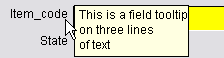
Please note that the 'blank' characters must be replaced with a vertical bar character |
A new line must be inserted with the \n sequence.
DBCustomizer manages this new field attribute.
Dataentr2_@[email protected]
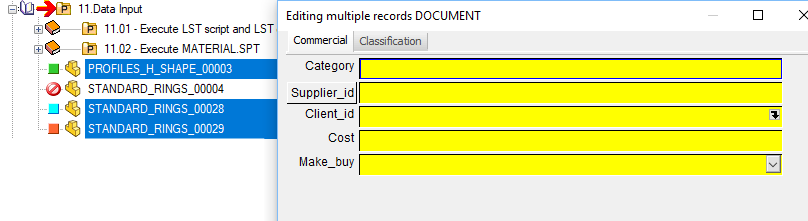
To differentiate the data form (i.e. the fields shown) when editing a multiple selection of records rather than editing a single record, it is possible to declare (in the same way of the DATAENTR2.TXT) a specific form, named DATAENTR2_@[email protected].
Example
Dataentr2.txt ID UNIQUE_ID
|
Dataentr2_@[email protected] Commercial CATEGORY
|