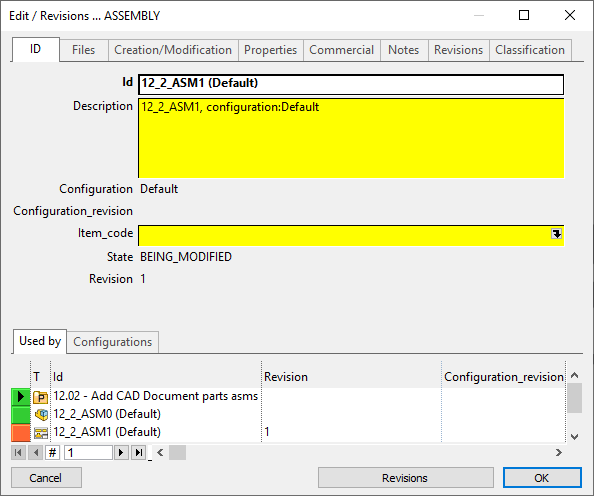
Data Form: Edit mode
The Data Form in edit mode displays the record of a document and allows for editing. To display the record of a document use the  Edit/Revisions command.
In this view the project is not displayed above the tabs, but below in the Used By grid.
Once the form is open you can click on the tabs to find the field you want to edit and click it to start editing directly the field value.
The grey fields cannot be edited as their content depends on external procedures that will be accessed elsewhere and that it would be unsafe to edit manually here. Every time a document is added to MechworksPDM, the CREATION_DATE field is automatically filled with the current date. If an update occurs, only the LAST_MODIFIED_DATE field will be updated.
For Assembly/Part/Drawing documents, also the ID, DESCRIPTION, FILE_NAME, FILE_DIRECTORY fields will be automatically filled by MechworksPDM.
To calculate the length of a part/assembly, MechworksPDM looks now for a special dimension in the Annotations group of the SolidWorks feature manager. If it finds a dimension with the prefix LENGTH=, it will use this one to get the length and store it in the associated record.
The yellow fields can be edited. MechworksPDM offers many advanced editing features that can help you in inputting calculated data and that are described in detail later in this chapter.
Revisions
Depending on the state, the Revisions button below can allow you to view/edit revisions or crate a new one.
If the state is NEW, the botton New Revisions at the bottom of the form allows to start and handle revision process for the given document. Please refer to Revisions for further details.
There are two circumstances under which the revisions button is disabled:
1.The document has been saved for the first time while the configurations option was enabled
2.The document is currently open in the CAD
In the first case you cannot start a configuration process for the document while in the latter you need to close the document before calling the form again.
Elements of the dialog