Data Form: Save mode
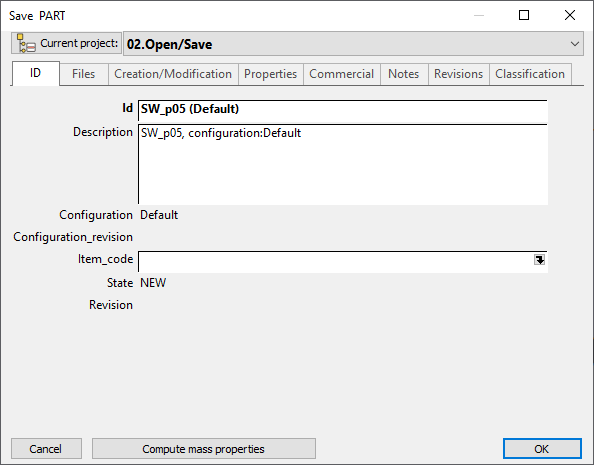
The Data Form in save mode displays the record of a document and allows for editing.
In this view the project is displayed above and by default is the current project.
Once the form is open you can click on the tabs to find the field you want to edit and click it to start editing directly the field value.
The grey fields cannot be edited as their content depends on external procedures that will be accessed elsewhere and that it would be unsafe to edit manually here. Every time a document is added to MechworksPDM, the CREATION_DATE field is automatically filled with the current date. If an update occurs, only the LAST_MODIFIED_DATE field will be updated.
For Assembly/Part/Drawing documents, also the ID, DESCRIPTION, FILE_NAME, FILE_DIRECTORY fields are automatically filled by MechworksPDM.
To calculate the length of a part/assembly, MechworksPDM looks now for a special dimension in the Annotations group of the SolidWorks feature manager. If it finds a dimension with the prefix LENGTH=, it will use this one to get the length and store it in the associated record.
The white fields can be edited. MechworksPDM offers many advanced editing features that can help you in inputting calculated data and that are described in detail later in this chapter.
An element present only at save time is the Compute mass properties button. The reason why this button is not present while simply editing values is that Mechworks PDM relies on CAD for performing the calculations and therefore requires the document to be open in CAD when it is clicked. The button fills the mass related field values automatically. Calculating mass properties on complex assemblies can occupy the computer for quite some time.
Elements of the dialog
Tabs
Main grid
Used by tab
Configurations tab
button
Showing foreign projects at save time
The option Project →  Always consider the Current Project as Shared allows to display also foreign projects. Read the topic for further information.