$LINKED_FIELD macro
The macro $LINKED_FIELD allows the display of linked tables values, even if in full UNICODE format (NVARCHAR).
So, for example, by using this macro it will be possible to display a Unicode Secondary Table value in the Input Form and in the Data Grids.
Syntax
$LINKED_FIELD(<DOCUMENT_table_key_field>,<Linked_Table_Name>,<Linked_Table_Field>,"<SQL_variant_filter>")
where:
DOCUMENT_table_key_field |
the current record DOCUMENT table field to which to link the value |
|---|---|
Linked_Table_Name |
the name of the linked database table |
Linked_Table_Field |
the field name of the linked database table for which the value will be returned |
SQL_variant_filter |
any valid WHERE … SQL statement, enclosed in quotation marks, with one and only one parameter defined as %s, parameter that will be replaced dynamically with the value of the DOCUMENT_ table_key_field for the current record |
Example
We would like to display both an English and a Chinese description in the same Input Form.
The English description will be contained in the field DESCRIPTION, the Chinese description in the field DESCRIPTION2.
Suppose that our DBW_UNICODE_MAPPING_TABLE contains the following records:
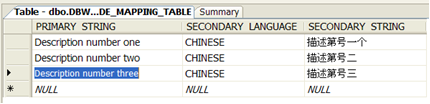
We will assign to the field DESCRIPTION2 the value:
$LINKED_FIELD(DESCRIPTION,DBW_UNICODE_MAPPING_TABLE,SECONDARY_STRING,"PRIMARY_STRING='%s' AND SECONDARY_LANGUAGE='CHINESE'")
in which:
DOCUMENT_table_key_field = DESCRIPTION
Linked_Table_Name = DBW_UNICODE_MAPPING_TABLE
Linked_Table_Field = SECONDARY_STRING
SQL_variant_filter = "PRIMARY_STRING='%s' AND SECONDARY_LANGUAGE='CHINESE'"
Please note the '%s' variant parameters, that will be replaced by the value of the DESCRIPTION field
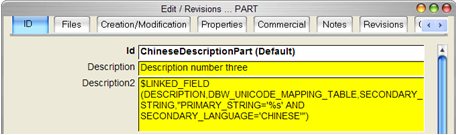
Whenever the edit control will loose its focus, the displayed result will be the following:
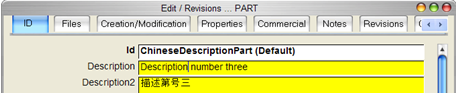
More, the same value will be displayed in the standard Data Grids:

Of course, the DESCRIPTION2 field could be easily populated for all the documents with the above macro, by simply writing a DESCRIPTION2.LST with a proper .DEFAULT directive:
.DEFAULT $LINKED_FIELD(DESCRIPTION,DBW_UNICODE_MAPPING_TABLE,SECONDARY_STRING,"PRIMARY_STRING='%s' AND SECONDARY_LANGUAGE='CHINESE'")
$LINKED_FIELD in document properties
suppose you have a linked table named SUPPLIER with a record like followings:
SUPPLIER |
SUPPLIER_NAME |
|---|---|
IBM |
International Business Machines |
suppose you define the ITEM_CODE field like this:

when SUPPLIER_ID is like this:
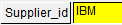
then the ITEM_CODE value will be calculated so to show this:

and also the hen the ITEM_CODE value will be calculated so to show this:
