MechworksPDM handles options in a separate dialog that can be opened by clicking a Menu entry in the PDM Standalone Client or a button in the CAD ribbon bar.
The options are stored in two different files:
•USER options: (USERS\<user name>\DBWORKS.PAR and USERS\<user name>\DBWLApp.PAR)
•GLOBAL options: (<GlobalParametersPath>\DBWApp.PAR)
Rules that apply to options management
The USER level is always displayed on every installation and is freely editable.
The GLOBAL level is displayed:
•always, without the DBWArm enabled, and if not belonging to the local group "DBWorks Simple User"
•only when not denied the MODIFY OPTIONS feature, with DBWArm enabled
•always on Standalone installations, when belonging to the "DBWorks Standalone Power User" group
Options structure
Options are grouped by area, as you can see from the table of contents on the left
For each option, an icon ( or
or  ) shows the default value.
For options that involve srtings rather than only checked/unchecked, the default value is reported between [ ].
Read only options
When the DBWAPP.PAR file is read-only, a string will be show in the option dialog header:

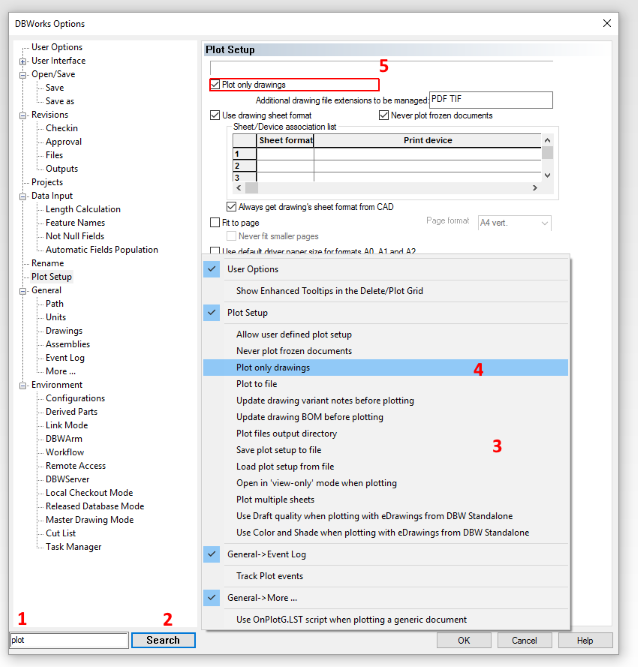
Search option
A search box is available in the lower left corner of the Options Dialog.

To use it
1.type a word in the box
2.click SEARCH button
3.a menu will open (scrollable if necessary) with all the options matching the entered word
4.select the option
5.the specific Options Page will be activated, and the selected option will be highlighted in red.