DBWApp.PAR
The DBWApp.PAR file is the main parameters file for MechworksPDM: it contains all the global options settings.
This file must be kept READ-ONLY in a network shared installation because it's overwritten each time the CAD application is closed, so the last user closing the program would overwrite the file shared file with his settings (and invalidating other users previous changes).
Saving a ReadOnly parameters file
When you change some parameter settings and you forgot to first remove the RO flag, you get the following message:
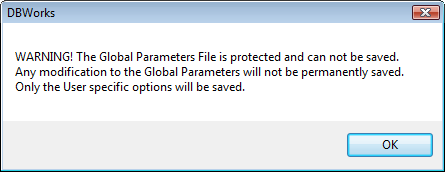
In this case, you do not have to close all, unset the readonly flag, reopen options and re-perform all the changes since the settings are still kept in memory; so a workaround procedure would be:
1.open the options dialog
2.change the options
3.press ok at the options dialog
4.the read-only notification warning pops up: DON'T PRESS OK
5.remove now the read-only flag
6.press now ok to the notification dialog
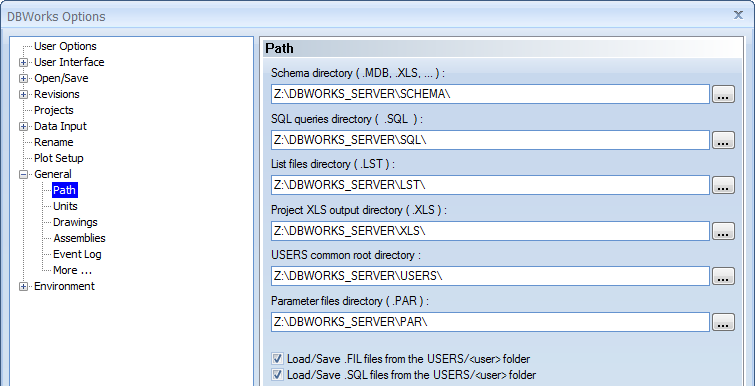
Here below is an example of some parameters in the DBWAPP.PAR file and their correspondence in MechworksPDM options dialog:
;
;
; DBWAPP.PAR - DBWORKS (C)MechWorks global parameters file
;
;
LST_DIR Z:\DBWORKS_SERVER\LST\
PAR_DIR Z:\DBWORKS_SERVER\PAR\
SCHEMA_DIR Z:\DBWORKS_SERVER\SCHEMA\
SQL_DIR Z:\DBWORKS_SERVER\SQL\
USERS_DIR Z:\DBWORKS_SERVER\USERS\
XLS_DIR Z:\DBWORKS_SERVER\XLS\
...
Default paths
Starting from build 20140430, When no DBWAPP.PAR exists, the default values for the following parameters:
LST_DIR
PAR_DIR
SCHEMA_DIR
SQL_DIR
USERS_DIR
XLS_DIR
are built using the GlobalParametersPath registry value.
Hidden parameters
Here below are parameters that's not exposed in the options user interface but that are active as well.
•NEVER_UPDATE_FILE_PROPERTIES_ON_CHECKOUT
When set to 1 (Default:1) avoids any file properties operation during the CHECKOUT of a Document (even if in memory properties updates are always applied )
The need for such parameter is due for speeding up the CHECKOUT operation, since the only property that would be changed is the STATE property - with the latest versions of the CAD (in particular SolidWorks), the access time for updating the file properties is slow, and so, being the CHECKOUT operation typically followed by the OPENING of the assembly in memory, the STATE property update is not strictly needed in the most of times - for restoring the previous behavior, the MechWorks PDM Administrator can set the value of the NEVER_UPDATE_FILE_PROPERTIES_ON_CHECKOUT to 0 (zero) and set the shared DBWAPP.PAR read-only again.